Burner Wallet for Crypto: Complete Airdrop & Risky dApp Guide (2026)
— By Whatsertrade in Tutorials
Complete burner wallet setup for airdrops, meme coins, risky dApps. Separate browser profile, hardware + burner combo, isolated seed, post-claim flow.
A burner wallet is the single most underrated piece of crypto security infrastructure. It is the wallet you use when you do not fully trust what you are about to click. Every airdrop claim page, every meme coin Telegram link, every fresh DeFi protocol with an anonymous team, every NFT mint posted by a Twitter influencer with 3,000 followers. If your main wallet, the one holding your long-term ETH, BTC and stablecoins, ever touches one of those sites, you are one malicious signature away from losing everything.
This guide is the complete 2026 playbook for using a burner wallet correctly. We will cover the exact setup walkthrough for a separate Chrome profile dedicated to risky activity, how to pair a hardware wallet with a burner soft wallet for medium-risk plays, how to generate a completely isolated seed phrase that has never touched your main devices, the top airdrop farming strategies that require a burner, the post-claim transfer flow for safely moving rewards out, and the list of things you should never, under any circumstances, put inside a burner wallet.
The numbers tell the story. According to wallet drainer trackers, over $494 million was stolen from crypto users in 2024 alone through malicious dApp approvals, phishing sites, and signature scams. The overwhelming majority of those victims signed with their main wallet. Almost none of them would have lost their savings if they had used a properly segregated burner. By the end of this guide, you will have a complete wallet architecture that lets you chase airdrops, snipe meme coins, and connect to any dApp on earth, all without putting your portfolio at risk.
What Is a Burner Wallet, Exactly?
A burner wallet is a non-custodial wallet that you treat as fully disposable. It holds only the capital you need for one specific risky action, it never holds long-term value, it never gets connected to trusted services like your CEX deposit address, and you mentally write it off the moment you create it. If it gets drained tomorrow, your reaction should be a shrug and the creation of a new one, not a panic attack.
The technical structure is identical to any other Ethereum, Solana, or Bitcoin wallet. There is no special burner wallet software. What makes a wallet a "burner" is the discipline around how you use it. The same MetaMask, Phantom, or Rabby installation can hold both your main wallet and a burner, although as we will see below, that single-installation approach is the weakest of the three setups and most readers should avoid it.
The phrase "burner wallet" gets used loosely in crypto. Some people mean a wallet they delete after one session. Others mean a permanent low-value wallet used for any high-risk activity. Some run dozens of burners, one per airdrop campaign. All of these are valid. What matters is the principle: isolation. The wallet that signs the risky transaction must not be the wallet that holds your wealth.
Why You Need One in 2026
Five years ago, you could get away with one MetaMask wallet. The DeFi attack surface was small, the number of malicious sites was manageable, and most users were technical enough to spot obvious scams. None of that is true today. The crypto threat landscape has industrialized into a full criminal economy.
Wallet drainers as a service. Inferno Drainer, Pink Drainer, and successors operate as turnkey kits that any scammer can rent for a 20-30% cut of the loot. They handle the malicious smart contract, the fake site frontend, and even the social engineering scripts. A 16 year old in another country can spin up a phishing site in 20 minutes that will empty your wallet faster than you can react if you sign the wrong message.
Sophisticated approval phishing. Modern drainers do not ask you to send tokens. They ask you to sign a Permit2 signature or a Seaport listing. The signature looks innocuous in the MetaMask popup. Behind the scenes, you have just authorized the attacker to move any ERC-20 in your wallet for the next 30 days.
Address poisoning. Attackers send dust transactions from addresses that look almost identical to addresses in your transaction history, hoping you copy-paste the wrong one. Read our full guide on address poisoning defenses for the full playbook.
Airdrop incentive abuse. The Friendtech and Blast points eras taught the crypto world that everything can be gamified into an airdrop. New campaigns launch every week. Each one wants you to connect a wallet, sign a few messages, and prove you are not a Sybil. The only sane way to participate is with isolated wallets.
If you currently use one wallet for everything, including airdrop claims and meme coin trading, you are not "being careful." You are gambling. The fact that you have not been drained yet is luck, not skill. Wallet drainers do not care how smart you think you are. They only need you to misread one signature popup, one time. A burner wallet removes the consequences of that single mistake.
The Three Burner Wallet Setups (Ranked Weakest to Strongest)
Not all burner setups are equal. Below are the three standard approaches, from minimum viable to maximum security. Pick the one that matches your risk profile and the size of the main wallet you are protecting.
A second account inside the same MetaMask. Easy to set up, but seed phrase is shared. One phishing of the seed compromises both wallets.
Dedicated Chrome or Brave profile with its own wallet extension, completely isolated seed phrase. Zero cross-contamination between burner and main.
Hardware wallet for main holdings on one profile, soft burner wallet on a second profile. Physical air gap between high-risk and high-value.
Level 1 Setup: Separate Account in MetaMask
This is the bare minimum and only acceptable if your main wallet contains under $1,000. The idea is to create a second account inside your existing MetaMask, Rabby, or Phantom installation. Both accounts share the same seed phrase but have different addresses. You use Account 1 for storage and Account 2 for risky activity.
The problem with this setup is that the seed phrase is shared. If you ever paste your seed into a phishing site that pretends to be MetaMask's "wallet restore" page, every account derived from that seed gets drained at once. The accounts are technically separate at the address level but cryptographically joined at the seed.
To create a Level 1 burner in MetaMask:
- Click the account circle in the top center of MetaMask.
- Click "Add account or hardware wallet."
- Choose "Add a new account."
- Name it something obvious like "BURNER" or "RISKY."
- Switch to the new account before connecting to any risky dApp.
The discipline that keeps this setup safe is constant attention to which account is active. The little address shown in the MetaMask header must match the burner before you sign anything. One mistake here and you are signing a drain transaction with your main wallet active.
Level 2 Setup: Separate Browser Profile (Recommended)
This is the setup that works for 90% of users. You create a dedicated browser profile that has only one purpose: risky crypto activity. The profile runs its own copy of MetaMask, Rabby, or whatever extension you prefer, and that extension is initialized with a completely different seed phrase from your main wallet. The two seeds have nothing in common. The two browser profiles do not share cookies, bookmarks, history, extensions, or saved passwords.
The reason this works so well is that all major wallet phishing attacks rely on either tricking you into pasting your seed phrase into a fake site, or tricking you into signing a malicious approval. With Level 2, the burner profile's seed has never been typed anywhere except the initial wallet creation. There is no way for an attacker to phish it because you never use it.
Here is the exact setup walkthrough on Chrome (the process is identical in Brave, Edge, or Arc).
Step 1: Create the Dedicated Browser Profile
Click the profile icon in the top right corner of Chrome. Click "Add" to create a new profile. Name it something unmistakable like "BURNER" or "Crypto Risky." Choose a distinct color and icon, ideally something red or orange so you cannot confuse it with your normal profile at a glance. Do not sign in with your Google account. The profile should be completely anonymous.
Why no Google sign-in? Because if you sign in, Chrome syncs extensions, bookmarks, and saved passwords. The whole point of the burner profile is that it shares nothing with your main browser. A Google sync would defeat that.
Step 2: Install a Fresh Wallet Extension
Inside the new profile, go to the Chrome Web Store and install your wallet of choice. The most popular options in 2026 are MetaMask, Rabby Wallet, Phantom for Solana, and OKX Web3 Wallet. Pin the extension to the toolbar so the icon is always visible.
Critical: download the extension only from the official link. The Chrome Web Store has been infiltrated multiple times by fake wallet extensions that look identical to the real ones but steal your seed phrase the moment you create or import a wallet. Always cross-check the publisher and the install count. MetaMask should show ConsenSys as the publisher and tens of millions of users. If the count looks small or the publisher name is off, you found a fake.
Step 3: Generate a Brand New Seed Phrase
When the wallet extension opens, choose "Create a new wallet," not "Import existing wallet." This generates a fresh 12 or 24 word seed phrase that has never existed before and has nothing to do with your main wallet's seed. This is the entire foundation of Level 2 security.
Write the seed down on paper and store it somewhere offline. Yes, even for a burner. The reason is not the small amount of crypto in the wallet, it is that the burner wallet sometimes accumulates valuable assets (a successful airdrop, a profitable meme coin) before you have time to transfer them out. If your computer dies and you have not backed up the burner's seed, you lose anything currently in it.
Step 4: Set a Strong Password Specific to This Profile
Use a different password from your main wallet. Ideally, generate it with a password manager. The password protects the local encrypted storage of the wallet extension, so even if someone gains physical access to your computer, they cannot drain the wallet without the password (or the seed phrase).
Step 5: Bookmark Only Legitimate dApp URLs
The burner profile starts with no bookmarks. Before you visit any dApp, look up the official URL through multiple sources: the project's verified Twitter, DefiLlama, CoinGecko's official site link. Bookmark the verified URL. From now on, always reach the dApp through your bookmark, never through Google search results (which can be manipulated by malicious ads) or social media links.
Level 3 Setup: Hardware Wallet for Main, Burner for Risky
If your main wallet holds five figures or more, Level 2 is no longer enough. You need a physical separation between the high-value vault and the high-risk operational wallet. This is the gold standard, and every serious crypto user converges to this architecture over time.
The setup looks like this. Your main browser profile runs MetaMask, but MetaMask is configured to interact with a hardware wallet (Ledger, Trezor, or Keystone). The actual private keys never leave the hardware device. To sign any transaction, you must physically confirm on the hardware screen. This makes remote drainer attacks essentially impossible against the main wallet, because even if someone tricks your computer into broadcasting a malicious transaction, you would have to physically approve it on the device while looking at the recipient address on its screen.
The burner profile runs a software-only wallet (MetaMask, Rabby, Phantom) with a hot key on the computer. The seed phrase exists in the encrypted local storage of the extension, which is convenient but inherently less secure than a hardware wallet. That trade-off is acceptable because the burner only holds small amounts.
Hardware Wallet Recommendations 2026
Ledger Nano S Plus / Stax / Flex. Most widely supported. Works with virtually every dApp out there. The 2023 Ledger Connect supply chain attack was a wakeup call but the device's secure element has never been compromised directly. Avoid the Ledger Recover service unless you fully understand the trade-offs.
Trezor Safe 3 / Safe 5. Open-source firmware and a more transparent supply chain. Slightly less polished UX than Ledger but appeals to users who prioritize verifiability.
Keystone 3 Pro. Air-gapped via QR codes. Never connects via USB or Bluetooth, which eliminates an entire class of attack vectors. Slightly clunkier flow but the most paranoia-friendly option.
GridPlus Lattice1. Premium tier device with a large touchscreen for displaying transaction details. Expensive but the readability of complex DeFi transactions on the device screen is unmatched.
For deep guidance on hardware wallet selection, read our complete hardware wallet guide.
The Burner Wallet Architecture: Three-Tier Model
Once you graduate from "one wallet for everything" to a proper segregated setup, the standard architecture is three tiers. Each tier has a different purpose, a different size, and a different security posture.
Hardware wallet, ideally air-gapped. Holds 80-90% of your crypto. Connected to zero dApps. Only used to receive deposits and occasionally send to Tier 2.
Touches a dApp: Never
Hardware-secured or hot wallet. Holds 10-15%. Connects only to trusted dApps you have used many times: Uniswap, Aave, Lido, your CEX deposit.
Touches a dApp: Verified only
Soft wallet in isolated browser profile. Holds under 5%. Connects to anything: airdrop sites, new launches, meme coins, untested dApps.
Touches a dApp: Anything
The key flow is unidirectional. Money moves from Tier 1 down to Tier 2 as you need it for active management, and from Tier 2 down to Tier 3 only when you have a specific risky play in mind. Profits move back up. Tier 1 never sends to Tier 3 directly. If a burner gets drained, the loss is capped at whatever was in that wallet at that moment.
Top Airdrop Strategies That Require a Burner
Airdrop farming is the single largest use case for burner wallets in 2026. Every major chain launch, every new L2, every new restaking protocol promises a future token to early users. Participating means connecting your wallet to dozens of new contracts, signing dozens of messages, and trusting that the team is not malicious. A burner is mandatory.
Strategy 1: New L2 and Appchain Airdrops
Every new Layer 2 chain (Linea, Scroll, zkSync Era, Mantle, Manta, Blast, Mode, and dozens of newer entries) has run an airdrop campaign. The pattern is consistent: bridge funds to the chain, interact with native dApps, complete quests, and wait for the snapshot. A burner wallet is essential because you are interacting with brand new, often unaudited dApps, and the chain itself may have novel attack vectors.
The minimum setup: bridge a small amount of ETH or stablecoins to the new L2 using a verified bridge. Use the burner wallet, not your main wallet. Complete the quest list on the chain's official ecosystem page. Periodically check whether your wallet has accumulated airdrop allocation. When the token drops, claim with the burner, immediately bridge or sell, and transfer the proceeds out.
Strategy 2: DeFi Protocol Airdrops
New DeFi protocols routinely run airdrop campaigns to bootstrap usage. Examples from recent cycles: EigenLayer for restakers, Ether.fi for liquid restakers, Jito for Solana stakers, Pyth for oracle users. The participation pattern is the same: deposit, hold, earn points, claim. Each protocol's smart contract is a potential exploit surface. Each approval you sign extends your attack surface. A burner contains the blast radius.
Read our deep dive on airdrop farming strategy for the long version. The short version: never use your main wallet for airdrop farming.
Strategy 3: Multi-Wallet Sybil Farming
Some farmers run dozens or hundreds of wallets to maximize airdrop allocation. Each wallet does roughly the same activity, hoping the protocol's Sybil filters miss them. Whether this is ethical is a separate debate. Whether it is risky is not, every one of those wallets must be a burner. Connecting a hundred wallets to a new protocol means a hundred attack surfaces. If any single contract is malicious, all hundred wallets are compromised.
Sybil farmers usually run a custom browser stack: different fingerprints per wallet, different IPs (often through residential proxies), and disposable email accounts. This is professional-tier setup and outside the scope of most retail users, but the burner principle scales: never let any of those wallets touch real value beyond what each one is farming.
Strategy 4: Quest and Galxe Campaigns
Galxe, Layer3, Zealy, and similar quest platforms aggregate dozens of airdrop campaigns into a single interface. You connect a wallet, complete tasks (often "interact with this dApp" or "swap on this DEX"), and earn points. The pattern is the same as direct airdrop farming. Use a burner. Treat every quest as a potential phishing surface, because quest aggregators sometimes link to malicious or impersonator sites by accident.
Meme Coin Trading with a Burner Wallet
Meme coin trading on Solana, Base, and Ethereum has its own unique risk profile. The coins are often launched by anonymous teams, the contracts may have hidden trap doors (mint authority not revoked, freeze authority enabled, tax functions), and the typical liquidity is shallow enough that price can be manipulated in minutes. A burner wallet is the only sane approach.
The flow looks like this. Move the exact amount of capital you want to risk on the meme play from your main wallet to your burner. Connect the burner to your DEXTools dashboard or trading platform of choice. Execute the buy. Set price alerts. If the play works, transfer profits to your main wallet immediately, do not leave them sitting in the burner. If the play fails, the loss is contained.
Solana Meme Coin Specifics
Solana meme coins move faster than Ethereum meme coins. Pump.fun has accelerated the launch cadence to thousands of new tokens per day. Most are scams or die within hours. The burner wallet approach is doubly important. Phantom and Solflare both support multiple accounts under one wallet, but as with MetaMask, the safer approach is a separate browser profile with a different seed.
Solana also has its own version of approval risks. Token authority can be transferred to malicious contracts. Some tokens are designed to be unsellable (honeypots) after you buy. Pair your burner with a tool like RugCheck or Birdeye token scanner before each trade.
Base and Ethereum Meme Coin Specifics
Base has become the second-largest meme coin chain after Solana. The same burner principles apply. The Ethereum L1 meme coin scene has shifted toward higher-cap, lower-velocity plays due to gas fees, but the risk profile is identical. Use a burner. Verify the contract has no mint function, no blacklist function, and no proxy upgrade authority before buying.
A honeypot is a token contract designed to let you buy but not sell. You see the price pumping. You buy. You try to sell. The transaction fails. The team rugs the liquidity.
A burner wallet does not prevent honeypots. It only limits how much you lose to one. Always test a small sell immediately after buying. If the sell goes through, you can size up. If it fails, exit before you commit serious capital.
The Post-Claim Transfer Flow
This is the part most guides skip. You set up your burner, you claim your airdrop, and now you have a valuable token sitting in a wallet that has been exposed to dozens of risky dApps. What now? You move it out. But you do not just slam it into your main wallet in one transaction, because that creates an obvious onchain link between burner and main that defeats some of the privacy benefits.
Here is the standard post-claim transfer flow.
Step 1: Revoke All Approvals on the Burner
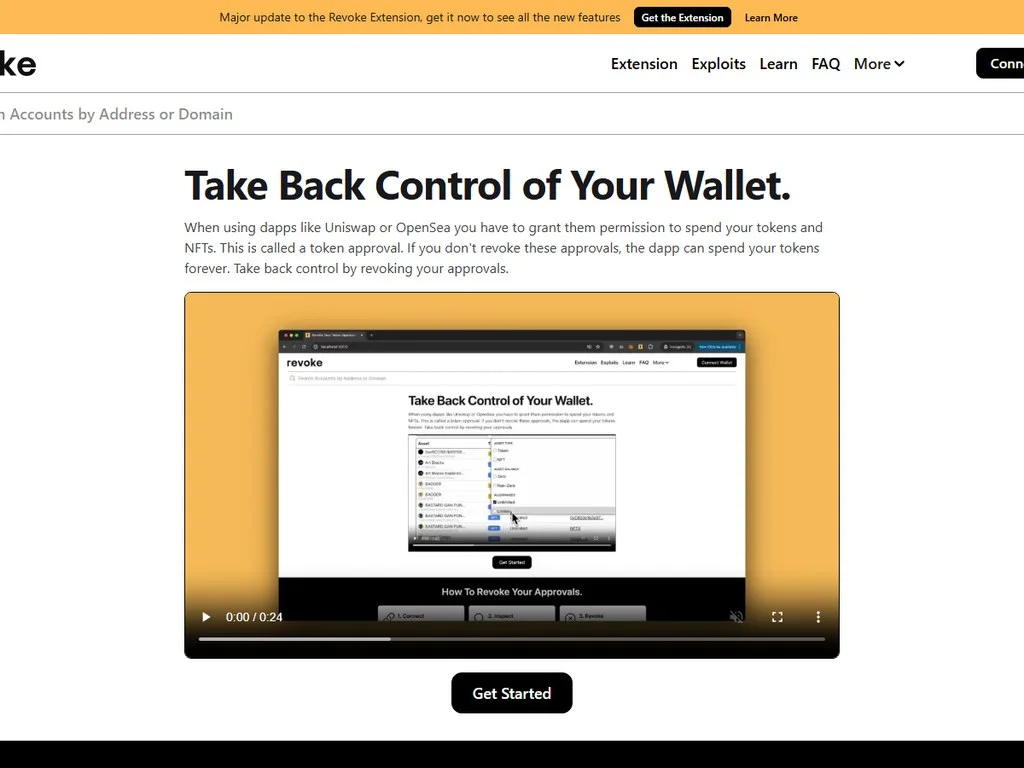
Before moving anything, go to Revoke.cash or use the wallet's built-in approval manager. Revoke every active approval. This costs a few dollars in gas per revoke but is essential. If any of the dApps you interacted with turn malicious in the future, an unrevoked approval is your wallet's death sentence.
Step 2: Move the Claimed Token to a CEX or Bridge
Send the claimed token directly to a centralized exchange deposit address (Coinbase, Binance, Kraken, OKX). This breaks the onchain link, because the CEX's internal accounting separates your deposit from any future withdrawal. Once the token is on the CEX, you can withdraw to your main wallet's address from a different address altogether.
An alternative is to use a bridge to swap chains. Bridging from Ethereum to Arbitrum via Stargate, then back to Ethereum to a different address, breaks the trivial onchain link without exposing the funds to a CEX. Each bridge adds fees, so for small amounts the CEX route is cheaper.
Step 3: Withdraw to a Fresh Address (Optional Privacy Step)
If you care about onchain privacy, withdraw from the CEX to a brand new address in your main wallet (a new account derived from the same seed, or a new derivation path). This way, the airdrop proceeds end up in a wallet that has no prior history with the burner. Most users skip this step but advanced operators always do it.
Step 4: Decide Burner's Future
You have two options. Keep the burner for future activity, or retire it. Keep it if you want to maintain airdrop eligibility for future snapshots from the same protocol (some protocols do multi-round airdrops). Retire it if the wallet has accumulated suspicious approvals or interacted with too many unknown contracts. Retiring is just abandoning the wallet, the seed phrase still exists in case you need to recover it later.
What to Never Put in a Burner Wallet
The burner wallet exists for disposable activity. Certain things must never touch it under any circumstances, because if they do, the burner is no longer a burner. It becomes a high-value target.
- Long-term holdings (BTC, ETH bags you hold for years)
- Significant stablecoin balances
- Staked or restaked positions you cannot quickly unstake
- NFTs of any meaningful value
- Wallets linked to your CEX KYC identity
- Any address used as your CEX withdrawal whitelist
- ENS names you actually want to keep
- Gas tokens for the activity you plan (ETH, SOL, BNB)
- The exact capital for one trade or one airdrop
- Recently claimed airdrop tokens (pending transfer out)
- Test amounts on new chains
- Meme coin positions during active trading
- Disposable NFT mints
- Dust you do not mind losing
The principle is simple. The burner wallet's expected value at any given moment should be the amount you would be willing to throw in a fire if forced to. If the answer is "more than $500," you have too much in your burner.
Burner Wallet Hygiene: The Weekly Routine
A burner is not "set and forget." Over time it accumulates risk. Approvals stack up. Old token contracts can become exploit vectors months after you first interacted with them. The wallet's reputation may degrade as it interacts with more unknown contracts. To keep the burner functional, you need a weekly hygiene routine.
Weekly Checklist
- Run a Revoke.cash scan. Connect the burner and review all active token approvals. Revoke anything you do not currently need.
- Check for unexpected balances. A surprise token in your wallet may be a phishing token (dust). Do not click "approve" or "swap" on it. Right-click hide and move on.
- Review recent transactions. If you see any transaction you do not recognize, treat the wallet as compromised. Transfer everything valuable out immediately and retire the wallet.
- Update wallet extension. Wallet extensions push security patches frequently. Always run the latest version.
- Backup new tokens. If you accumulated any meaningful tokens this week, transfer them to your main wallet or CEX following the post-claim flow.
Common Mistakes That Destroy the Burner Concept
Setting up a burner correctly is only half the battle. Most users compromise their burner over time through small mistakes that accumulate. Here are the most common failure modes.
Mistake 1: Drift Toward Main Wallet Behavior
You set up the burner, you use it for an airdrop, the airdrop pays off, and suddenly you have $5,000 in tokens sitting in the burner. You think "well, I will just leave it for now and use the burner like a second main wallet." Wrong. The moment the burner holds significant value, it is no longer a burner. It is a high-risk wallet with a target on its back. Either move the funds out or accept that the burner has been upgraded to Tier 2 status and create a new Tier 3 burner.
Mistake 2: Signing on the Wrong Account
This is the most common Level 1 setup failure. You have two accounts in MetaMask. You think you are on the burner, but you are actually on the main wallet. You sign the malicious approval. Drain. This is why Level 2 (separate browser profile) is so much safer, the visual context of the entire browser is different, so you cannot confuse the two.
Mistake 3: Reusing the Burner Address on a CEX
You use the burner to participate in an airdrop. You also happen to deposit some USDC to the burner from your CEX, intending to use it for trading. Now the burner address is linked to your KYC identity at the CEX. If the burner ever interacts with a sanctioned protocol or accepts tainted funds, your CEX deposits may be frozen. Keep CEX-linked addresses and burners completely separate.
Mistake 4: Never Revoking Approvals
Approvals accumulate. After six months of active airdrop farming, a burner may have 50+ active token approvals to various contracts. Even if 49 of those contracts are safe today, one of them may be compromised in the future. The fix is the weekly revoke routine described above.
Mistake 5: Trusting the dApp Just Because the Burner Is "Safe"
Burner wallets do not make malicious dApps safe. They limit the damage. You still need to read every signature prompt. You still need to verify URLs. You still need to check whether the contract you are approving is the one the dApp claims to be. The burner is a damage cap, not a force field.
Burner Wallet for NFT Mints
NFT mints have their own burner wallet considerations. The mint contracts are often newly deployed, written under time pressure, and not fully audited. They commonly request signatures (sometimes through Seaport) that grant the mint contract access to ERC-20 tokens in your wallet. If you mint with your main wallet, you give that contract a foothold on your full holdings.
The right flow for NFT mints: send only the mint price plus gas to the burner. Mint with the burner. If the mint is allowlist-based and requires your verified address, treat that as a red flag, no legitimate mint should require your wealthy address. Once minted, transfer the NFT to your main wallet only if you actually want to hold it long-term. Otherwise list it on a marketplace from the burner.
Burner Wallets and Privacy
Burner wallets are sometimes confused with anonymous wallets. They are not the same thing. A burner provides security through compartmentalization, not privacy through anonymity. Every transaction your burner makes is still visible on the blockchain. If you fund the burner from your main wallet via a direct transaction, anyone analyzing the chain can trivially link the two.
If onchain privacy matters to you, fund the burner through an intermediary: a CEX withdrawal, a bridge to another chain and back, or (where legal in your jurisdiction) a privacy-focused mixer. Privacy is a separate topic with its own legal complexities. The burner principle still applies whether or not you care about privacy.
Multi-Burner Setups for Power Users
Once you are comfortable with one burner, you may find yourself wanting more. Different burners for different purposes. The standard power-user setup looks something like this.
- Airdrop Burner. Used only for airdrop campaigns. Lives in browser profile A. Funded with small amounts of gas tokens for each campaign.
- Meme Coin Burner. Used only for meme coin trading on Solana, Base, and similar chains. Lives in browser profile B. Funded with the trading capital you are willing to lose.
- NFT Mint Burner. Used only for new mints. Lives in browser profile C. Funded just-in-time for each mint.
- Test Burner. Used for trying brand new dApps that nobody you trust has tested. Lives in browser profile D. Funded with the minimum required to test.
Each burner has its own seed phrase, its own browser profile, and its own purpose. The advantage of this segmentation is that a drain on one burner does not propagate to others. The downside is operational complexity. Most users do not need this level. One properly maintained burner is enough.
When to Retire a Burner
Burners do not last forever. Retire and create a new one when any of these conditions trigger.
- You signed something you do not understand and cannot verify in retrospect.
- The burner has accumulated more than 20 active approvals you have not reviewed.
- You used the burner on a site that turned out to be a phishing clone.
- You see any transaction in the burner's history that you did not initiate.
- The burner is older than six months and you have not revoked approvals in that time.
- The burner accumulated meaningful value (over $1,000) and you do not want to expose it further.
Retiring a burner is not the same as deleting the seed phrase. Keep the seed safe in case you need to recover something later (sometimes airdrops are claimable months after they are announced). Just stop using the wallet actively. Move all assets out, and create a new burner from scratch.
Burner Wallets vs Smart Contract Wallets
The rise of smart contract wallets (Safe, Argent, Coinbase Smart Wallet, Zerion's Zero) changes the burner conversation slightly. Smart contract wallets can have built-in spending limits, transaction simulation, and even social recovery. Some users argue this makes traditional burners obsolete.
The reality is that smart contract wallets and burners solve different problems. A smart contract wallet adds protective features to a wallet you actually want to use. A burner is a wallet you do not care about. The two layers complement each other. Power users sometimes run a smart contract wallet for their main holdings (which adds programmable security) and a simple EOA burner for risky activity (which is cheap and disposable).
One emerging pattern is using ERC-4337 account abstraction wallets with session keys. Session keys grant limited permissions to specific dApps for a limited time. This achieves some of the same isolation as a burner without requiring a separate wallet. The technology is maturing but not yet dominant. For now, the traditional burner remains the simplest and most robust approach.
Pros and Cons of Burner Wallets
- Caps the loss from any single drainer attack
- Enables participation in airdrop campaigns safely
- Lets you connect to untrusted dApps without anxiety
- Compatible with all existing wallet software
- Cheap to set up, free to maintain
- Easy to rotate when compromised
- Adds operational complexity (multiple profiles)
- Easy to mismanage and let drift toward main behavior
- Requires discipline to maintain weekly hygiene
- Does not protect against signing the wrong account
- Adds onchain footprint that can be analyzed
- Capital sitting in burner earns no yield
Burner Wallets and the 2025 Bybit Hack Lesson
The February 2025 Bybit hack of $1.5 billion was carried out through a sophisticated supply chain attack on the Safe (Gnosis Safe) multisig interface. The attackers compromised the frontend that the Bybit signers used to interact with their cold wallet. The signers thought they were approving a routine transaction. They were actually approving a malicious upgrade that drained the wallet.
This is technically not a burner wallet story, since Bybit was using a multisig cold storage. But the lesson is relevant. The signers did not verify the transaction on their hardware wallets carefully enough. They trusted the frontend. The same trust failure happens every day at retail scale when users sign approvals without verifying the contract address.
The burner wallet principle applies even more strongly after Bybit. Never sign a transaction on a high-value wallet without verifying every detail on the hardware screen. For anything you cannot fully verify, use a burner. The cost of being wrong is too high otherwise.
Practical Funding Strategy: How Much in Each Burner
The exact amount depends on the activity, but here are sensible defaults.
- Airdrop farming burner: $50-200 in gas tokens plus stablecoins for protocol deposits.
- Meme coin trading burner: The exact size of one trade, never more. If you are trading $500 positions, fund the burner with $510 ($500 trade + $10 gas).
- NFT mint burner: Mint price plus 2x the gas estimate, never more.
- Test burner for new dApps: $20-50 in gas tokens.
Top up the burner just-in-time for each new activity. Do not preload it with capital you might need next week. The longer crypto sits in a burner, the more time there is for something to go wrong.
Frequently Asked Questions
What is a burner wallet in crypto?
A burner wallet is a disposable cryptocurrency wallet used only for high-risk activities like airdrop claims, meme coin trading, and connecting to untested dApps. It holds only the small amount of capital needed for one specific action, so if it gets drained by a malicious contract or phishing site, your main holdings remain completely untouched.
Do I need a separate seed phrase for my burner wallet?
Yes, for proper security. Sharing a seed phrase between your main wallet and your burner means a phishing attack on the burner's seed compromises your main holdings too. The recommended Level 2 setup uses a completely separate browser profile with its own wallet extension initialized with a brand new seed phrase that has nothing in common with your main wallet's seed.
Can I use a hardware wallet as a burner wallet?
You can, but it is usually overkill. Hardware wallets are designed to secure long-term holdings. The friction of confirming every transaction on a physical device makes them slow for the rapid-fire connections typical of airdrop farming or meme coin trading. The standard architecture is hardware wallet for your main vault, software wallet for the burner. The hardware device protects what matters, the burner absorbs the risk.
How much money should I keep in my burner wallet?
Only the exact amount you need for the current activity, plus enough gas tokens to complete it. For airdrop farming, that might be $50-200. For meme coin trades, it is the size of one trade. The rule of thumb: if the wallet getting drained tomorrow would seriously hurt you, there is too much in it. The expected value of a burner should always be small enough that you can shrug off the loss.
Should I create a new burner wallet for every airdrop campaign?
Not necessarily, but power users often do. One well-maintained burner can handle multiple airdrop campaigns if you follow good hygiene: revoke approvals weekly, transfer valuable tokens out quickly, and retire the burner if it accumulates suspicious activity. Sybil farmers running many wallets for one campaign always use separate burners per wallet to avoid linking them onchain.
How do I move airdrop tokens from a burner to my main wallet safely?
The standard post-claim flow is: first revoke all approvals on the burner, then send the claimed tokens to a CEX deposit address (Coinbase, Binance, OKX), then withdraw to your main wallet from the CEX. This breaks the onchain link between the burner and your main wallet. An alternative is bridging the tokens to another chain and back to a fresh address. Both routes add a privacy layer and isolate the burner's onchain history from your main holdings.
Can a burner wallet get drained even if it only has a few dollars in it?
Yes, and that is fine, that is exactly what a burner is for. The whole point is that if the burner gets drained, the loss is limited to whatever was in it. Drainers will sometimes ignore wallets with very small balances because the gas cost of sweeping them exceeds the value. But you should never count on that, always assume any approval you give is a potential drain vector.
What is the difference between a burner wallet and just using a second MetaMask account?
A second MetaMask account is the weakest form of burner. The two accounts share a seed phrase, which means one phishing attack on the seed compromises both. A proper burner uses a completely separate wallet installation (or browser profile) with its own seed phrase. The added isolation makes a real difference because seed phrase phishing is the most common way wallets get drained.
Are burner wallets useful for meme coin trading on Solana?
Yes, essential. Solana meme coins launched on Pump.fun and similar platforms often have malicious contracts with hidden traps. Honeypot tokens that block selling, contracts with reactivatable mint authority, and outright scams are extremely common. Using a burner ensures that if you buy a malicious token, the only loss is the capital you allocated to that trade, not your full Solana portfolio.
How often should I revoke approvals on my burner wallet?
Weekly at a minimum, or after every major activity (such as an airdrop claim or a meme coin trading session). Use Revoke.cash or your wallet's built-in approval manager. Each revoke costs a small amount of gas but is essential, an unrevoked approval to a malicious contract is a ticking time bomb. The more approvals you accumulate, the larger the burner's attack surface grows.
The burner wallet is not a product you buy. It is a discipline you adopt. The hardest part is not the setup, it is the consistency, every time you click a new airdrop link or a new meme coin chart, the muscle memory must be to reach for the burner profile, not the main one. Once that habit forms, you can navigate the most dangerous corners of crypto without putting your savings at risk. Set up your burner today. Your main wallet will thank you the first time a drainer site looks too tempting to skip.
Related Guides
- Burner Wallet in Crypto Explained: Cut Drain Risk
- How to Use Coinbase Wallet: Self-Custody and dApp Guide (2026)
- Fee Revenue per Active Wallet vs Total Fees: Which Shows Real dApp Monetization?
- How to Get Free Solana for Testing: Faucets, Devnet and Airdrops
- Event-Driven Liquidity: How Airdrops, Listings and TGEs Create Temporary Markets
- How to Sell Meme Coins on Phantom Wallet (2026)
- How to Connect Your Wallet to a dApp Safely (2026)