Avoid Buying Old Token Contracts Post-Migration
— By Whatsertrade in Tutorials

Learn steps to prevent costly errors by ensuring you're trading the correct token contract after a migration.
Token migrations are common in crypto. A project may move from one contract to another because of a rebrand, a chain expansion, a security upgrade, a tokenomics change, or a relaunch. For legitimate projects, migration can be a normal part of growth. For traders, it can also create one of the most expensive mistakes in DeFi: buying the old contract instead of the new one.
This usually happens because token names and tickers are not unique. Several tokens can share the same symbol, and old contracts can remain visible on decentralized exchanges even after a project has moved on. Scammers can also create fake contracts with the same name, logo, and ticker to catch users who search too quickly.
Before you buy any token that has migrated, rebranded, relaunched, or changed chains, you need to confirm that you are looking at the active contract. This guide explains how to avoid buying the wrong token contract using DEXTools, official project channels, block explorers, liquidity data, volume, holders, and simple safety checks.
What Is a Token Migration?
A token migration happens when a project asks holders to move from an old token contract to a new one. The new contract may be created to fix bugs, improve security, support new tokenomics, change the token supply, launch on another chain, or align with a new brand.
In many cases, the old contract does not disappear immediately. It may still show charts, holders, old liquidity pools, historical volume, and trading activity. This can confuse traders, especially when the old token still appears in search results or is listed by name on DEX platforms.
A migration does not automatically mean a project is unsafe. The risk comes from trading without confirming which contract is official and currently supported.
Why Traders Buy the Wrong Contract
Most mistakes happen for simple reasons. The trader searches by token name instead of contract address. The old and new tokens have the same ticker. The old chart still has historical volume and looks more established. A fake token copies the real logo and name. Social media posts link to old information. The project announced a migration, but users missed the update.
In DeFi, the contract address matters more than the name, ticker, or logo. A token name can be copied in seconds. A contract address is the unique identifier.
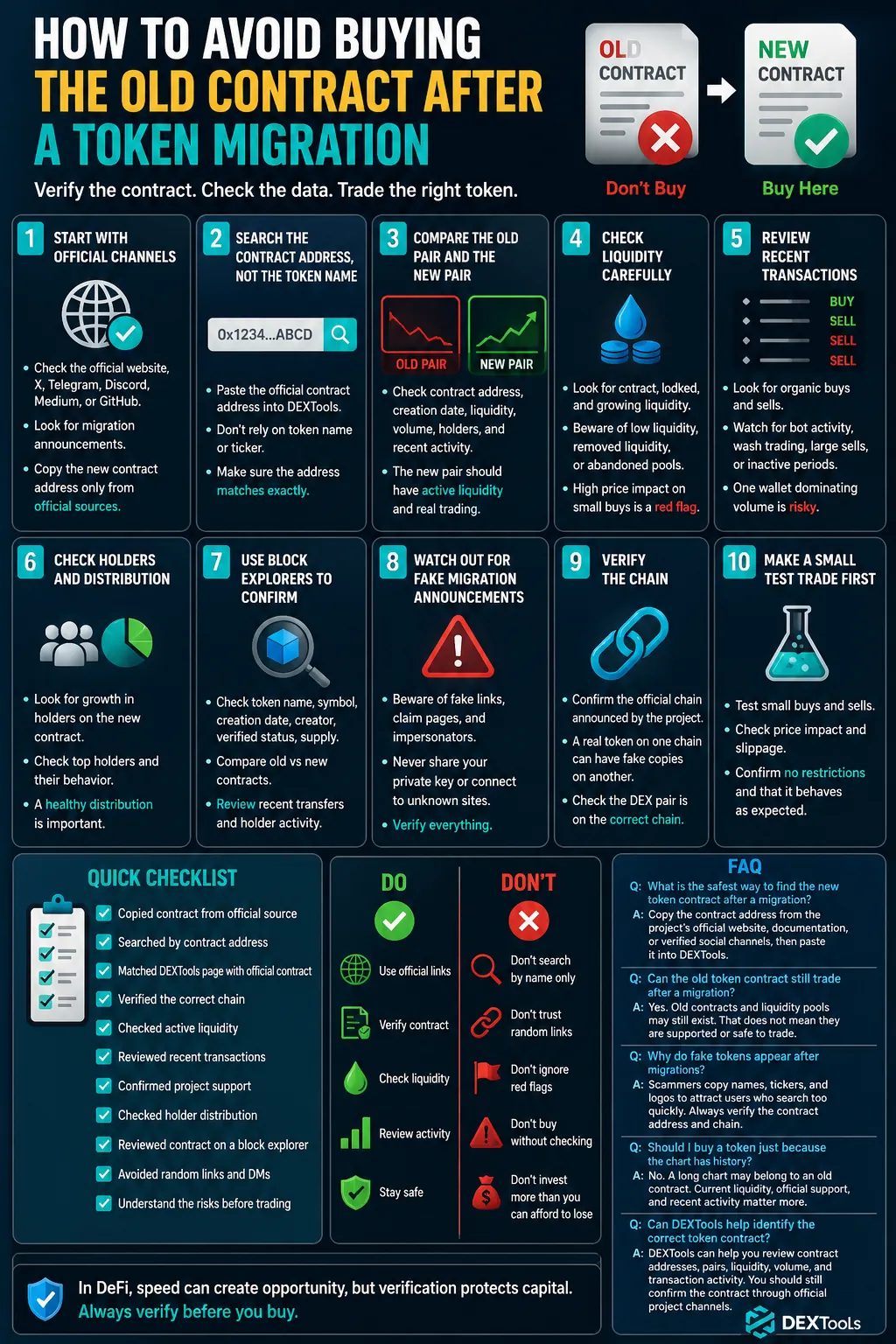
Step 1: Start With Official Project Channels
Before opening a chart, go to the project's official channels. Look for the official website, X profile, Telegram, Discord, Medium, GitHub, or documentation.
Check whether the project has posted any migration announcement. Look for phrases such as token migration, contract migration, new contract address, V2 launch, relaunch, rebrand, token swap, bridge update, or new liquidity pool.
Be careful with pinned posts that may be outdated. Some projects pin announcements from months ago and later publish newer information elsewhere. Always check recent posts, official documentation, and the website at the same time.
The most important detail is the new contract address. Copy it only from an official source. Never copy a contract address from a random reply, influencer post, Telegram comment, or community message.
Step 2: Search the Contract Address, Not the Token Name
Once you have the official contract address, paste the address directly into DEXTools. Do not rely only on the token name or ticker.
Searching by name can show multiple tokens with the same symbol. Searching by contract address reduces the chance of landing on a fake or outdated pair.
When the token page loads, compare the contract shown on DEXTools with the contract from the project's official channels. The addresses must match exactly. Do not accept a partial match, similar name, or similar logo.
Step 3: Compare the Old Pair and the New Pair
If a token has migrated, you may find more than one pair. The old pair may still exist, and the new pair may have a different pool, different liquidity, and different trading history.
Compare the contract address, pair creation date, liquidity, 24 hour volume, recent transactions, number of holders, price movement, official links, chain, and DEX.
A new contract may have less historical data but more current activity. An old contract may have a long chart but little fresh liquidity or no official support.
Step 4: Check Liquidity Carefully
Liquidity is one of the best clues when reviewing a migrated token. If the project has moved to a new contract, active liquidity should usually be on the new pair.
Red flags include very low liquidity on the pair you want to buy, liquidity that has not grown after the migration, a pool that looks abandoned, large price impact on small buys, no new liquidity added after the official announcement, or liquidity removed from the old pair while traders still buy it.
A token with weak liquidity can be difficult to sell, even if the chart looks active. Always check whether the current liquidity supports the trade size you are considering.
Step 5: Review Recent Transactions
The transaction feed can show whether real trading activity is happening. A migrated token should normally show organic buy and sell activity on the new pair.
Watch for recent buys and sells, repeated tiny transactions that may be bot activity, large sells from early wallets, no activity for long periods, one wallet dominating volume, or suspicious wash trading patterns.
If the old contract still has occasional buys but almost no sells, be careful. Some buyers may be making the same mistake you are trying to avoid.
Step 6: Check Holders and Distribution
A legitimate migration usually changes holder distribution. Some holders move to the new contract quickly, while others may delay. What matters is whether the new contract has clear adoption and whether the holder base looks healthy.
Look for growth in holders on the new contract, large wallets and their behavior, whether top holders are selling aggressively, whether the deployer still controls a dangerous amount, and whether the old contract still has most holders but no project support.
Holder count alone is not enough. A token can have many holders and still be abandoned, fake, or illiquid. Use holder data together with liquidity, volume, official announcements, and transaction flow.
Step 7: Use Block Explorers to Confirm the Contract
A block explorer can help confirm important details about a token contract. Search the official contract address on the relevant explorer and check the token name, symbol, contract creation date, creator address, verified contract status, token supply, holder distribution, and recent transfers.
You can also compare the old contract and the new contract. If the project announced a migration, there may be transactions from a migration contract, treasury wallet, or official deployer.
Step 8: Watch Out for Fake Migration Announcements
Scammers often take advantage of migrations. They may post fake links, create fake claim pages, or announce a false contract address in community channels.
Common scam tactics include fake X accounts with similar handles, Telegram admins impersonated by scammers, fake airdrop or claim websites, urgent messages asking users to connect wallets, replies under official posts with fake contract addresses, and fake support accounts offering migration help.
Never connect your wallet to a migration page unless you are completely sure it is official. A fake migration page can drain your wallet faster than a bad trade.
Step 9: Verify the Chain
Some projects migrate from one chain to another. For example, a token may move from Ethereum to Base, BNB Chain to Ethereum, or one Layer 2 to another.
Always confirm the chain before buying. A real token on one chain can have fake copies on another. If the project has not officially launched on a chain, any token using the same ticker there may be fake.
Check which chain the project says is official, whether the DEX pair is on the right chain, whether the contract address matches the chain, and whether liquidity exists on the official network.
A correct contract address on the wrong chain is not correct. Contract addresses are chain specific.
Step 10: Make a Small Test Trade First
If you have verified the contract but still feel uncertain, consider making a very small test trade. This can help confirm that buys and sells work as expected.
A test trade can show whether the token can be bought, whether the token can be sold, real price impact, slippage requirements, possible transfer restrictions, and whether the token behaves as expected in your wallet.
A test trade does not remove all risk, but it can prevent a larger mistake.
Quick Checklist Before Buying a Migrated Token
Before buying, confirm that you copied the contract from an official project source, searched by contract address, matched the DEXTools page with the official contract, verified the correct chain, checked active liquidity, reviewed recent transactions, confirmed project support, checked holder distribution, reviewed the contract on a block explorer, avoided random links, and understood the risks before trading.
Buying the old contract after a token migration is one of the easiest mistakes to avoid if you slow down and verify the basics. Names, tickers, logos, and charts can mislead you. The contract address is the key.
Use DEXTools to compare pairs, check liquidity, review transactions, and confirm whether the market is trading the active token. Combine that with official project announcements and block explorer checks before making a decision.
In DeFi, speed can create opportunity, but verification protects capital. Before buying any migrated token, make sure you are trading the contract the project actually supports.
What is the safest way to find the new token contract after a migration?
The safest way is to copy the contract address from the project's official website, documentation, or verified social channels, then paste that address directly into DEXTools.
Can the old token contract still trade after a migration?
Yes. Old contracts and old liquidity pools may still exist. That does not mean they are supported by the project or safe to trade.
Why do fake tokens appear after migrations?
Scammers copy names, tickers, and logos to attract users who search too quickly. Always verify the contract address and chain.
Should I buy a token just because the chart has history?
No. A long chart may belong to an old contract. Current liquidity, official support, and recent activity matter more than historical appearance.
Can DEXTools help identify the correct token contract?
DEXTools can help you review contract addresses, pairs, liquidity, volume, and transaction activity. You should still confirm the contract through official project channels.
How to Bridge Crypto Between Chains: Complete Cross-Chain Tutorial 2026 How to Use 1inch: Complete DEX Aggregator Swap Tutorial (2026) How to Use OKX Web3 Wallet: Multi-Chain DeFi Hub Guide (2026)Frequently Asked Questions
Why avoid old token contracts after migration?
New token contracts often include security enhancements or feature upgrades. Using the old contract may mean missing out on these improvements.
What is a token migration?
A token migration is when a cryptocurrency project moves its token from one blockchain or contract address to another. This often involves a swap where old tokens are exchanged for new ones.
How can I identify an old token contract?
Project announcements and official documentation typically specify the current, valid contract address. Cross-reference this information with the token's listing on reputable explorers.
What happens if I buy an old token contract?
Tokens from old contracts may not be recognized by exchanges or dApps that have updated to the new contract. This could render them illiquid or unusable within the project's ecosystem.
Where can I find the correct token contract address?
Always refer to the official website, social media channels, or documentation provided by the cryptocurrency project. Verify the address on a blockchain explorer before transacting.
Related Guides
- The Wallet Age Signal: What Fresh Wallets vs Old Wallets Reveal About a Token
- What Is Vertex Protocol: Hybrid Perp DEX & Ink Move 2026
- How to Launch a Meme Coin on Raydium: Migration Route, Liquidity and Verification (2026)
- Post-Trade Review Using DEXTools: How to Learn From Failed Crypto Trades
- Post-Quantum Blockchain: Are Current Cryptos at Risk?