What Are Multisig Wallets: Complete Security Guide (2026)
— By Whatsertrade in Tutorials

Multisig wallets explained. Set up Safe (Gnosis Safe) 2-of-3, use with hardware wallets, manage DAO treasuries, and protect high-value crypto with multi-signature security.
If you are holding significant crypto assets in a single wallet controlled by one private key, you are one phishing email, one stolen seed phrase, or one moment of carelessness away from losing everything. Multisig wallets solve this problem by requiring multiple approvals before any transaction can execute. In this guide, we break down exactly how multisig wallets work, when you need one, and how to set one up step by step in 2026.
Table of Contents
- What Is a Multisig Wallet?
- How Multisig Works Technically
- Common Multisig Configurations (2-of-3, 3-of-5)
- Safe (Gnosis Safe) Deep Dive
- Setting Up a 2-of-3 Safe Step by Step
- Transaction Signing Flow
- Adding and Removing Signers
- Electrum Multisig for Bitcoin
- Casa Multisig
- When to Use Multisig
- Multisig vs Single-Sig vs MPC Wallets
- Multisig for DeFi
- Social Recovery and Multisig
- Multisig + Hardware Wallets Combo
- Costs and Gas Fees
- Pros and Cons of Multisig
- Frequently Asked Questions
- Related Tutorials
1. What Is a Multisig Wallet?
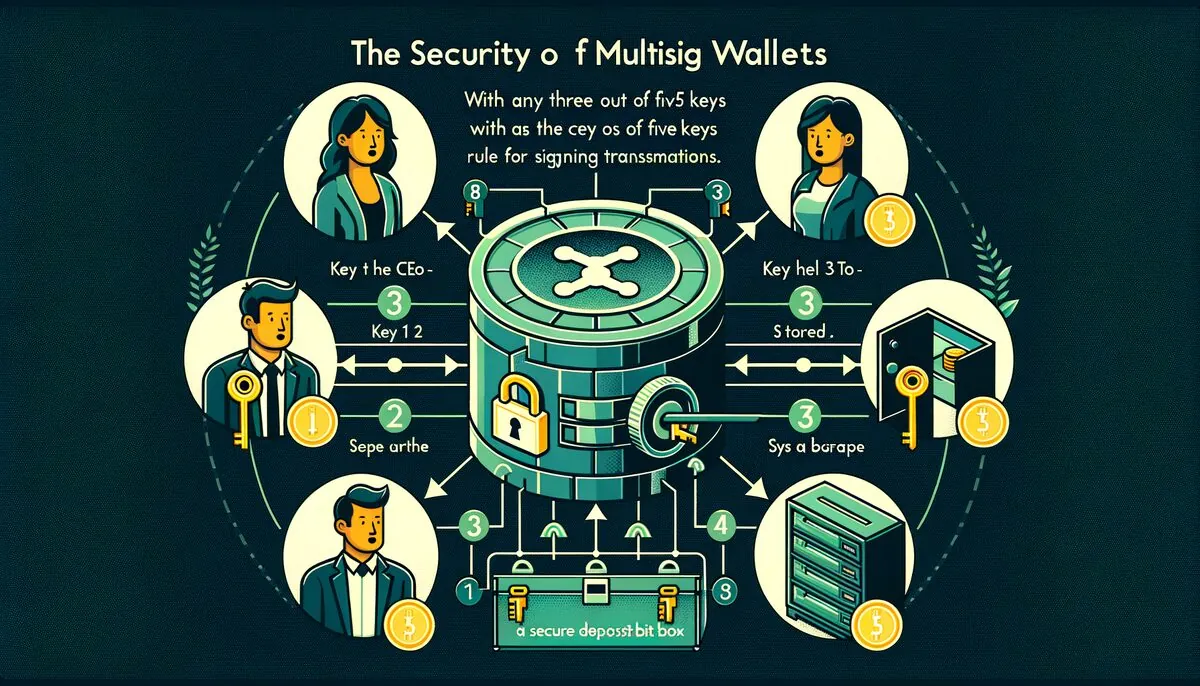
A multisig (multi-signature) wallet is a cryptocurrency wallet that requires two or more private keys to authorize a transaction. Instead of relying on a single key holder, a multisig setup distributes control among multiple parties or devices. Think of it like a bank safety deposit box that requires two separate keys held by two different people to open.
In a standard wallet - like a typical MetaMask setup - one private key controls everything. If that key is compromised through malware, social engineering, or a physical theft, the attacker has full access to all funds. A multisig wallet removes this single point of failure entirely.
Multisig wallets are described using an M-of-N notation. The "M" represents how many signatures are required, and "N" represents the total number of key holders. A 2-of-3 multisig means there are three key holders, and any two of them must sign a transaction for it to execute. This is the most common configuration for individuals and small teams.
Key Concept: A multisig wallet does not simply add more passwords. Each signer holds an independent private key, often stored on separate devices or managed by different people. The blockchain itself enforces the multi-signature requirement at the protocol or smart contract level.
2. How Multisig Works Technically
The technical implementation of multisig differs between blockchains, but the core logic remains consistent: multiple cryptographic signatures must validate a transaction before the network will process it.
Bitcoin Multisig (Native)
Bitcoin has supported multisig natively since 2012 through a script opcode called OP_CHECKMULTISIG. When you create a Bitcoin multisig address, the Bitcoin Script encodes the M-of-N requirement directly. The transaction is only valid when the correct number of signatures are provided alongside the redeem script. P2SH (Pay-to-Script-Hash) addresses starting with "3" and P2WSH (Pay-to-Witness-Script-Hash) addresses are the standard formats used for Bitcoin multisig.
Ethereum Multisig (Smart Contract)
Ethereum does not support multisig natively at the protocol level. Instead, multisig functionality is implemented through smart contracts. The most widely used implementation is Safe (formerly Gnosis Safe), which deploys a smart contract that holds assets and enforces the signing threshold. When a signer initiates a transaction, the smart contract collects signatures from the required number of owners before executing.
The Signing Process
- Transaction Proposal: One signer creates and signs a transaction proposal. This does not execute anything on-chain yet.
- Signature Collection: The proposal is shared with other signers (off-chain for Ethereum, or via a partially signed transaction for Bitcoin). Each additional signer reviews the transaction details and adds their signature.
- Threshold Met: Once the required number of signatures (M) is collected, the transaction becomes valid.
- Execution: The fully signed transaction is broadcast to the network. On Ethereum, this triggers the smart contract to execute. On Bitcoin, the transaction is simply submitted to the mempool.
Security Note: On Ethereum-based multisigs, the signatures can be collected off-chain (gasless for co-signers) and only the final execution transaction costs gas. This means only one signer pays the gas fee. On Bitcoin, all signatures are embedded directly in the transaction.
3. Common Multisig Configurations (2-of-3, 3-of-5)
Choosing the right configuration depends on your use case, the number of stakeholders, and how much friction you are willing to accept in exchange for security. Here are the most common setups:
The 2-of-3 setup is the gold standard for most users. You can distribute the three keys across: (1) your primary MetaMask or software wallet, (2) a Ledger hardware wallet stored at home, and (3) a backup hardware wallet stored in a separate location like a bank safe deposit box. If any single device is compromised or lost, you can still access your funds with the remaining two.
For DAOs and organizations managing community treasuries, 3-of-5 or 4-of-7 configurations provide both security and operational flexibility. Distributing keys among core team members ensures no single individual can unilaterally move funds.
4. Safe (Gnosis Safe) Deep Dive
Safe (rebranded from Gnosis Safe in 2022) is the dominant multisig solution on Ethereum and EVM-compatible chains. As of 2026, Safe secures over $100 billion in digital assets across more than 30 networks including Ethereum, Polygon, Arbitrum, Optimism, Base, BNB Chain, and Avalanche.
Why Safe Dominates
- Battle-tested smart contracts: The Safe contracts have been audited multiple times and have secured assets since 2018 without a contract-level exploit.
- Open source: Fully open-source codebase allows anyone to verify the contract logic.
- Modular architecture: Supports modules for spending limits, recurring transactions, and custom logic via smart contract extensions.
- Multi-chain deployment: One interface to manage multisig wallets across all major EVM networks.
- DApp integration: Built-in transaction builder and WalletConnect support to interact with any DeFi protocol.
- Off-chain signature collection: Co-signers can approve transactions without paying gas. Only the final execution requires an on-chain transaction.
How Safe Works Under the Hood
When you create a Safe, a proxy contract is deployed on-chain that points to the Safe singleton (master copy) implementation. This proxy pattern reduces deployment costs significantly. The proxy stores your configuration: the list of owner addresses, the signing threshold, and any enabled modules.
Transactions go through these stages: (1) A signer proposes a transaction using the Safe web app or API. (2) The transaction details are stored on the Safe Transaction Service (off-chain). (3) Other signers connect their wallets, review the transaction, and add their signatures off-chain. (4) Once the threshold is reached, any signer can execute the transaction on-chain by submitting the collected signatures to the Safe contract. (5) The contract verifies all signatures and executes the transaction atomically.
5. Setting Up a 2-of-3 Safe Step by Step
Follow these steps to create a 2-of-3 multisig wallet using Safe. Before you begin, make sure you have three separate wallet addresses ready. Ideally, at least one should be a cold wallet for maximum security.
Step 1: Go to Safe and Connect Your Wallet
Navigate to app.safe.global in your browser. Click "Create Account" to start the setup wizard. Connect your primary wallet (this will be Owner 1). You can use MetaMask, a Ledger via MetaMask, WalletConnect, or any supported wallet.
Step 2: Choose Your Network
Select the blockchain network for your Safe. Ethereum mainnet is the most common choice for high-value storage, but L2 networks like Arbitrum or Base offer significantly lower gas fees for deployment and transactions. You can always create additional Safes on other networks later.
Step 3: Name Your Safe and Add Owners
Give your Safe a descriptive name (stored locally, not on-chain). Then add your three owner addresses:
- Owner 1: Your connected wallet (auto-populated)
- Owner 2: Paste the address of your second wallet (ideally a hardware wallet)
- Owner 3: Paste the address of your third wallet (backup stored in a separate physical location)
Give each owner a label so you can identify them later (e.g., "MetaMask Primary," "Ledger Home," "Ledger Bank Vault").
Step 4: Set the Signing Threshold
Set the threshold to 2 out of 3 owners. This means any two of your three wallets must sign for a transaction to execute. This gives you redundancy - if one key is lost or compromised, the other two can still move funds and replace the lost signer.
Step 5: Review and Deploy
Review all settings carefully. Double-check every owner address character by character. Once confirmed, click "Create" and approve the deployment transaction in your connected wallet. You will pay a gas fee to deploy the Safe smart contract. On Ethereum mainnet, this typically costs between $5-$30 depending on network congestion. On L2 networks, expect less than $1.
Step 6: Fund Your Safe
After deployment, your Safe has a unique Ethereum address. Send a small test amount first to verify everything works. Then send the remaining assets you want to protect. Always keep a small ETH balance in the Safe for future gas fees when executing transactions.
Critical Warning: Triple-check all owner addresses before deploying. If you add an incorrect address as an owner, that address will have signing power over your funds. There is no way to fix this except by using the multisig itself to remove the wrong signer - which requires the threshold of correct signers to approve.
6. Transaction Signing Flow
Understanding the transaction flow is essential for day-to-day use of your multisig. Here is how a typical transaction moves from proposal to execution:
- Propose: Signer A connects to the Safe app and creates a new transaction (e.g., send 1 ETH to an external address). Signer A reviews the details and signs. This signature is stored off-chain on the Safe Transaction Service. No gas is spent yet.
- Confirm: Signer B receives a notification (via the Safe app, email, or Telegram integration). Signer B connects their wallet, reviews the same transaction details, and adds their off-chain signature. The 2-of-3 threshold is now met.
- Execute: Either Signer A or Signer B (or even Signer C) can now execute the transaction on-chain. The executor pays the gas fee. The Safe contract verifies both signatures and transfers the 1 ETH to the destination.
If a signer disagrees with a proposed transaction, they simply do not sign it. The transaction will remain pending until the threshold is met or it is explicitly rejected. To reject a pending transaction, signers can propose and approve a rejection transaction with the same nonce, which effectively cancels it once the threshold is reached.
For teams, the Safe interface shows a clear queue of pending transactions with their confirmation status. Each transaction displays which owners have signed and which approvals are still needed.
7. Adding and Removing Signers
The signer configuration of a Safe is not permanent. You can add new owners, remove existing ones, and change the threshold - but all changes require the current threshold of signatures to approve.

Adding a New Signer
Go to Settings > Owners in the Safe app. Click "Add new owner." Enter the new wallet address and optionally adjust the threshold. This creates an on-chain transaction that must be signed by the current required number of owners. Once executed, the new address immediately has signing power.
Removing a Signer
In Settings > Owners, click the trash icon next to the signer you want to remove. You can also adjust the threshold at the same time. This is commonly used when a team member leaves an organization, when rotating keys for security purposes, or when a hardware wallet is replaced.
Swapping a Signer
Safe supports an atomic swap operation that replaces one owner with another in a single transaction. This is cleaner than removing and adding separately, as it prevents the threshold from temporarily being invalid.
Best Practice: After any signer change, verify the new owner list and threshold on-chain using a block explorer. Do not rely solely on the Safe web interface.
8. Electrum Multisig for Bitcoin
Electrum is the go-to desktop wallet for Bitcoin multisig. It has supported native Bitcoin multisig since its early days, and it remains one of the most reliable options for users who want full control over their Bitcoin security without relying on a smart contract.
Setting Up Electrum Multisig
- Open Electrum and select "File > New/Restore."
- Choose "Multi-signature wallet."
- Select the number of cosigners (N) and required signatures (M). For a 2-of-3 setup, choose 3 cosigners and 2 signatures.
- For each cosigner, choose whether to create a new seed phrase, use an existing seed, or import a master public key (xpub/Zpub).
- For hardware wallet integration, select "Use a hardware device" and connect your Ledger or Trezor.
- After all cosigners are configured, Electrum generates multisig addresses that require M signatures to spend.
To send Bitcoin from an Electrum multisig wallet, you create a transaction on one device, export it as a partially signed Bitcoin transaction (PSBT), share it with the next cosigner (via USB, QR code, or file), and repeat until enough signatures are collected. The final cosigner broadcasts the fully signed transaction.
9. Casa Multisig
Casa takes a different approach by offering a managed multisig service designed for non-technical users. Their flagship product is a 2-of-3 or 3-of-5 Bitcoin multisig where Casa holds one key as a recovery partner, the user holds one or more keys on hardware wallets, and the Casa mobile app serves as another key.
Casa Key Shield Tiers
- Standard (2-of-3): Casa holds one key, you hold one on your phone and one on a hardware wallet. Affordable monthly subscription.
- Premium (3-of-5): Casa holds one key, you hold four keys across multiple devices and locations. Includes a dedicated security advisor and inheritance planning.
The advantage of Casa is the guided user experience and the built-in inheritance protocol. If you become incapacitated, your designated heir can initiate a recovery process through Casa. The disadvantage is that you are relying on a third-party company - if Casa goes out of business, you need to handle the migration yourself (which Casa provides tools for).
10. When to Use Multisig
Multisig is not necessary for everyone, but there are clear scenarios where it becomes essential:
DAO and Organization Treasuries
Any DAO or crypto organization managing community funds should use a multisig. It prevents a single compromised team member from draining the treasury. Most major DeFi protocols use 3-of-5 or 4-of-7 multisigs to control protocol upgrades, fee parameters, and treasury disbursements.
Team and Business Wallets
Any crypto business with multiple stakeholders should use a multisig for operational funds. This provides accountability (every transaction requires multiple approvals), prevents internal theft, and ensures business continuity if one key holder becomes unavailable.
High-Value Personal Storage
If you are holding more than $50,000 in crypto, a multisig dramatically reduces your risk. Distributing keys across multiple cold wallets in different geographic locations protects against theft, fire, natural disasters, and device failure.
Inheritance Planning
A 2-of-3 multisig is ideal for inheritance. You hold two keys for day-to-day use, and your heir holds the third. If something happens to you, your heir works with a lawyer or trusted third party who has instructions to facilitate access using your second key. This prevents premature access while ensuring assets are not lost.
Escrow Arrangements
A 2-of-3 multisig works naturally as an escrow: the buyer holds one key, the seller holds one key, and a neutral arbitrator holds the third. If the transaction goes smoothly, buyer and seller sign together. If there is a dispute, the arbitrator signs with the rightful party.
11. Multisig vs Single-Sig vs MPC Wallets
Understanding the differences between these three wallet architectures helps you choose the right solution for your needs:
MPC (Multi-Party Computation) wallets split a single private key into encrypted shards that are distributed among multiple parties. The key is never fully reconstructed - instead, each party uses their shard to compute a partial signature, and the results are combined. MPC wallets look like regular transactions on-chain and have lower gas costs, but they trade transparency for convenience. You cannot independently verify the signing policy on-chain the way you can with a multisig. For organizations that need auditability and trustless verification, multisig remains the better choice.
12. Multisig for DeFi
Using a multisig wallet with DeFi protocols adds a powerful layer of security for high-value positions. Safe makes this straightforward through its built-in transaction builder and WalletConnect integration.
Connecting to DeFi Protocols
Safe supports two methods for interacting with DeFi apps: (1) The built-in "Apps" section within the Safe interface, which loads popular DeFi protocols directly. (2) WalletConnect, which allows you to connect your Safe to virtually any DeFi application. You initiate the WalletConnect session from within the Safe app, then paste the connection link into the DeFi protocol.
Approving DeFi Transactions
When interacting with DeFi through a multisig, every action - swaps, deposits, withdrawals, claims - goes through the standard signing flow. This means no single signer can unilaterally interact with a protocol. For teams managing DeFi treasury positions, this prevents unauthorized trades or strategy changes.
Transaction Batching
Safe's transaction builder allows you to batch multiple operations into a single multisig transaction. For example, you can approve a token, deposit it into a lending protocol, and enable it as collateral - all in one atomic transaction that only requires one round of signatures. This saves gas and reduces the number of signing rounds needed.
DeFi Tip: For time-sensitive DeFi operations (like liquidation protection), multisig adds latency since you need multiple signers to approve. Consider using Safe modules with spending limits for routine operations, keeping the full multisig requirement for large or unusual transactions.
13. Social Recovery and Multisig
Social recovery is a concept popularized by Vitalik Buterin that uses trusted contacts (guardians) to help recover access to a wallet. While not identical to multisig, it shares the principle of distributed trust and is often implemented using multisig-like mechanisms.
In a social recovery setup, you designate a group of guardians - friends, family members, or institutional custodians. If you lose access to your wallet, a majority of guardians can authorize a key change, effectively restoring your access. The guardians cannot initiate transactions or access funds under normal circumstances. They can only participate in the recovery process.
Multisig as Social Recovery
A 2-of-3 multisig can function as a basic social recovery scheme. You hold two keys (for normal operations) and give the third to a trusted guardian. If you lose one key, you and the guardian use the remaining two to transfer assets to a new multisig with fresh keys. This is simpler than dedicated social recovery smart contracts and works today without additional tooling.
For advanced social recovery, Safe modules can implement time-locked recovery flows where guardians initiate a recovery process that takes effect after a delay (e.g., 48 hours), giving the original owner time to cancel if the recovery was unauthorized. This protects your seed phrase and wallet access even in complex scenarios.
14. Multisig + Hardware Wallets Combo
The most secure multisig configuration combines multiple hardware wallets as signers. This means an attacker would need to physically compromise multiple devices in different locations to steal funds.
Recommended 2-of-3 Hardware Setup
- Signer 1: Ledger Nano X - kept at home for regular signing
- Signer 2: Ledger Nano S Plus - stored in a bank safety deposit box or secure offsite location
- Signer 3: Trezor Model T or Keystone - different manufacturer for vendor diversity, stored at a trusted family member's location
Using hardware wallets from different manufacturers protects against vendor-specific vulnerabilities. If a critical security flaw is discovered in Ledger's firmware, your Trezor signer remains unaffected. This defense-in-depth approach is the highest standard of self-custody crypto security available to individuals.
Connecting Hardware Wallets to Safe
Each hardware wallet connects to the Safe app through its respective bridge: Ledger uses Ledger Live or the browser extension, while Trezor connects through the Trezor Suite browser bridge. When signing a Safe transaction, you physically confirm the transaction details on the hardware wallet's screen, verifying the destination address and amount before approving. Make sure you have backed up each device's seed phrase securely and independently.
15. Costs and Gas Fees
Multisig wallets involve higher transaction costs compared to standard wallets due to the additional on-chain verification logic. Here is a realistic breakdown of costs as of early 2026:
For Bitcoin multisig (Electrum, Casa), transaction fees are slightly higher than standard transactions because the multisig script and multiple signatures increase the transaction size. However, the cost difference is modest - typically 10-30% more than a standard single-sig transaction.
If gas costs are a concern, deploying your Safe on an L2 network is the best strategy. You can bridge assets from Ethereum mainnet to Arbitrum or Base, deploy a Safe there for under $1, and benefit from consistently low execution costs while maintaining the same security model.
16. Pros and Cons of Multisig
Pros
- Eliminates single point of failure
- Protects against phishing and key theft
- Built-in access control for teams
- On-chain verifiable signing policy
- Supports inheritance and succession planning
- Reduces insider threat risk
- Battle-tested technology (Safe since 2018)
- Transparent transaction audit trail
- Compatible with hardware wallets
Cons
- Higher gas costs on Ethereum mainnet
- Slower transaction execution (requires coordination)
- More complex setup and management
- Smart contract risk (Ethereum multisigs)
- Key management burden across multiple devices
- Not ideal for frequent, small transactions
- Signer availability can become a bottleneck
- Recovery is harder if threshold of keys is lost
- Learning curve for non-technical users
17. Frequently Asked Questions
What happens if I lose one key in a 2-of-3 multisig?
You can still access your funds with the remaining two keys. You should immediately use those two keys to create a transaction that removes the lost key and adds a new replacement key. This restores your full 2-of-3 security.
Can I use the same hardware wallet as multiple signers?
Technically, you can derive multiple accounts from one hardware wallet and use them as separate signers, but this defeats the purpose. If that device is compromised, all signing keys are compromised. Always use physically separate devices for each signer.
Is a multisig wallet hackable?
The multisig concept itself is extremely robust. However, there are attack vectors: (1) smart contract vulnerabilities in the multisig implementation, (2) compromising enough signers to meet the threshold, (3) social engineering attacks against multiple key holders. Safe's contracts have withstood years of real-world use and multiple audits, making implementation-level attacks highly unlikely. The bigger risk is operational security around the individual signers.
How does a multisig handle ERC-20 tokens and NFTs?
A Safe multisig wallet can hold any asset that a regular Ethereum address can hold: ETH, all ERC-20 tokens, ERC-721 NFTs, and ERC-1155 tokens. The Safe interface displays your full portfolio and allows you to send any asset type through the standard multisig signing flow.
Can I use a multisig on Bitcoin and Ethereum at the same time?
Bitcoin multisig and Ethereum multisig are completely separate systems. You would need a Bitcoin multisig (via Electrum, Casa, or similar) for your BTC and a Safe multisig for your ETH and EVM tokens. The signer devices can be the same hardware wallets, but the multisig setups are independent.
What if Safe (the company) shuts down?
Your Safe multisig is a smart contract deployed on the blockchain - it does not depend on Safe's servers to function. If Safe's web interface goes down, you can interact with the contract directly through Etherscan, through alternative frontends, or through your own web3 scripts. The contract is immutable and your funds remain accessible as long as you have the required signer keys.
How long does it take to execute a multisig transaction?
The on-chain execution is as fast as any other transaction (seconds to minutes depending on the network). The bottleneck is collecting enough signatures, which depends on signer availability. If all signers are online and responsive, a transaction can go from proposal to execution in minutes. For organizations with signers in different time zones, it might take hours or even a day.
Is multisig worth it for small amounts of crypto?
For small amounts (under $5,000), a standard single-sig wallet on a hardware wallet with proper backup of your seed phrase is usually sufficient. The added complexity and gas costs of multisig may not justify the security benefit for small holdings. However, if you are part of a team or DAO managing shared funds, multisig is essential regardless of the amount.
Can I set up a multisig wallet on mobile?
Safe has a mobile app for iOS and Android that supports creating and managing multisig wallets. You can propose, sign, and execute transactions from your phone. However, for maximum security, use hardware wallets as your signers rather than relying solely on mobile-based keys. Casa offers a streamlined mobile-first multisig experience specifically designed for phone-based signing.
What is the difference between multisig and multi-factor authentication (MFA)?
MFA protects access to an account (like a centralized exchange login) by requiring multiple forms of identity verification - but once authenticated, a single key still controls the funds. Multisig operates at the blockchain level: the transaction itself requires multiple independent cryptographic signatures. MFA can be bypassed if the exchange is compromised. Multisig cannot be bypassed without compromising the threshold number of independent private keys.
18. Related Tutorials
How to Use MetaMask Wallet
Complete setup and usage guide for the most popular Ethereum wallet.
How to Use a Ledger Hardware Wallet
Secure your crypto with the industry-leading hardware wallet.
Best Cold Wallets 2026
Hardware wallet comparison guide for secure offline storage.
How to Protect Crypto From Hackers
Essential security practices for safeguarding your digital assets.
How to Recover a Crypto Wallet
Seed phrase backup and wallet recovery guide.
What Is a Smart Contract?
Complete beginner guide to smart contracts and how they work.
What Is DeFi?
Complete guide to decentralized finance protocols and strategies.
What Is a DAO?
Guide to decentralized autonomous organizations and governance.
Frequently Asked Questions
Q: What is a multisig wallet?
A: A multisig wallet requires multiple private keys to authorize a transaction, enhancing security by distributing control over funds.
Q: How does multisig improve security?
A: Multisig wallets mitigate single points of failure, such as a lost or compromised private key, by requiring consensus from multiple parties for transactions.
Q: What are common multisig configurations?
A: Common configurations include 2-of-3 or 3-of-5, meaning a specified number of keys out of the total must sign to approve a transaction.
Q: What are the risks associated with multisig wallets?
A: Risks include the loss of multiple keys, disputes among key holders, or the compromise of a majority of keys, which could lead to fund inaccessibility or theft.
Q: What security practices are recommended for multisig in 2026?
A: Best practices include secure key storage, regular auditing of key holders, and utilizing hardware security modules for key management to minimize vulnerabilities.
Related Guides
- Understanding Multisig Wallets: Crypto Security Explained
- What Is a Multisig Wallet in Crypto? Complete Security Guide (2026)
- What Is Safe: Multisig Wallets, Smart Accounts and Treasury Control (2026)
- What Is Wallet Poisoning? Crypto Security Guide 2026
- What Is Signature Phishing in Crypto? Complete Security Guide (2026)