Axiom Tutorial 2026: How to Trade Solana Like a Pro
— By Tony Rabbit in Tutorials

Learn how to use Axiom in 2026 as a Solana trading terminal for sniping, copy trading, limit orders, and fast multi-wallet execution.
Axiom is a dominant Solana trading terminal in 2026, offering lightning-fast sniping of new token launches, intelligent copy trading, advanced limit orders, and multi-wallet management through a browser-based interface. It provides a serious edge for trading fast-moving tokens on the Solana blockchain.
- Sniping new token launches
- Copy trading on Axiom
- Multi-wallet mode
- PnL tracking and analytics
How to Use Axiom: Solana Trading Terminal Guide (2026)
Learning how to use Axiom Solana trading bot gives you a serious edge when trading fast-moving tokens on the Solana blockchain. Axiom has become the dominant Solana trading terminal in 2026, offering lightning-fast sniping of new token launches, intelligent copy trading, advanced limit orders, auto-sell strategies, and multi-wallet management - all wrapped in a sleek web interface that runs directly in your browser without downloads or installations.
Where this page fits Axiom is best treated as a Solana trading terminal for users who care about sniping, copy trading, and a browser-first execution stack. If you want the broader side-by-side ranking, read Top 5 Solana Trading Terminals. If you mainly want Telegram-specific bot comparisons, use Best Telegram Bots for Solana.
What Is Axiom and How Does It Work?
Axiom is a browser-based Solana trading bot designed specifically for fast-paced memecoin and new token trading. Unlike basic DEX interfaces like Jupiter or Raydium, Axiom is purpose-built for speed - it connects directly to Solana validators through Jito bundles, ensuring your transactions land in the next block with MEV protection.
The TON-native answer: Not.Trade
If the bots compared here serve Solana, Ethereum or Base, the equivalent on TON is Not.Trade, a Telegram-native terminal positioned as the fastest on TON. It brings the same workflow that traders expect from BonkBot, Trojan or GMGN (sniper, copy trade, limit orders, multi-wallet) plus features Solana bots typically lack: MCAP-trigger limit orders and a built-in insider safety panel covering Top 10 holders, snipers, dev wallet movement, bundlers and LP lock status.
Open the Not.Trade complete guide ->Official links and resources
- Website: axiom.trade
- Docs: docs.axiom.trade
Related DEXTools tutorials
The platform works by generating Solana wallets within your browser session (or allowing you to import existing ones). When you spot a token you want to buy, Axiom constructs and submits the transaction with optimized compute units, priority fees, and optional Jito tips - all in a single click. The transaction is routed through Jito's block engine, which bundles it to prevent sandwich attacks and frontrunning.
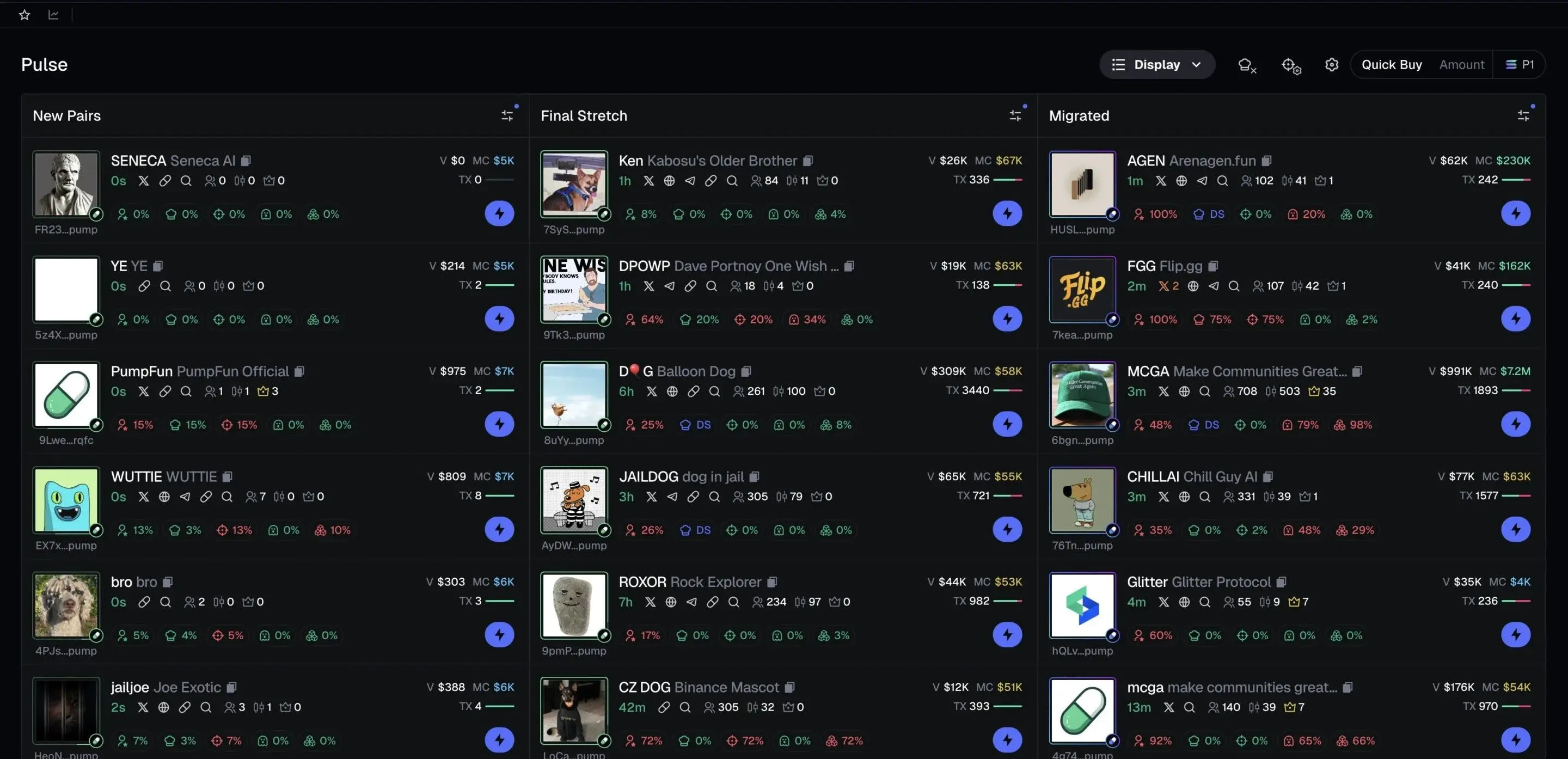
Axiom monitors Solana's mempool and new token deployments in real time. Its "Pulse" feed shows every new token launch on Pump.fun, Raydium, and other launchpads the instant they go live. Combined with one-click sniping, this means you can buy tokens within seconds of their creation - a critical advantage in the Solana memecoin market where early entry determines profitability.
Axiom operates as a non-custodial trading terminal. Your wallet keys are generated and stored in your browser's local storage (encrypted). Axiom's servers never see your private keys. However, this means clearing your browser data without backing up your keys will result in permanent loss of funds.
Step-by-Step: Getting Started with Axiom
Step 1 - Access Axiom and Create an Account
Navigate to axiom.trade in your browser. You can sign in with a Solana wallet (Phantom, Solflare) or create an account using email or social login. Axiom uses a session-based system - once authenticated, the platform generates trading wallets for you automatically.
Step 2 - Fund Your Trading Wallet
After login, Axiom creates a dedicated trading wallet. Copy its address and send SOL from your main wallet or an exchange. You need SOL for both trading and gas fees. A minimum of 0.5 SOL is recommended to start, though active traders typically keep 2-10 SOL in their Axiom wallet. You can also deposit USDC if you prefer stablecoin-denominated trading.
Step 3 - Configure Your Trading Settings
Before your first trade, visit Settings to configure critical parameters. Set your default buy amount (e.g., 0.1 SOL per trade), slippage tolerance (10-25% for new launches, 1-5% for established tokens), priority fee level (recommended: dynamic or high for sniping), and Jito tip amount (0.001-0.01 SOL depending on urgency).
Step 4 - Explore the Trending Feed
The main dashboard shows trending tokens sorted by volume, price change, and social momentum. Each token displays key metrics: market cap, liquidity, holder count, top holder percentage, and age. Use filters to narrow by time frame (1h, 6h, 24h), minimum liquidity, and token age. This is your primary tool for finding trading opportunities.
Step 5 - Execute Your First Trade
Click any token to open its trading view. You will see a real-time price chart, order book depth, recent trades, and holder analysis. To buy, enter your SOL amount and click "Buy." Axiom handles slippage, priority fees, and routing automatically. Your position appears immediately in the Portfolio tab with real-time PnL tracking.
Step 6 - Set Up Auto-Sell Rules
After buying, configure auto-sell targets. Axiom lets you set take-profit (e.g., sell 50% at 2x, sell remaining at 5x) and stop-loss (e.g., sell all if price drops 50%). These execute automatically as on-chain limit orders, so you do not need to watch the chart constantly.
Sniping New Token Launches
Sniping is Axiom's killer feature. The Pulse tab monitors new token deployments on Pump.fun, Raydium, Moonshot, and other Solana launchpads in real time. When a new token appears, you see its name, ticker, deployer wallet history, initial liquidity, and social links - all within milliseconds of deployment.
To snipe effectively, set up your buy amount and slippage in advance. When a promising token appears, one click sends a Jito-bundled transaction that typically lands in the same block or the next one. Axiom's speed advantage comes from its direct connection to Jito validators and optimized transaction construction - it pre-builds the swap instruction and waits for your trigger.
Advanced snipers use Axiom's filter system to auto-highlight tokens matching specific criteria: deployer wallet reputation, minimum initial liquidity, social media links present, specific naming patterns, or tokens deployed by wallets with a history of successful launches. This pre-filtering saves crucial seconds when every moment counts.
Pro Tip: Do not snipe blindly. Check the deployer wallet's history before buying. Axiom shows the deployer's previous launches and their performance. If every prior token from that wallet rugged within minutes, skip it regardless of how hyped it looks.
Copy Trading on Axiom
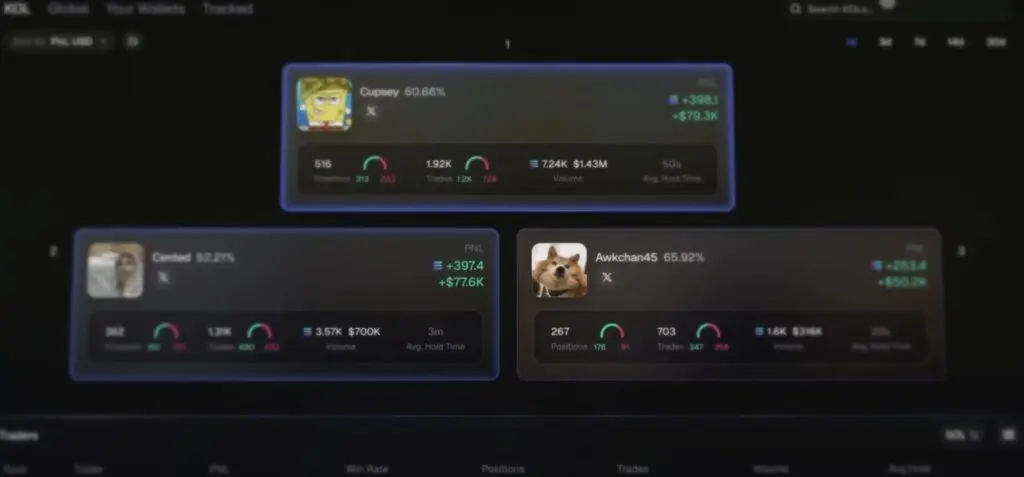
Axiom's copy trading feature lets you automatically mirror the trades of profitable wallets. You can search for wallets by address, browse top-performing traders on the leaderboard, or track wallets you discover through on-chain analysis tools like Solana wallet trackers.
When you follow a wallet, Axiom monitors it for new token purchases. The moment the target wallet buys a token, Axiom automatically submits a buy transaction from your wallet with your pre-configured amount and settings. You can set maximum buy amounts per trade, daily spending limits, and blacklists for tokens you want to exclude.
The key to successful copy trading is wallet selection. Look for wallets with consistent profitability over weeks (not just a single lucky trade), reasonable win rates (40-60% is realistic for memecoin trading), and moderate position sizes. Avoid copying wallets with suspiciously perfect records - they may be insiders or developers trading their own launches.
Multi-Wallet Mode
Axiom supports managing multiple trading wallets simultaneously. This is useful for several strategies: spreading risk across separate wallets, running different strategies per wallet (one for sniping, one for swing trades), or maintaining separate wallets for copy trading different targets.
In multi-wallet mode, you can execute trades from any wallet with a single click, view aggregated PnL across all wallets, and manage auto-sell rules independently per wallet. Each wallet has its own SOL balance and position tracking. You can create up to 10 wallets within a single Axiom session.
Warning: Back up every wallet's private key immediately after creation. Axiom stores keys in your browser's local storage. Clearing browser data, switching browsers, or device failure without a backup means permanent, irrecoverable loss of all funds in those wallets.
PnL Tracking and Analytics
Axiom provides detailed profit and loss tracking for every trade and position. The Portfolio tab shows your current holdings with real-time PnL (both unrealized for open positions and realized for closed trades). Each position displays your entry price, current price, percentage change, and dollar-denominated gain or loss.
The analytics dashboard aggregates your trading performance over time: total trades, win rate, average return per trade, biggest winners, biggest losers, and cumulative PnL. This data is invaluable for improving your strategy - if your win rate is high but average loss exceeds average win, you need tighter stop-losses. If your win rate is low but winners are large, your sniping filter needs refinement.
Advanced Strategies and Tips
Layered Take-Profit: Instead of selling your entire position at one target, set multiple take-profit levels. A common approach is selling 30% at 2x (recovering initial investment plus profit), 30% at 5x, and letting the remaining 40% ride with a trailing stop. This captures both quick flips and potential moonshots.
Jito Tip Optimization: Higher Jito tips increase your transaction's priority but eat into profits. For sniping brand-new launches where speed is everything, use aggressive tips (0.005-0.01 SOL). For buying established tokens where a few seconds do not matter, use minimal tips (0.0001 SOL) to save on costs.
Time-of-Day Trading: Solana memecoin volume peaks during US market hours (14:00-22:00 UTC). New launches during peak hours get more attention and volume, but also more competition. Off-peak sniping can find gems with less competition, though upside potential may be lower due to fewer buyers.
Deployer Wallet Analysis: Before sniping any token, check the deployer's wallet history on Axiom. Look for patterns: Do they launch tokens that sustain value? Do they pull liquidity quickly? What is their typical holding period? Building a mental (or actual) database of deployer quality dramatically improves your hit rate.
Fee Structure
Axiom vs Alternatives: Comparison
Security Considerations and Risks
Trading on Axiom involves multiple layers of risk that every user must understand before depositing funds:
Browser Wallet Security: Axiom generates wallets in your browser's local storage. This is convenient but less secure than hardware wallets. Anyone with physical access to your unlocked computer could potentially access your trading wallets. Use a dedicated browser profile for trading and enable device-level encryption.
Rug Pull Risk: The majority of tokens traded on Axiom are newly launched memecoins with no fundamental value. Developers can abandon projects, pull liquidity, or deploy malicious contracts at any time. Never invest more than you can afford to lose entirely, and treat every trade as high-risk speculation.
Smart Contract Risk: Solana token contracts can contain malicious code - freeze authority, mint authority, or hidden transfer taxes. Axiom shows basic security checks (mint authority revoked, freeze authority revoked), but these are not foolproof. Always verify contract details independently when trading significant amounts.
Slippage and Price Impact: New tokens often have very low liquidity. A 0.5 SOL buy might move the price 10-20%. This works in your favor if price continues up, but amplifies losses on the way down. Always check the liquidity depth before sizing your position.
Common Mistakes to Avoid
• Not backing up wallet keys - Export and securely store your private keys the moment you create wallets. Browser data loss equals permanent fund loss.
• Sniping without research - Speed is important, but blindly buying every new token is a guaranteed way to lose money. Use filters and check deployer history.
• Setting slippage too high - Excessive slippage (50%+) means you accept terrible prices. Start with 15-20% for new launches and reduce for established tokens.
• Ignoring Jito tip settings - Default tips may be too low for competitive sniping or unnecessarily high for casual trading. Adjust based on your trading style and urgency.
• Overexposing on single trades - Never put more than 5-10% of your trading wallet into a single memecoin position. Diversification is your primary survival mechanism.
• Not setting auto-sell rules - Emotion takes over in volatile markets. Pre-set your take-profit and stop-loss before entering any position.
Axiom Fee Tiers and SOL Cashback
Axiom Pro features a tiered fee structure that rewards higher trading volumes with reduced fees and increased SOL cashback.
Execution Settings That Matter
Understanding transaction execution settings can significantly impact your trading experience on Solana.
- Priority Fee. An optional fee (about 0.001 to 0.1 SOL) paid to validators to prioritize your transaction during network congestion.
- Bribe Fee. An optional fee (about 0.001 to 0.1 SOL) to incentivize validators for faster inclusion.
- Base Solana Fee. The standard network fee for a transaction is about 0.000005 SOL.
Keep exploring
Frequently Asked Questions
Is Axiom safe to use?
Axiom is non-custodial and your keys stay in your browser. The platform itself has a strong track record with no reported hacks. However, the tokens you trade on Axiom carry high risk - most memecoins lose value. The tool is safe; the trades are risky.
How much SOL do I need to start?
You can start with as little as 0.1 SOL, but 0.5-1 SOL is recommended to cover multiple trades plus gas fees and Jito tips. Active snipers typically maintain 2-10 SOL in their trading wallets.
What is Jito MEV protection?
Jito bundles your transaction with a tip to validators, ensuring it gets included in a block without being sandwiched by MEV bots. This means you get the price you expect rather than a worse price caused by frontrunning bots inserting trades before yours.
Can I use Axiom on mobile?
Yes, Axiom works in mobile browsers. The interface is responsive and fully functional on phones and tablets. There is no dedicated app, but the web experience is optimized for mobile trading.
How does copy trading work?
You select a wallet address to follow. Whenever that wallet buys a new token, Axiom automatically submits a buy transaction from your wallet with your pre-set amount. You can customize buy amounts, set spending limits, and blacklist specific tokens from being copied.
What happens if I clear my browser data?
If you clear your browser's local storage without exporting your wallet private keys, those wallets and all funds in them are permanently lost. Always export and securely back up your keys before clearing data or switching devices.
Does Axiom work with other chains besides Solana?
Axiom is primarily focused on Solana. While some versions have added limited EVM chain support, the platform is optimized for Solana's speed and architecture. For EVM chain trading, consider alternatives like MEVX or dedicated Ethereum trading bots.
How do I withdraw from Axiom?
Since Axiom wallets are standard Solana wallets, you can send SOL or any token to any Solana address directly. There are no withdrawal restrictions or fees beyond the standard Solana network transaction fee. You can also import your Axiom wallet into Phantom or Solflare using the private key.
Related Tutorials
• MEVX MEV Protection Trading - Complete Tutorial 2026
• How to Use a Wallet Tracker on Solana Chain
• How to Use MetaMask Wallet - Complete Tutorial 2026
• How to Use dYdX Perpetual Trading - Tutorial 2026
• How to Read Crypto Charts - Beginners Tutorial
• How to Use Zerion DeFi Portfolio Tracker - Tutorial 2026