How to Use KuCoin: Complete Trading Guide 2026
— By Tony Rabbit in Tutorials
How to use KuCoin in 2026: account setup, KYC tiers, spot and futures trading, the KCS dividend, grid bots, Earn, lending, and U.S. user alternatives.
KuCoin is a top-five global cryptocurrency exchange, founded in 2017, known for listing emerging tokens early and offering built-in trading bots, lending markets, and a launchpad. It serves over 38 million users with more than 900 listed assets, supporting both crypto and fiat deposits for spot and futures trading.
KuCoin earned the nickname "The People's Exchange" by listing emerging tokens earlier than almost any competitor and shipping built-in trading bots, lending markets, and a launchpad that traditional exchanges took years to copy. Founded in 2017 in Singapore by Michael Gan and Eric Don, with Johnny Lyu serving as CEO until his 2024 step-down, KuCoin sits among the top five global crypto exchanges by daily spot volume in 2026, with more than 38 million registered users and over 900 listed assets.
This tutorial walks through the full KuCoin stack as it exists in 2026, after the platform's March 2024 settlement with the U.S. Department of Justice forced a strategic reset. You will learn how to create and verify an account, deposit through crypto or fiat rails, navigate spot and futures interfaces, configure grid bots, claim KCS Bonus dividends, and decide whether KuCoin still fits your trading workflow given the new regulatory map.
The differentiator in 2026 is execution depth. KuCoin Earn, Futures, Pre-Market Trading, and the bot suite each compete head-on with Binance and Bybit on fees, asset coverage, and tooling. The catch is that U.S. users can no longer access the global platform, and the regulatory tightening across Europe and Asia means KYC compliance is now mandatory for almost every meaningful action.
What Is KuCoin in 2026?
KuCoin is a centralized cryptocurrency exchange offering spot trading, perpetual futures up to 125x leverage, margin lending, automated trading bots, yield products, and a token launchpad. It is registered in the Seychelles, operates under a Mwali (Comoros) license for derivatives, and supports more than 900 tradable assets across roughly 1,400 pairs. The platform is not available to U.S. residents following the March 2024 DOJ settlement.
KuCoin's History and the DOJ Settlement
KuCoin launched in September 2017, raising early capital from IDG Capital and Matrix Partners. The exchange grew aggressively through 2018 and 2019 by listing tokens that Binance and Coinbase rejected, building a reputation as the venue where new altcoins debuted first. By 2019, KuCoin was processing more than $1 billion in daily volume.
The defining crisis came on September 25, 2020, when attackers drained an estimated $281 million in BTC, ETH, ERC-20 tokens, and other assets from KuCoin's hot wallets. The exchange traced the breach to a leaked private key. Working with Chainalysis, Elliptic, and a network of partner exchanges, KuCoin recovered roughly 84% of the stolen funds within weeks and covered the remainder from its insurance reserve. Every affected user was made whole. The incident pushed the exchange to overhaul its custody architecture and migrate the majority of reserves into multi-signature cold storage.
The second defining moment arrived in March 2024 when the U.S. Department of Justice filed criminal charges against KuCoin and its two founders for operating an unlicensed money transmitting business and violating the Bank Secrecy Act. KuCoin agreed to a settlement that included roughly $297 million in penalties and forfeitures, the departure of its founders from any U.S.-facing role, and a commitment to exit the U.S. market for at least two years. By April 2024, U.S. users were locked out of trading and given 30 days to withdraw funds. The settlement reshaped the exchange's global compliance posture and accelerated mandatory KYC across all product tiers.
KuCoin Token (KCS): Utility and Daily Dividend
KCS is the native exchange token of the KuCoin platform, originally issued in 2017 as a KuCoin Shares ERC-20 token and later migrated to its own KCC chain. The total supply is capped at 170 million KCS, with periodic burns funded by a portion of exchange profits, mirroring the deflationary mechanism Binance applied to BNB. As of mid-2026, the circulating supply sits near 96 million KCS.
The token's signature feature is the KCS Bonus, a daily revenue-sharing payment routed to wallets that hold at least 6 KCS in their Main Account. KuCoin allocates a configurable share of its daily trading-fee revenue (historically 50%, reduced to 40% after the DOJ settlement) into the bonus pool. Each eligible wallet receives a pro-rata payout in dozens of supported assets every day, distributed automatically without staking or lockup.
Yield math example: at a token price of $11 and a 6 KCS minimum holding ($66 of capital), a wallet would earn between $0.005 and $0.04 per day depending on exchange volume, translating to a 3% to 22% annualized yield. For larger holders, the math scales linearly until the platform's per-wallet cap kicks in. Holding KCS also unlocks a 20% spot fee discount and grants Spotlight and IEO subscription rights, where allocation is weighted by 30-day average KCS holdings.
How KuCoin Works: The Account Architecture
KuCoin splits user balances across four internal sub-accounts, and learning this layout up front prevents the most common beginner mistakes. The Main Account receives every deposit and is the only account that can withdraw to external addresses. The Trading Account holds the funds available for spot orders. The Futures Account is segregated for derivatives margin, and the Margin Account holds collateral for cross or isolated margin loans.
Funds move between accounts through Internal Transfer, which is instant and free. Before placing your first spot order, you must transfer balance from Main to Trading. Before opening a futures position, you transfer from Main to Futures. This separation protects spot balances from being auto-liquidated by losing futures positions, but it also catches beginners who fund the wrong account and wonder why their order panel shows zero balance.
Sitting under the four sub-accounts is the asset layer: each token tracks its on-chain network (ERC-20, TRC-20, BEP-20, Solana, KCC, Polygon, Arbitrum, Optimism, Base, and others) and a separate deposit address per network. Selecting the wrong network is the most expensive beginner mistake on KuCoin because cross-network sends can be unrecoverable. The deposit page now warns aggressively when the chosen network does not match the most common one for that asset, but the responsibility remains with the user.
Step 1: Create and Verify Your Account
Sign up at kucoin.com with an email address or mobile number, set a password of at least 8 characters mixing letters, numbers, and symbols, and confirm the registration code. Immediately enable Google Authenticator or a Yubikey under Security Settings, set a separate Trading Password (used to authorize trades and withdrawals), and turn on the Anti-Phishing Code, which appears in every legitimate KuCoin email so you can spot spoofed messages instantly.
Verification is split into tiers. KYC1 requires a government-issued ID and a selfie, processed within minutes, and unlocks a daily fiat deposit allowance and a 200 BTC equivalent daily withdrawal cap. KYC2 (Advanced Verification) adds proof of address and bumps the withdrawal limit to 1,000 BTC equivalent per 24 hours, opens P2P trading, and enables institutional-tier API rate limits. Since the DOJ settlement, KuCoin has required KYC1 minimum for any meaningful trading action; the old "no KYC" loophole that let users trade up to 1 BTC per day is gone for accounts created after April 2024.
Step 2: Deposit Funds (Crypto and Fiat)
For crypto, navigate to Assets, click Deposit, search the asset, select the network, and copy the address or scan the QR code. KuCoin credits the deposit after a network-defined number of confirmations: 12 blocks for Ethereum ERC-20, 1 block for TRC-20, 15 confirmations for Bitcoin, and so on. Match the network on the sending side exactly; a USDT TRC-20 send to an ERC-20 KuCoin address will be lost permanently.
Fiat deposit options expanded significantly in 2025. Card purchases through Simplex, Banxa, MoonPay, and Mercuryo support 50+ currencies, with 1.5% to 4% fees depending on the route. SEPA bank transfer in EUR is free above a 50 EUR minimum and settles in one to two business days. The P2P marketplace is the cheapest fiat rail, matching buyers and sellers directly with KuCoin holding the crypto in escrow until the seller confirms fiat receipt. P2P supports 60+ fiat currencies and 200+ payment methods including local bank transfers, mobile wallets, and even cash deposits in some markets.
Step 3: Master the Spot Trading Interface
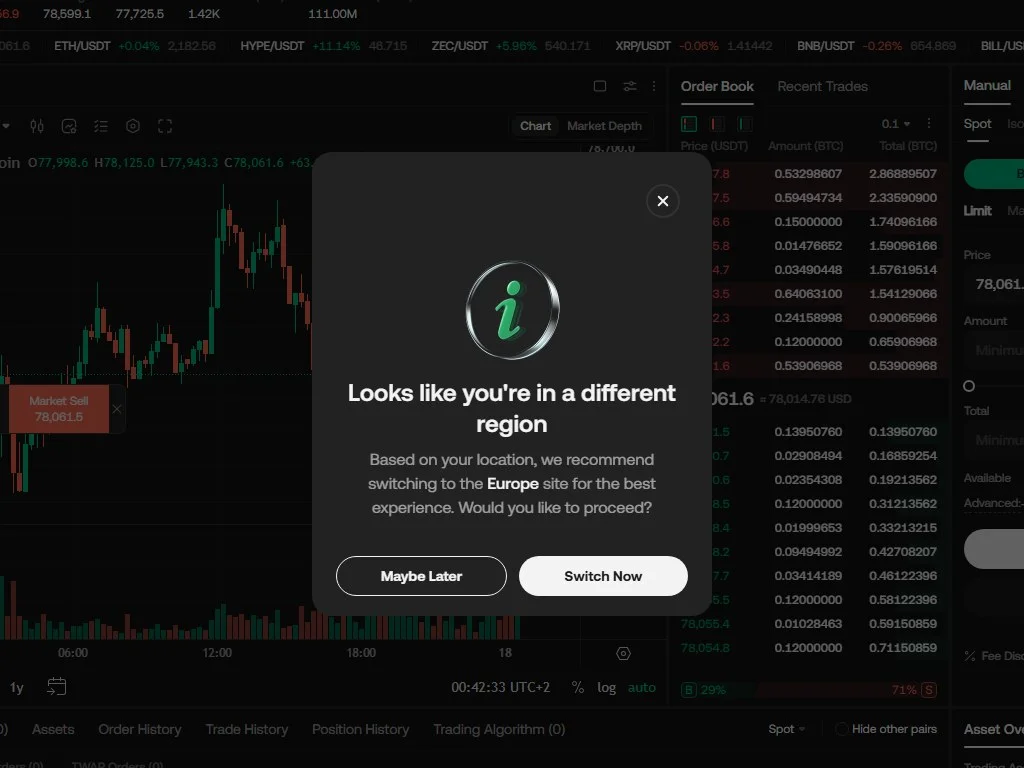
The spot trading screen is divided into four zones. The top-left holds the pair selector and the rolling 24-hour high, low, change, and volume metrics. The center is a full TradingView chart with the standard indicator library, drawing tools, and replay mode. The right column carries the order book (asks above, bids below, depth visualization on the side) and the recent trades feed. The bottom row contains the order panel and a tabbed history view for open orders, filled orders, and trade history.
Spot order types in 2026 include Market (instant fill at best available price), Limit (resting order at a chosen price), Stop-Limit (triggers a limit order when a stop price is hit), Stop-Market (triggers a market order when the stop is hit), OCO (one-cancels-other for pairing take-profit and stop-loss), and Iceberg (splits a large order into smaller visible chunks to reduce market impact). The order panel also exposes Post-Only and Hidden flags. Post-Only guarantees the maker fee tier by rejecting orders that would cross the spread, while Hidden conceals the order from the public book.
KuCoin's biggest spot advantage remains pair breadth. The pairs menu organizes markets into USDT, USDC, BTC, KCS, ETH, and Innovation Zone tabs. The Innovation Zone is where new and higher-risk tokens debut, often weeks before they appear on Binance or Coinbase. Liquidity in the Innovation Zone varies wildly, so always check 24-hour volume and spread before placing market orders. For deeper context on identifying low-liquidity traps, see our guide on detecting fake volume in crypto charts.
Step 4: KuCoin Futures (USDT-M and Coin-M)
KuCoin Futures launched in 2019 and now ranks among the top five derivatives venues globally. The platform offers two contract families. USDT-M (linear) contracts settle in USDT and quote price directly in USD, so PnL math is straightforward and stablecoin collateral works for every market. Coin-M (inverse) contracts settle in the underlying asset (BTC for BTC contracts, ETH for ETH contracts), which suits long-term holders who want to use their crypto as collateral and earn additional crypto on profitable trades.
Maximum leverage reaches 125x on BTC USDT-M perpetual contracts, 100x on ETH, and tapers to 20x or lower on smaller-cap altcoins. The margin engine supports both Cross Margin (uses the entire futures account balance as collateral, lower liquidation risk but higher account-wide exposure) and Isolated Margin (caps risk to the margin allocated per position, preferred by most active traders).
Order types mirror spot but add Trailing Stop, Take-Profit/Stop-Loss attached at order entry, and Reverse Position (closes and re-opens the opposite side in one click). Funding fees settle every 8 hours and reflect the difference between perpetual price and underlying spot. If you are new to leveraged trading, read our breakdowns on long vs short positions in crypto and liquidation zones before risking real capital.
At 125x leverage, a 0.8% adverse move triggers full liquidation. Industry data from major derivatives venues shows roughly 80% of retail futures traders lose money within their first 90 days. Professional desks rarely use more than 5x on directional bets. Keep position sizing at 1% to 2% of account equity per trade, and use Isolated Margin so a single bad position cannot wipe the entire account.
Step 5: Margin Trading and Crypto Lending
KuCoin offers Cross Margin and Isolated Margin for spot leverage, both backed by a peer-to-peer lending market rather than a centralized loan book. Borrowing rates float in real time based on supply and demand. During calm markets, USDT and USDC borrow at 0.01% to 0.05% per day. During volatility spikes, rates can briefly hit 0.5% per day or higher as leveraged traders bid for capital. Maximum spot leverage is 10x on Cross Margin and 5x on Isolated Margin.
The lending side is genuinely unique. Any user can deposit idle assets into the Lending Market, set their preferred rate and term (7, 14, or 28 days), and earn passive income from margin traders. KuCoin acts as the matching layer and the risk backstop; if a borrower's collateral fails to cover the loan during a liquidation, KuCoin's insurance fund makes lenders whole. Historical annualized yields on USDT have ranged from 4% to 25%, with brief spikes above 50% during 2024 and 2025 deleveraging events.
Step 6: KuCoin Earn (Flexible, Locked, KuCoin Win)
KuCoin Earn bundles every yield product under one tab. Flexible Savings pays 1% to 4% APY on stablecoins and major assets with same-day redemption. Locked Staking runs 7 to 180 day terms with APY tiers from 5% to 30% depending on the asset; ETH 2.0 staking, ATOM, DOT, ADA, and SOL all have direct staking integrations. Dual Investment lets users earn yield by committing capital to a strike price; if the asset hits the strike, the capital converts at that price, otherwise the principal plus yield is returned.
The newest tier is KuCoin Win, a probability-weighted yield product that pays a base APY on stablecoin deposits while running a periodic lottery distributing bonus prizes funded from the deposit pool. The base APY tends to be lower than Flexible Savings, but the optionality of winning a larger prize draws users seeking a slot-machine-style payoff structure. For a deeper comparison of yield product mechanics, see our guide on decentralized finance versus centralized yield.
Step 7: Trading Bots (Spot Grid, Futures Grid, Smart Rebalance, DCA)
The Trading Bot suite is the single feature most often cited by KuCoin power users. All bots are free to run, configured in-platform, and execute against the user's own spot or futures account. The five core strategies cover most retail automation use cases.
Buys low, sells high within a defined price range. The bot stacks limit orders at grid intervals and captures volatility on range-bound assets. Best on assets trading sideways in clear channels.
Same grid logic with optional 5x to 20x leverage. Higher returns in tight ranges, but liquidation risk if price breaks the grid boundary. Use only on pairs with sustained ATR-defined ranges.
Maintains a target percentage allocation across a basket of assets. Automatically sells outperformers and buys underperformers. Mirrors a self-rebalancing index fund.
Schedules recurring buys at chosen intervals (daily, weekly, monthly). Reduces timing risk and is the simplest bot to configure for long-term accumulators.
Grid bot ROI data from KuCoin's published performance leaderboards shows median 30-day returns of 1.8% to 4.5% for spot grids on majors like BTC and ETH during sideways markets, and negative results during strong directional moves. Futures grids with 5x leverage produce wider distributions, with top quartile bots returning 8% to 15% in 30 days and bottom quartile bots blowing up at the grid boundary. The Infinity Grid variant removes the upper bound, designed for assets in confirmed long-term uptrends, and has historically performed best on BTC and ETH during accumulation phases. For an in-depth look at validating bot strategies before deployment, see our guide on backtesting in crypto.
Step 8: Pre-Market Trading, IEO, and Spotlight
Pre-Market Trading lets verified users trade tokens before they officially list, settling against a fixed listing time. Sellers commit to delivering tokens at the listing date; buyers lock in a price. KuCoin holds collateral from both sides and forces delivery once the spot listing goes live. This market gives early investors a way to lock in profits before listing volatility and gives speculators a directional bet on launch price.
Spotlight is KuCoin's launchpad. New projects offer tokens at a fixed price to KCS holders, with allocation weighted by a 30-day average KCS holding snapshot. Historical Spotlight returns have varied widely; standout launches in 2018 to 2021 delivered 10x to 100x first-day returns, but recent cohorts have produced more modest 1.5x to 5x outcomes as the launchpad model has matured and competition for early allocations has tightened. The Initial Exchange Offering (IEO) program runs alongside Spotlight with looser project criteria and typically smaller raise sizes.
Fee Structure and KCS Holder Benefits
VIP tiers compound on top of the KCS discount. KuCoin uses a 30-day spot volume ladder running from LV0 (no volume requirement) up to VIP12 (more than $250 million in 30-day volume), reducing maker fees to as low as negative 0.005% (rebate) and taker fees to 0.03%. Combined with KCS holding, top-tier institutional traders effectively pay near-zero on liquidity-providing orders.
KuCoin vs Binance vs Bybit vs OKX (2026)
KuCoin's clear wins are asset breadth, the open P2P lending market, and the KCS daily dividend. Binance still leads in raw spot liquidity and global brand trust, Bybit dominates derivatives volume in many altcoin pairs, and OKX offers the deepest fiat on-ramp coverage outside of Asia. For U.S. users specifically, KuCoin is not an option in 2026 and the only viable centralized choices are Coinbase, Kraken, Gemini, and the limited US-licensed versions of Binance, Bybit (where available), and OKX.
U.S. User Status and Alternatives
As of the April 2024 DOJ settlement enforcement deadline, KuCoin geo-blocks U.S. residents from registering or trading on the global platform. IP detection, KYC document review, and on-chain analytics are used to enforce the block. Existing U.S. accounts were given a 30-day withdrawal window, after which trading was disabled and accounts were converted to withdraw-only status.
The state-by-state alternative map for 2026 looks like this: Coinbase, Kraken, and Gemini are available in 49 states (Hawaii excluded for Kraken/Gemini, varies by year). Binance.US has rebuilt limited operations in approved states after its own SEC settlement. Bybit launched a U.S.-licensed entity in late 2025 covering most states but with reduced asset coverage. Robinhood Crypto and Cash App offer a curated short list of majors for users prioritizing simplicity over depth.
U.S. traders seeking KuCoin-style features (early token listings, native bot infrastructure, lending markets) increasingly turn to DeFi protocols: Uniswap V4 and 1inch for early-stage token access, GMX and dYdX for perpetuals, Aave for lending. The tradeoff is custody and complexity. Self-custody removes counterparty risk but adds wallet management responsibility. For wallet best practices, read our guides on crypto wallet security and using burner wallets for airdrops.
Withdrawal Limits and Network Fees
KYC2 verified accounts can withdraw up to 1,000 BTC equivalent per 24 hours. KYC1 caps daily withdrawals at 200 BTC equivalent. Withdrawal fees vary by network: Bitcoin charges roughly 0.0002 BTC, Ethereum ERC-20 varies with gas (typically $1 to $5 in USDT terms), TRC-20 USDT is 1 USDT flat, Solana SPL transfers are around 0.01 USDT, and Polygon, Arbitrum, Optimism, and Base routes are well under $1.
The Withdrawal Whitelist feature locks outgoing transfers to pre-approved addresses, dramatically reducing the risk of an attacker draining funds after a phishing attack. Once enabled, adding a new address requires 24 hours of cool-down plus 2FA confirmation. This is one of the strongest single security improvements any KuCoin user can make in 2026, and combined with anti-phishing codes, hardware key 2FA, and IP login alerts, it builds a defense-in-depth perimeter around the account.
Mobile App vs Web Platform
The KuCoin mobile app (iOS and Android) mirrors most web functionality with a few simplifications. Spot trading, futures, bots, earn, deposits, withdrawals, and P2P all work natively. The TradingView chart is full-featured but the multi-pane layout the web offers is hard to reproduce on small screens, so most active traders use mobile for monitoring and execution rather than analysis. Push notifications cover price alerts, order fills, deposits, and security events.
One small workflow note: bot configuration is significantly easier on web than mobile. The grid parameter selection screen in particular benefits from the larger viewport. Most users configure bots on desktop and monitor them on mobile.
KuCoin API for Algorithmic Trading
KuCoin offers REST and WebSocket APIs for both spot and futures. The spot API supports order placement, account queries, market data, and trade history with default rate limits of 30 requests per second per IP and 1,800 requests per minute per key. Futures API limits are similar with a separate quota. Authentication uses API key, secret, and passphrase signed with HMAC SHA-256.
The platform also exposes a Sandbox environment for risk-free strategy testing. Official client libraries exist for Python, Node.js, Java, and Go, with active community ports for Rust, C#, and PHP. For traders building on top of API integrations, the WebSocket trade and order book streams typically arrive within 50ms to 150ms of exchange-side execution depending on geographic proximity. This is competitive with Bybit and OKX for retail-grade infrastructure, though dedicated colocation customers on traditional venues still enjoy a latency edge.
Security Architecture Post-2020 Hack
The 2020 incident triggered a complete security overhaul. As of 2026, KuCoin states that the majority of user funds are held in multi-signature cold wallets requiring multiple geographically distributed signers. Hot wallet exposure is kept below 1% of total reserves, automatically rebalanced as deposits and withdrawals flow through. The exchange publishes monthly Proof of Reserves snapshots verified by independent attestors using Merkle tree user-balance proofs.
User-side security tools include mandatory 2FA on every withdrawal and trading password change, Google Authenticator or U2F hardware key support, IP and device whitelisting, withdrawal address whitelist with cool-down, anti-phishing code in all emails, login email and SMS alerts, and an account-freeze feature that immediately suspends all activity if the user suspects compromise. KuCoin also operates a bug bounty program with rewards up to $200,000 for critical vulnerabilities. For broader scam awareness, our guide on avoiding crypto address poisoning scams covers tactics that target both centralized and self-custody users.
Pros and Cons
- 900+ assets, often listed weeks before Binance and Coinbase
- Five free in-platform bots covering grid, DCA, and rebalancing
- KCS daily dividend with no lockup or staking required
- Open P2P lending market with variable high-yield opportunities
- Competitive futures fees (0.02% / 0.06%) and up to 125x leverage
- Robust security stack post-2020, monthly Proof of Reserves
- P2P fiat coverage across 60+ currencies and 200+ methods
- Not available to U.S. residents (April 2024 DOJ exit)
- 2020 hack history, even though all funds were recovered
- Interface complexity overwhelming for first-time crypto users
- Innovation Zone tokens often have thin liquidity and wide spreads
- Mandatory KYC1 since 2024 removed the old no-verification trading option
- Customer support response times can lag during incident peaks
- Geographic restrictions tightening across additional jurisdictions
Best Practices for New KuCoin Users
Start with a small deposit to learn the platform's quirks: the four-sub-account model, network selection for deposits, the transfer-before-trade workflow, and the difference between Cross and Isolated margin. Mistakes are cheap when the balance is small and expensive when the balance is meaningful. Use Internal Transfer aggressively to keep only working capital in the Trading or Futures account; idle funds belong in Main where the KCS Bonus also accrues.
Treat the Innovation Zone as a separate risk bucket. Position sizing on a brand-new token with $50K of 24-hour volume should be a fraction of position sizing on BTC or ETH. Slippage on illiquid pairs can swing 5% to 20% on modest market orders, and exits during volatility events can be much worse than entries. Always check 24-hour volume and the spread before clicking Buy or Sell, and prefer limit orders over market orders whenever the spread is wider than 10 basis points.
Layer security like an institution. Hardware 2FA, withdrawal whitelist, anti-phishing code, unique email used only for KuCoin, password manager generated 30-character random password, and the account-freeze function bookmarked for fast triggering. Review login history weekly. If KuCoin emails arrive without your anti-phishing code, treat the email as a phishing attempt and report it through the official channel. For traders running automated strategies, restrict API keys to specific IP addresses and grant only the minimum required permissions (no withdrawal scope, ever).
Backtest bot configurations before deploying real capital. KuCoin's bot leaderboards make it tempting to copy top performers, but past performance on a 30-day window does not guarantee forward results in a different market regime. Pair bot deployment with sound risk management principles, and read up on volume-weighted average price (VWAP) and market maker dynamics to understand the order flow your bots are competing against.
Frequently Asked Questions
Q Q Q Is KuCoin safe to use in 2026?
KuCoin is considered reasonably safe for non-U.S. users. After the 2020 hack (in which 84% of funds were recovered immediately and the rest covered from insurance), the exchange rebuilt its custody around multi-signature cold wallets, publishes monthly Proof of Reserves, and runs a bug bounty program. As with any centralized exchange, custody risk exists, so users should keep long-term holdings in self-custody wallets and only park active trading capital on the exchange.
Q Q Q Can U.S. residents use KuCoin in 2026?
No. Following the March 2024 DOJ settlement, KuCoin geo-blocks U.S. residents from the global platform and has no licensed U.S. entity. Existing U.S. accounts were converted to withdraw-only status and given 30 days to remove funds. U.S. traders need to use Coinbase, Kraken, Gemini, Binance.US, or licensed competitors instead.
Q Q Q Do I need KYC to use KuCoin?
Yes, since 2024. The old no-KYC trading option that previously allowed 1 BTC daily withdrawal without ID verification was eliminated as part of compliance commitments. New accounts must complete KYC1 (government ID plus selfie) to trade. KYC2 (advanced verification with proof of address) unlocks higher withdrawal limits, P2P trading, and full fiat features.
Q Q Q What is KCS and how does the daily bonus work?
KCS is KuCoin's native exchange token with a 170 million capped supply. Holding at least 6 KCS in the Main Account qualifies the wallet for KCS Bonus, a daily payout funded by a share of the exchange's trading-fee revenue (around 40% of fees, distributed pro-rata to eligible holders). KCS also unlocks a 20% spot fee discount and grants subscription rights for Spotlight launches. Annualized yield ranges from 3% to 22% depending on exchange volume and KCS price.
Q Q Q What is the maximum leverage on KuCoin Futures?
Up to 125x on BTC USDT-M perpetual contracts, 100x on ETH, and lower tiers (20x to 75x) on smaller-cap altcoins. Coin-M (inverse) contracts have similar tiers. Most professional traders use 3x to 5x leverage on directional bets and reserve high leverage for scalping or hedging. At 125x leverage, a 0.8% adverse move triggers liquidation.
Q Q Q How do KuCoin trading bots work?
KuCoin offers five free in-platform bots: Spot Grid, Futures Grid, Smart Rebalance, DCA Bot, and Infinity Grid. Users configure parameters (price range, grid count, investment amount, leverage where applicable) and the bot executes 24/7 against their account. AI-suggested settings provide starting parameters based on recent price action. Median 30-day spot grid returns sit around 1.8% to 4.5% on majors during sideways markets, with much wider distributions on volatile altcoins.
Q Q Q How do KuCoin fees compare to Binance and Bybit?
Base spot fees are identical across KuCoin, Binance, and Bybit at 0.10% maker and 0.10% taker. With native token discounts, KuCoin charges 0.08% (KCS), Binance charges 0.075% (BNB), and Bybit has no token discount but matches via VIP tiers. Futures fees on KuCoin are 0.02% maker and 0.06% taker, identical to Binance and slightly higher than Bybit's 0.02% / 0.055%. KuCoin's unique edge is the KCS daily dividend that effectively rebates a portion of fees back to long-term holders.
Q Q Q What is the difference between Main, Trading, Futures, and Margin accounts on KuCoin?
KuCoin segregates user balances across four sub-accounts. Main Account receives deposits and is the only account that can withdraw externally. Trading Account holds funds available for spot orders. Futures Account holds derivatives margin, segregated to prevent futures losses from auto-draining spot balances. Margin Account holds collateral for cross or isolated margin loans. Internal Transfer moves balance between accounts instantly and free of charge.
Q Q Q Can I lose funds by depositing on the wrong network?
Yes, this is the most common and most expensive beginner mistake on KuCoin. Sending USDT TRC-20 to a USDT ERC-20 deposit address (or any similar mismatch) generally results in permanent loss, although support can sometimes recover funds for a fee on certain compatible chains. Always match the sending network exactly to the network selected on the deposit page and double-check the address before sending.
Q Q Q What is KuCoin Pre-Market Trading?
Pre-Market Trading allows verified users to buy and sell tokens before they are officially listed on the spot market. Sellers commit to delivering tokens at the listing date, buyers lock in a price, and KuCoin escrows collateral from both sides. At the official listing time, the platform settles the contracts automatically. This gives early investors a path to lock in profits before listing-day volatility and gives speculators a directional bet on launch pricing.
Q Q Q How safe is KuCoin's lending market?
The P2P lending market is backed by collateral from margin borrowers and an exchange-funded insurance pool. If a borrower's collateral fails to cover a margin loan during liquidation, the insurance fund pays out lenders. Historical losses to lenders have been minimal, though counterparty risk to KuCoin itself remains the largest unhedged exposure. Lenders should treat lending market deposits as exchange custody risk, similar to any other balance held on a centralized platform.
Q Q Q Does KuCoin support API trading?
Yes. KuCoin offers REST and WebSocket APIs for spot and futures, with default rate limits around 30 requests per second per IP and 1,800 per minute per key. Authentication uses API key, secret, and passphrase signed with HMAC SHA-256. Official client libraries cover Python, Node.js, Java, and Go. A Sandbox environment is available for testing strategies without risk. API keys should be IP-restricted and granted minimum permissions (never enable withdrawal scope unless absolutely required).
Conclusion: Is KuCoin Right for You in 2026?
KuCoin in 2026 is a mature, feature-dense exchange that still delivers on its original "People's Exchange" promise: early access to emerging tokens, deep tooling for active traders, and meaningful rewards for long-term participants through the KCS Bonus dividend. For non-U.S. users who want one platform that handles spot, futures, margin, lending, bots, and a launchpad without bouncing between tabs, KuCoin remains one of the strongest all-in-one options globally.
The honest tradeoffs are real. U.S. users are locked out and need to build a different stack of regulated exchanges plus DeFi protocols. Beginners can be overwhelmed by the interface depth and should expect a learning curve measured in weeks rather than minutes. The 2020 hack history and 2024 DOJ settlement are part of the institutional memory, even though KuCoin has demonstrated operational discipline since both events.
The decision framework is straightforward. If you live outside the U.S., trade actively, value asset breadth and built-in automation, and are comfortable with a complex multi-product platform, KuCoin earns a spot in your exchange rotation. If you prioritize simplicity, regulatory clarity in your home jurisdiction, or pure spot liquidity on majors, a different exchange may serve you better. Either way, the discipline that matters most is the same: minimum funds on any exchange, hardware-key 2FA, withdrawal whitelist enabled, and an exit plan ready before you ever need it.