How to Use OKX: Complete Trading Tutorial (2026)
— By Tony Rabbit in Tutorials
Learn how to use OKX step by step: deposit, spot and futures trading, Web3 wallet and withdrawals. A complete 2026 OKX tutorial for beginners.

OKX has established itself as one of the top five cryptocurrency exchanges in the world, serving over 50 million users across more than 180 countries. Whether you are a complete beginner looking to buy your first Bitcoin or an experienced trader seeking advanced derivatives and DeFi access, OKX offers a comprehensive suite of tools that caters to every level of expertise. In this complete OKX exchange tutorial for 2026, we will walk you through everything from creating your account and completing KYC verification to executing spot trades, navigating futures markets, earning passive income, and leveraging the built-in OKX DEX for decentralized swaps.
OKX stands out from competitors like Binance and Bybit thanks to its combination of centralized exchange features, a powerful Web3 wallet, and a DEX aggregator all within one platform. The exchange also boasts some of the lowest trading fees in the industry and has maintained a strong proof-of-reserves track record since 2022, giving users confidence in the security of their funds.
Quick Overview - OKX Exchange at a Glance
- Founded: 2017 (formerly OKEx, rebranded 2022)
- Users: 50+ million worldwide
- Supported Cryptocurrencies: 350+ tokens
- Spot Fees: 0.08% maker / 0.10% taker (base tier)
- Futures Fees: 0.02% maker / 0.05% taker
- Key Features: Spot, Futures, Options, DEX, Copy Trading, Earn, Web3 Wallet
Getting Started - Creating Your OKX Account
Setting up an account on OKX is a straightforward process that takes only a few minutes. The exchange offers both a web platform and mobile applications for iOS and Android, giving you flexibility in how you access the platform. We recommend starting on the web for the initial setup since the desktop interface provides a more complete view of all available options.
To create your OKX account, visit the official OKX website and click the Sign Up button in the top-right corner. You can register using your email address or phone number. Enter your preferred registration method, create a strong password that includes uppercase and lowercase letters, numbers, and special characters, and then enter the verification code sent to your email or phone. If you have a referral code from a friend, enter it during registration to receive potential fee discounts or sign-up bonuses that OKX periodically offers to new users.
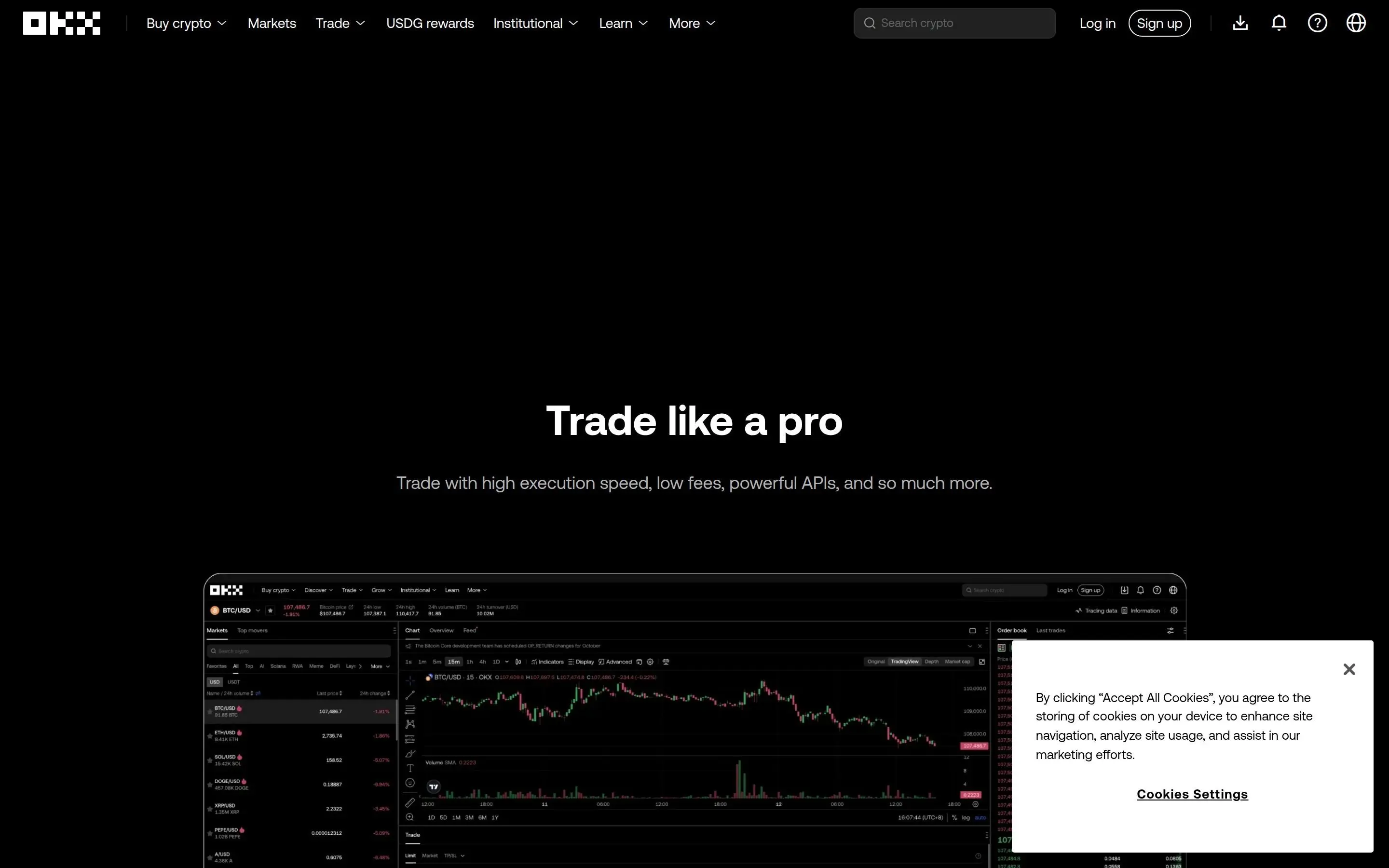
Once your account is created, the first thing you should do is enable two-factor authentication. Navigate to Security Settings in your account menu and enable Google Authenticator or a similar 2FA app. This adds a critical layer of protection to your account. OKX also offers additional security features including an anti-phishing code, which adds a custom phrase to all official OKX emails so you can verify their authenticity, and a trading password that is required before executing any trades or withdrawals.
Security Checklist After Account Creation
- Enable Google Authenticator (2FA) immediately
- Set up an anti-phishing code for email verification
- Create a separate trading password
- Enable withdrawal whitelist (only allows withdrawals to pre-approved addresses)
- Set up login notifications to track account access
- Consider linking a hardware security key for maximum protection
KYC Verification - What You Need and How Long It Takes
Know Your Customer verification on OKX comes in multiple levels, each unlocking additional features and higher limits. Understanding these tiers will help you decide how much verification you need based on your intended usage of the platform.
Level 1 verification requires your full legal name, nationality, and a government-issued ID document such as a passport or national ID card. This process is typically completed within a few minutes using automated document scanning. Once Level 1 is approved, you gain access to fiat deposits and withdrawals, increased crypto withdrawal limits up to 200 BTC equivalent per day, and access to P2P trading markets where you can buy crypto directly from other verified users.
Level 2 verification adds facial recognition and proof of address documentation. You will need to provide a utility bill, bank statement, or government letter dated within the last three months that shows your name and residential address. This level increases your daily withdrawal limit further and unlocks certain institutional features. Most individual users will find Level 1 sufficient for everyday trading needs and casual investing.
The verification process on OKX has improved significantly in 2026, with most Level 1 applications being approved within 10 minutes during business hours. Level 2 can take up to 24 hours for manual review of address documents. If your verification is taking longer than expected, ensure your documents are clear, unobstructed, and match the information you entered during registration exactly.
Depositing Funds - Crypto and Fiat Options
OKX provides multiple pathways to fund your account, accommodating users who already hold cryptocurrency as well as those starting from scratch with fiat currency. Understanding the available deposit methods and their associated costs will help you minimize fees from the very beginning of your trading journey.
For cryptocurrency deposits, navigate to Assets and then click Deposit. Select the cryptocurrency you want to deposit and carefully choose the correct network. For example, if you are depositing USDT, you can select between ERC-20 on Ethereum, TRC-20 on Tron, or several other networks including Arbitrum, Optimism, and Polygon. Using the wrong network can result in permanent loss of funds, so always double-check. TRC-20 is generally recommended for USDT deposits due to its low network fees and fast confirmation times of just a few seconds.
For fiat deposits, OKX supports multiple methods depending on your region. Bank transfers via SEPA for European users or wire transfer for others offer the lowest fees but take one to three business days. Credit and debit card purchases through Visa and Mastercard are instant but carry a processing fee of approximately 1.5 to 3.5 percent. Third-party payment processors like Simplex and Banxa provide additional options. P2P trading lets you buy crypto directly from other users using local payment methods including bank transfer, mobile money, and digital wallets - this often offers the most competitive rates.
Deposit Methods Comparison
| Method | Speed | Fee | Minimum |
|---|---|---|---|
| Crypto Transfer | 1-30 min | Network fee only | Varies by coin |
| Credit/Debit Card | Instant | 1.5-3.5% | $10 |
| Bank Transfer | 1-3 days | Low or free | Varies |
| P2P Trading | 5-30 min | 0% platform fee | Varies |
Spot Trading on OKX - Step-by-Step Walkthrough
Spot trading is the most straightforward way to buy and sell cryptocurrencies on OKX. When you execute a spot trade, you are purchasing or selling an asset at the current market price for immediate delivery. This is the foundation of all cryptocurrency trading and where most beginners should start before exploring more complex instruments like futures or options.
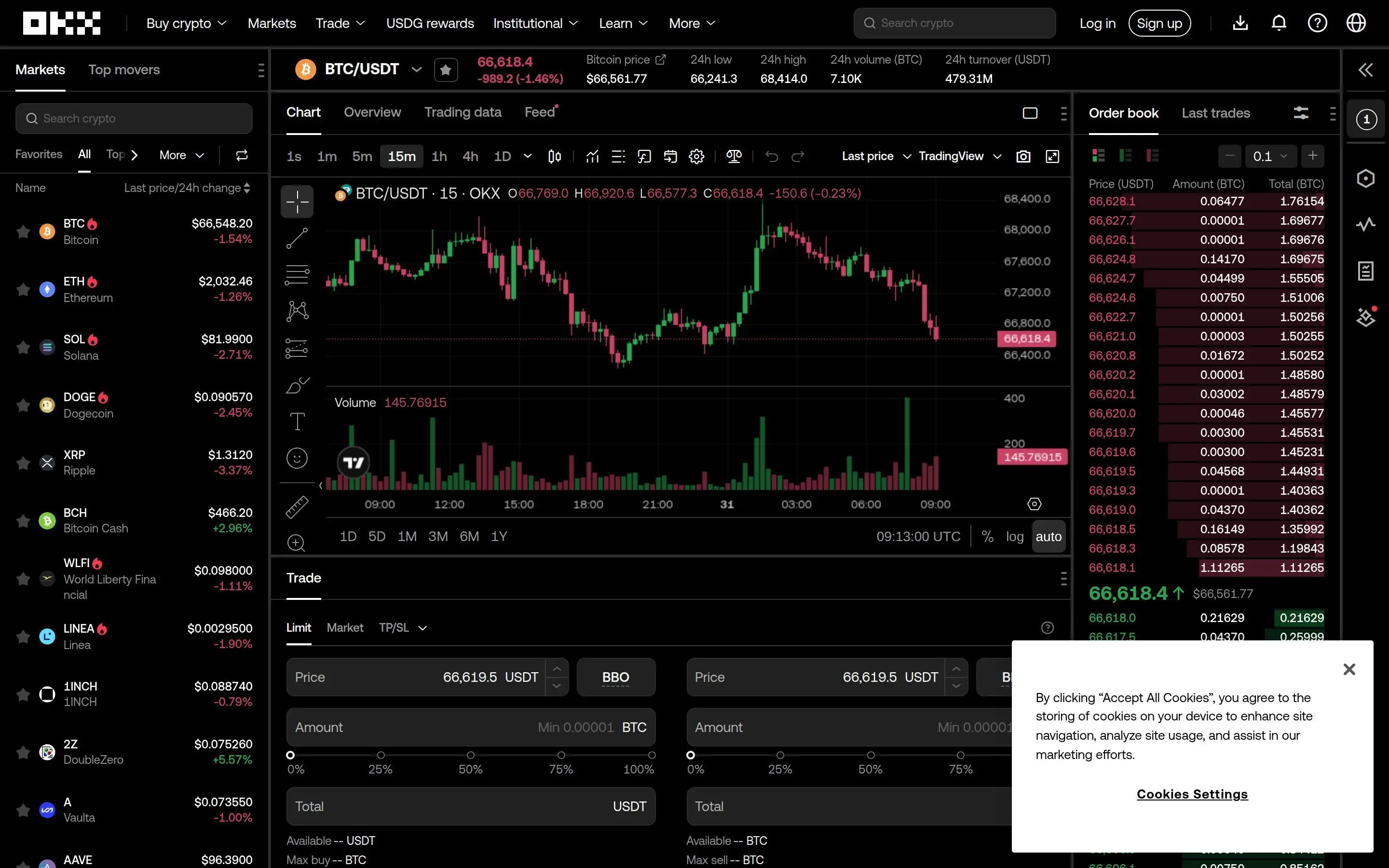
To access spot trading, click on Trade in the top navigation menu and select Spot Trading. The trading interface consists of several key components. On the left side, you will find the order book showing current buy and sell orders at various price levels, color-coded in green for bids and red for asks. The center displays the price chart with comprehensive technical analysis tools including drawing tools, indicators, and multiple timeframe options. The right side contains the trading panel where you place your orders, and the bottom shows your open orders, order history, and current asset positions.
Before placing your first trade, you need to transfer funds from your Funding Account to your Trading Account. Click on Assets, then Transfer, and move the desired amount from Funding to Trading. This internal transfer is instant and free. OKX uses a unified account system in 2026 that allows you to use the same collateral across multiple trading modes, but you still need to ensure funds are allocated to the correct account type for each activity.
OKX offers several order types for spot trading that cater to different strategies. Market orders execute immediately at the best available price and are ideal when you want to enter or exit a position quickly without concern for the exact execution price. Limit orders let you specify the exact price at which you want to buy or sell, and the order will only execute when the market reaches your specified price. Stop-limit orders combine a trigger price with a limit price, making them useful for setting automatic stop-losses or entering positions at specific breakout levels.
Advanced order types available on OKX include iceberg orders that break large orders into smaller visible chunks to minimize market impact, and TWAP or Time-Weighted Average Price orders that execute gradually over a specified time period. These are particularly useful for larger positions where executing all at once would move the market against you.
For your first spot trade, let us walk through buying Bitcoin with USDT. First, search for BTC/USDT in the trading pairs search bar at the top of the interface. Select the pair, and the chart and order book will update to show Bitcoin price data. In the trading panel on the right, ensure you are on the Buy tab. Select Limit Order from the order type dropdown, enter the price at which you want to buy or click a price level in the order book to auto-fill the price field, enter the amount of BTC you want to purchase or use the percentage slider to allocate a portion of your USDT balance, and click Buy BTC to submit your order. Your order will appear in the Open Orders section below the chart and will remain there until filled or manually canceled.
Pro Tip - Using the OKX Convert Feature
If you simply want to swap one cryptocurrency for another without navigating the full trading interface, use the OKX Convert feature. Navigate to Trade and select Convert. This provides a simplified swap interface showing you the exact amount you will receive before confirming. The rates are competitive with spot market prices with no additional fees beyond the standard spread. This is perfect for beginners who find the full trading interface overwhelming at first.
Futures Trading on OKX - Leverage and Derivatives
OKX offers one of the most comprehensive futures trading platforms in the cryptocurrency space. Futures contracts allow you to speculate on the future price of a cryptocurrency with leverage, meaning you can control a larger position with less capital. However, leverage amplifies both gains and losses, making proper risk management absolutely essential for long-term survival.
OKX provides two types of futures contracts. Perpetual swaps have no expiration date and use a funding rate mechanism to keep the contract price anchored close to the spot price. The funding rate is exchanged between long and short traders every eight hours, and it can work for or against your position depending on market sentiment. Delivery futures have set expiration dates including weekly, bi-weekly, and quarterly contracts, and they settle automatically at expiry based on an index price.
To start futures trading, navigate to Trade and select Futures. Before placing any trades, you need to set your margin mode and leverage level. OKX offers cross margin where your entire account balance acts as collateral and isolated margin where only the allocated amount acts as collateral for each individual position. Beginners should always use isolated margin to limit potential losses to the amount specifically allocated to each trade, preventing a single bad trade from affecting your entire portfolio.
Leverage on OKX ranges from 1x to 125x depending on the trading pair and your account tier. While high leverage can generate significant returns on small price movements, it also means your position can be liquidated with very small adverse price movements. At 100x leverage, a mere 1% move against your position results in total liquidation. We strongly recommend starting with no more than 5x to 10x leverage until you have thorough understanding of how liquidation prices work and how to manage risk effectively in volatile cryptocurrency markets.
When placing a futures order, you will notice additional options compared to spot trading. You can set a take-profit price to automatically close your position when it reaches a desired profit level, and a stop-loss price to limit your downside risk. Using both of these for every single trade is a fundamental risk management practice that separates successful traders from those who blow up their accounts. OKX also offers trailing stop orders that automatically adjust your stop-loss as the price moves in your favor, helping you lock in profits during strong trending moves.
Risk Warning - Futures Trading
Futures trading with leverage carries substantial risk. Statistics show that over 70% of retail traders lose money when trading leveraged derivatives. Never trade with funds you cannot afford to lose. Always use stop-loss orders, start with low leverage, and ensure you fully understand liquidation mechanics before trading futures. Consider practicing with the OKX demo trading feature before risking real capital.
OKX Earn - Passive Income Opportunities
OKX Earn is a comprehensive suite of passive income products that allows you to generate returns on your cryptocurrency holdings without active trading. The platform offers several distinct products, each with different risk profiles, lock-up periods, and potential returns to suit different investment strategies.
Simple Earn is the most accessible option, offering flexible savings where you can deposit and withdraw at any time with no lock-up period, or fixed-term savings with higher rates for locking your assets for a set duration typically ranging from 7 to 90 days. Flexible savings rates for stablecoins like USDT typically range from 2 to 5 percent APY, while fixed terms can offer 5 to 10 percent depending on market conditions, demand, and the specific asset you are depositing.
On-chain staking allows you to stake proof-of-stake cryptocurrencies like Ethereum, Solana, Cosmos, and Polkadot directly through the OKX platform without running your own validator node. OKX handles all the technical complexity, and you receive staking rewards directly in your account on a regular basis. The staking APY varies by asset with ETH staking currently offering approximately 3 to 4 percent APY while some smaller proof-of-stake tokens can offer significantly higher returns.
Structured products are more advanced offerings designed for experienced users who want higher potential returns and are comfortable with more complex risk profiles. These include dual investment which lets you buy low or sell high at a target price while earning a premium regardless of the outcome, shark fin products that provide guaranteed returns within a certain price range, and snowball products with auto-call features based on price movement relative to predefined barriers.
DeFi yields through OKX Earn give you access to decentralized finance protocols directly from the OKX interface. You can provide liquidity to various DeFi protocols across multiple blockchains and earn yields without needing to interact with the protocols directly, manage your own wallet connections, or worry about smart contract approvals. OKX aggregates the best opportunities and handles the technical execution for you.
OKX DEX - Decentralized Trading Within OKX
One of the most innovative features that sets OKX apart from other centralized exchanges is its built-in DEX aggregator. The OKX DEX allows you to execute decentralized trades across multiple blockchains without leaving the OKX ecosystem, combining the convenience of a centralized platform with the permissionless nature of decentralized finance.
The OKX DEX sources liquidity from dozens of decentralized exchanges including Uniswap, SushiSwap, PancakeSwap, Raydium, and many others across over 20 supported blockchains. It uses intelligent routing to split your order across multiple liquidity sources and find the best possible execution price, often beating the rates you would get by going to any single DEX directly.
To access the OKX DEX, navigate to the Web3 section of the platform and select DEX. You can connect your OKX Web3 wallet which is automatically created with your account, or import an existing wallet. The DEX interface is clean and intuitive - select your source token, destination token, and amount, and the aggregator will display the best available route along with the expected output amount and any price impact.
The OKX DEX supports cross-chain swaps, meaning you can swap tokens between different blockchains in a single transaction. For example, you can swap ETH on Ethereum mainnet for SOL on Solana without needing to use a separate bridge or go through the centralized exchange. This cross-chain functionality dramatically simplifies multi-chain portfolio management and saves both time and gas fees compared to manual bridging. If you are interested in decentralized trading tools for Ethereum, you might also want to check out our MetaMask wallet tutorial for managing your Web3 assets independently.
Copy Trading on OKX
OKX copy trading is an excellent feature for beginners who want to benefit from the expertise of experienced traders while simultaneously learning trading strategies by observing their approach. The platform allows you to browse and follow top-performing traders, automatically replicating their trades in your own account with proportional position sizing based on your allocated capital.
To get started with copy trading, navigate to Trade and select Copy Trading. You will see a marketplace of lead traders with detailed performance metrics including total return, win rate, maximum drawdown, number of followers, assets under management, average holding period, and profit and loss charts. Take your time to analyze these metrics carefully - a high return rate is meaningless without considering the associated drawdown and overall risk profile.
When selecting a lead trader to follow, consider these important factors. Look for consistent performance over at least 90 days rather than spectacular short-term results that may be unsustainable. Evaluate their maximum drawdown which should ideally stay under 30 percent. Check their number of followers as social proof of their reputation. Review their trading style and frequency to ensure it matches your risk tolerance and investment timeline. Avoid traders who use extremely high leverage or have very short track records that may not reflect a genuinely sustainable strategy.
Once you select a trader, configure your copy trading settings carefully. Set the total investment amount you want to allocate to this specific trader, choose whether to copy all their future trades or only specific trading pairs, set a maximum amount per individual trade to control your exposure, and configure your own stop-loss level as an additional safety net beyond whatever risk management the lead trader uses. You can follow multiple lead traders simultaneously to diversify your copy trading portfolio across different strategies and trading styles.
OKX Fee Structure - Complete Breakdown
OKX Fee Tiers - Spot Trading
| Tier | 30d Volume | Maker | Taker |
|---|---|---|---|
| Regular | Under $100K | 0.080% | 0.100% |
| VIP 1 | $100K - $5M | 0.060% | 0.080% |
| VIP 2 | $5M - $10M | 0.040% | 0.060% |
| VIP 3 | $10M - $20M | 0.020% | 0.050% |
| VIP 4+ | Over $20M | 0.000% | 0.040% |
Understanding the fee structure is essential for maximizing your trading profitability on OKX. The exchange uses a tiered fee system based on your 30-day trading volume and OKB token holdings, with higher tiers receiving progressively lower fees. At the base tier, spot trading fees are 0.08% for makers and 0.10% for takers, while futures trading fees start at just 0.02% for makers and 0.05% for takers.
Compared to other major exchanges, OKX fees are very competitive. Binance charges 0.10% for both makers and takers at the base level, while Coinbase charges significantly more on its simple buy interface. Bybit has similar base fees to OKX at the regular tier. For futures trading specifically, OKX offers some of the lowest fees in the entire industry.
To reduce your fees further, consider holding OKB tokens which provide additional fee discounts at each tier level. Using limit orders instead of market orders means you pay the lower maker fee instead of the taker fee. As your trading volume increases and you reach higher VIP tiers, the savings compound significantly - VIP 4 and above traders enjoy zero maker fees on spot trading. You