Coinbase vs. MetaMask: The 2026 Master Guide
Discover the key differences between Coinbase and MetaMask when buying Ethereum in 2026. Understand custody, fees, and the best strategic options for beginners.
Table of Contents
- Quick Overview
- Key Differences at a Glance
- Supported Chains and Tokens
- User Interface and Experience
- Security Model Deep Dive
- DeFi and DApp Compatibility
- Fees Comparison
- Staking and Earning
- NFT Support
- Mobile vs Desktop Experience
- Full Comparison Table
- Which Should You Choose?
- Can You Use Both?
- Pros and Cons
- FAQ
- Related Tutorials
Choosing the right crypto wallet is one of the most important decisions you will make in your Web3 journey. Coinbase and MetaMask are two of the most popular names in the space, but they serve fundamentally different purposes. Coinbase is a publicly traded exchange platform with its own custodial and non-custodial wallet products, while MetaMask is a dedicated non-custodial wallet built for interacting with decentralized applications. In this 2026 master guide, we break down every single difference, feature, and trade-off so you can make the right choice - or learn how to use both together for maximum flexibility.
Whether you are a complete beginner buying your first Bitcoin, a DeFi power user farming yield across five chains, or an NFT collector who needs seamless dApp access, this guide has you covered. We have tested both platforms extensively in 2026 and present our findings with real screenshots, honest fee comparisons, and practical recommendations.
1. Quick Overview - What Each Platform Is
Coinbase: The All-in-One Ecosystem
Coinbase is much more than a wallet. Founded in 2012, it is the largest publicly traded cryptocurrency exchange in the United States (NASDAQ: COIN). When people say "Coinbase," they could be referring to several distinct products:
- Coinbase Exchange - The centralized trading platform where you buy, sell, and trade crypto with fiat currency. This is what most people think of when they hear "Coinbase." Your funds here are held in a custodial manner, meaning Coinbase controls the private keys on your behalf.
- Coinbase Wallet - A separate, non-custodial wallet application (browser extension and mobile app) that gives you full control of your private keys. This is Coinbase's answer to wallets like MetaMask.
- Coinbase Advanced - The advanced trading interface (formerly Coinbase Pro) with lower fees and professional charting tools.
- Base - Coinbase's own Layer 2 blockchain built on the OP Stack, offering fast and cheap transactions.
For this comparison, we focus primarily on Coinbase Wallet (the non-custodial product) and the overall Coinbase ecosystem versus MetaMask. When we refer to the exchange-specific features, we will say "Coinbase Exchange" explicitly.
MetaMask: The Original Web3 Wallet
MetaMask launched in 2016 as a browser extension created by ConsenSys, and it has become the most widely used non-custodial cryptocurrency wallet in the world. With over 100 million cumulative users, MetaMask is the default wallet for interacting with Ethereum and EVM-compatible blockchains.
Unlike Coinbase, MetaMask is a pure wallet - it does not operate an exchange. You connect MetaMask to decentralized exchanges (DEXs), lending protocols, NFT marketplaces, and thousands of other dApps. It also offers a built-in swap aggregator and a portfolio dashboard for tracking your assets across chains.
MetaMask is entirely non-custodial. You hold your own seed phrase, you control your own private keys, and no company can freeze your funds or block your transactions. This gives you complete sovereignty over your crypto, but it also means you bear full responsibility for security.
2. Key Differences at a Glance
3. Supported Chains and Tokens
Blockchain support is one of the most critical factors when choosing a wallet. The chains your wallet supports determine which tokens you can hold, which dApps you can access, and which DeFi protocols you can participate in.
Coinbase Chain Support
The Coinbase Exchange supports hundreds of tokens across multiple chains for trading purposes. When it comes to on-chain withdrawals and deposits, Coinbase supports:
- Ethereum (ETH) - Full support including all ERC-20 tokens
- Solana (SOL) - Native SOL and SPL tokens
- Bitcoin (BTC) - Native Bitcoin support on the exchange; Coinbase Wallet supports wrapped BTC on EVM chains
- Polygon (MATIC/POL) - Full ERC-20 support on Polygon PoS
- Base - Coinbase's own L2, tightly integrated with zero-fee transfers from the exchange
- Arbitrum - Full support for Arbitrum One
- Optimism - Full OP Mainnet support
- Avalanche, BNB Chain, and more - Expanding list of supported networks
Coinbase Wallet (the non-custodial app) supports thousands of EVM-compatible chains and lets you add custom RPC networks manually. It also has native Solana support in the mobile app, making it more versatile than many people realize.
MetaMask Chain Support
MetaMask was built for Ethereum and EVM-compatible blockchains from the ground up. It supports:
- All EVM-compatible chains - Ethereum, Polygon, Arbitrum, Optimism, Base, Avalanche, BNB Chain, Fantom, zkSync, Linea, Scroll, and literally any chain that uses the Ethereum Virtual Machine. You can add any EVM chain by entering its RPC details or using Chainlist.
- MetaMask Snaps - The Snaps extensibility system allows third-party developers to add support for non-EVM chains. As of 2026, there are Snaps for Bitcoin, Solana, Cosmos, Starknet, and other ecosystems. This means MetaMask can theoretically support any blockchain through community-built extensions.
MetaMask does not natively support Bitcoin or Solana in the way Coinbase does. You need Snaps for non-EVM chains, and the experience is not as seamless as native support. However, for EVM chains, MetaMask is unmatched - it works with every EVM chain ever created, and most dApps are designed to work with MetaMask first.
Verdict: Chain Support
If you primarily use Ethereum and EVM chains, MetaMask gives you the widest and most seamless compatibility. If you need native Bitcoin and Solana support alongside EVM chains in a single interface, Coinbase's ecosystem handles that better.
4. User Interface and Experience
The user experience gap between Coinbase and MetaMask is significant, and it reflects each platform's target audience. Let us walk through what using each one actually looks like in 2026.
Coinbase: Polished and Beginner-Friendly
Coinbase has invested heavily in making cryptocurrency accessible. The exchange interface is clean, modern, and follows conventional fintech design patterns that anyone familiar with apps like Robinhood or Cash App will instantly understand. Key UX strengths include:
- Simple buy/sell flow - Enter a dollar amount, choose a coin, and tap buy. No need to understand gas fees, slippage, or network selection.
- Portfolio tracking - Clean dashboard showing your holdings, profit/loss, and price charts.
- Learning rewards - Coinbase Learn lets you earn small amounts of crypto by watching educational videos.
- Unified experience - The exchange, wallet, staking, and trading features all live under one roof.
Coinbase Wallet (the non-custodial app) is also well-designed, though it requires more crypto knowledge to use effectively. It features a built-in dApp browser on mobile, clean token management, and a straightforward interface for sending and receiving tokens.
MetaMask: Built for Power Users
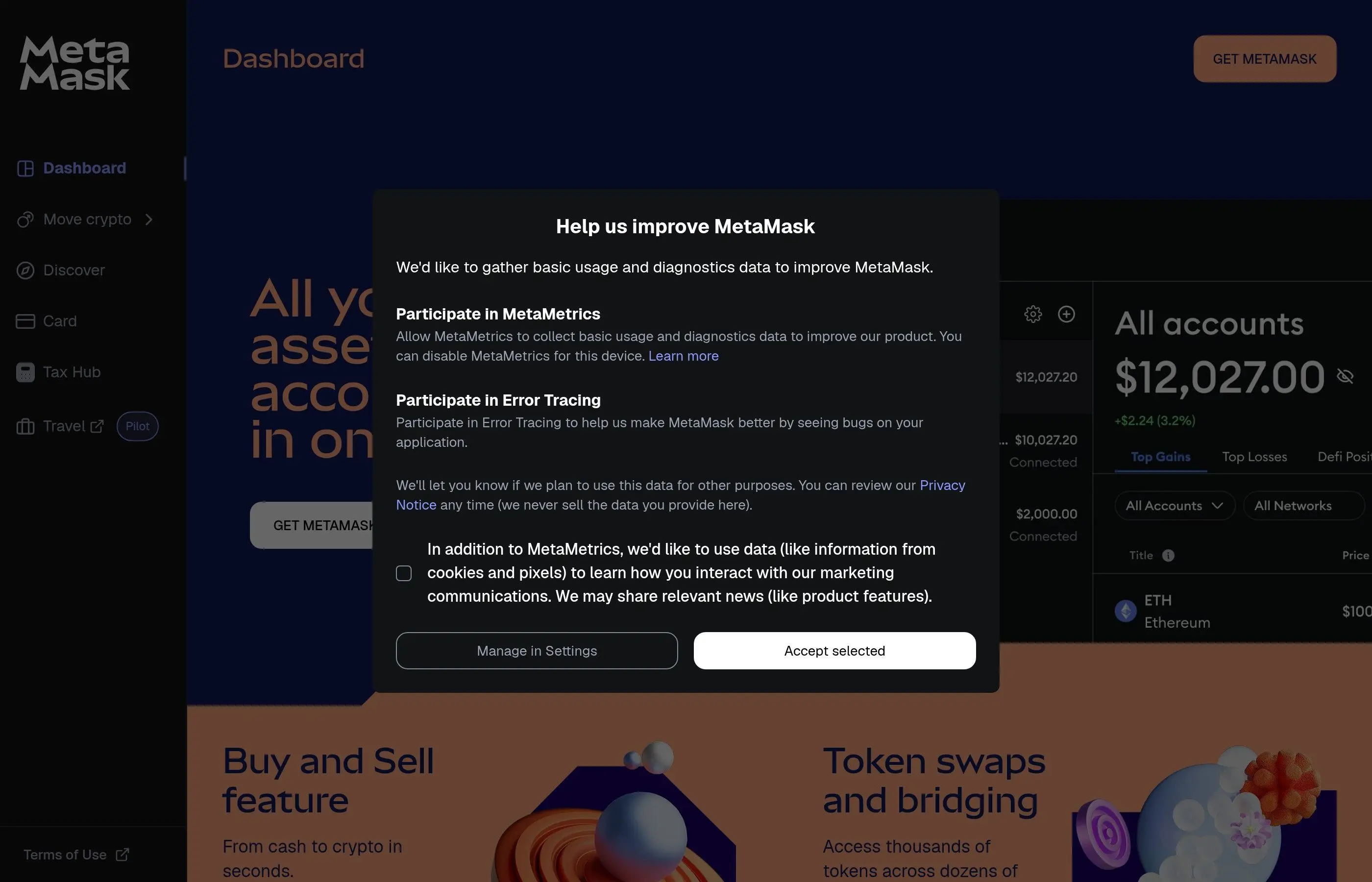
MetaMask's interface has improved significantly over the years, but it is still designed with experienced crypto users in mind. The 2026 version includes a much-improved portfolio view, better network switching, and a streamlined swap interface, but core operations still expose technical details that can overwhelm newcomers.
- Network selector - You manually switch between chains, and tokens on different chains show separately. This is powerful but can confuse beginners who do not understand why their ETH on Arbitrum does not show up when they are viewing Ethereum mainnet.
- Transaction details - MetaMask shows gas prices, nonce values, hex data, and contract interaction details. Power users love this transparency; beginners find it intimidating.
- Portfolio dashboard - The MetaMask Portfolio site (portfolio.metamask.io) provides a unified view of all your assets across chains, including DeFi positions and NFTs. This is a massive improvement over the extension-only experience.
- Customization - Custom tokens, custom networks, custom RPC endpoints, advanced gas controls, and Snaps for extended functionality. MetaMask gives you more knobs to turn.
Verdict: User Experience
Coinbase wins for beginners - hands down. If you are new to crypto, Coinbase's learning curve is dramatically gentler. MetaMask wins for experienced users who want granular control and transparency over every transaction.
5. Security Model Deep Dive
Security is where these two platforms diverge most fundamentally. Understanding the difference between custodial and non-custodial models is essential for anyone holding cryptocurrency.
Custodial vs Non-Custodial: What It Really Means
When you use Coinbase Exchange (the main trading platform), your crypto is held in a custodial manner. Coinbase controls the private keys to your wallet. This is similar to how a bank holds your money - you trust the institution to keep it safe and return it when you want it.
When you use MetaMask (or Coinbase Wallet), your crypto is non-custodial. You hold the private keys through a seed phrase - a 12 or 24-word recovery phrase that is the master key to your wallet. No company, government, or hacker can access your funds without this phrase. But if you lose it, no one can help you recover your assets either.
Coinbase Security Features
- FDIC insurance - USD balances (not crypto) are insured up to $250,000 through partner banks.
- Crypto insurance - Coinbase carries a crime insurance policy that covers a portion of digital assets held in hot storage against theft, including cybersecurity breaches.
- 98% cold storage - Coinbase claims to keep 98% of customer funds in offline cold storage, significantly reducing the attack surface.
- Two-factor authentication (2FA) - SMS, authenticator app, and hardware security key support.
- Vault and time locks - Withdrawal time locks and vault features for additional protection.
- Regulatory compliance - As a publicly traded company, Coinbase is subject to regular audits, SEC oversight, and regulatory requirements that provide a baseline of institutional accountability.
MetaMask Security Features
- Self-custody - You own your keys. Period. No one can freeze, censor, or seize your funds unless they gain access to your seed phrase or private keys.
- Seed phrase backup - Your 12-word recovery phrase is the only backup. MetaMask never stores it on any server. You must write it down and protect it physically.
- Hardware wallet integration - MetaMask connects seamlessly to Ledger, Trezor, and other hardware wallets, allowing you to sign transactions with your keys stored offline on a dedicated security device.
- Transaction simulation - MetaMask now shows simulated transaction results before you confirm, helping you identify potentially malicious contract interactions.
- Phishing detection - Built-in warning system for known malicious sites and suspicious contract calls.
- Blockaid integration - As of 2025/2026, MetaMask integrates with Blockaid for real-time transaction screening, alerting you to potential scams and dangerous approvals before you sign.
Smart Contract Interaction Risks
Both Coinbase Wallet and MetaMask expose you to smart contract risks when interacting with dApps. When you approve a token spending allowance or interact with a DeFi protocol, you are trusting that the smart contract code is secure. Malicious or buggy contracts can drain your wallet regardless of which wallet you use.
MetaMask handles this slightly better with more detailed transaction previews and approval management. Both wallets now support revoking token approvals, and we strongly recommend checking your approvals regularly using tools like Revoke.cash.
Security Warning
No matter which wallet you choose, NEVER share your seed phrase with anyone, never enter it on a website, never store it digitally (screenshots, cloud notes, email), and always verify URLs before connecting your wallet. Phishing remains the number one cause of crypto theft in 2026. For a deeper dive into wallet security best practices, read our Crypto Wallet Security Tips guide.
Verdict: Security
This is not a simple "one is better" comparison. Coinbase Exchange provides institutional-grade security and insurance, making it safer for users who do not want to manage their own keys. MetaMask provides true self-sovereignty, which is more secure against institutional failure or government seizure but puts the entire security burden on you. For maximum security, use a hardware wallet with MetaMask, and keep only trading funds on Coinbase.
6. DeFi and DApp Compatibility
If you plan to use decentralized finance protocols, NFT marketplaces, DAOs, or any other Web3 applications, dApp compatibility is crucial. This is where MetaMask has a significant structural advantage.
MetaMask: The DeFi Standard
MetaMask is the wallet that most dApps are built to support first. When a new DeFi protocol launches, MetaMask compatibility is almost always there on day one. Here is why MetaMask dominates the dApp ecosystem:
- Universal dApp browser - The MetaMask browser extension injects a Web3 provider (window.ethereum) into every webpage, allowing any dApp to detect and connect to your wallet seamlessly.
- WalletConnect support - MetaMask supports WalletConnect v2 for connecting to dApps on your desktop from your mobile wallet, or vice versa.
- First-class DeFi integration - Protocols like Uniswap, Aave, Curve, Lido, Compound, and MakerDAO are all designed with MetaMask as the primary wallet.
- Built-in swap aggregator - MetaMask Swaps aggregates quotes from multiple DEXs to find you the best price, all without leaving the wallet interface.
- Snaps ecosystem - Snaps allow developers to extend MetaMask with custom transaction insights, new chain support, and protocol-specific features.
Coinbase Wallet: Growing but Behind
Coinbase Wallet also supports dApp connections and works with most major DeFi protocols. It has a built-in dApp browser on mobile and supports WalletConnect. However, it faces some challenges:
- Second-priority support - Some newer or niche dApps may not explicitly list Coinbase Wallet as a connection option, even though it often works via WalletConnect or injected provider.
- Base ecosystem advantage - Coinbase Wallet excels specifically with dApps on Base, Coinbase's own L2. If you are heavily invested in the Base ecosystem, Coinbase Wallet offers a more streamlined experience.
- Exchange bridge - You can easily move funds between Coinbase Exchange and Coinbase Wallet, making it convenient to buy on the exchange and then interact with dApps.
Verdict: DeFi and DApps
MetaMask wins decisively. It has broader dApp compatibility, deeper integration with DeFi protocols, and a larger developer ecosystem. If DeFi is your primary use case, MetaMask is the clear choice. Coinbase Wallet is adequate for major protocols, but you will occasionally hit compatibility gaps.
7. Fees Comparison
Fee structures differ dramatically between Coinbase and MetaMask because they are fundamentally different types of platforms. Let us break down every fee you might encounter.
Coinbase Exchange Fees
- Trading fees (Simple Trade) - Coinbase charges a spread of about 0.50% plus a flat fee ranging from $0.99 to $2.99 depending on the transaction size. This makes small purchases relatively expensive.
- Trading fees (Advanced) - Coinbase Advanced uses a maker/taker model starting at 0.60% taker and 0.40% maker for under $10K monthly volume, decreasing with higher volume. These are significantly lower than the simple trade fees.
- Deposit fees - Bank transfers (ACH) are free. Debit card purchases carry a 3.99% fee. Wire transfers are $10 inbound, $25 outbound.
- Withdrawal fees - Network fees for on-chain withdrawals (varies by chain). Withdrawals to Coinbase Wallet on Base are often free or near-free.
MetaMask Fees
- Wallet usage - Free. MetaMask charges nothing to store, send, or receive tokens. You only pay the blockchain's gas fees for transactions.
- MetaMask Swaps - MetaMask charges a 0.875% service fee on swap transactions processed through its built-in swap aggregator. This fee is included in the quoted price.
- Gas fees - You pay standard network gas fees for all transactions. MetaMask lets you customize gas settings (low, market, aggressive) and even set custom gas prices and priority fees for advanced users.
- MetaMask Bridge - A small fee (typically 0.875%) is applied to cross-chain bridge transactions done through MetaMask's built-in bridge feature.
- Third-party on-ramp fees - If you buy crypto through MetaMask's integrated providers (Transak, MoonPay, etc.), those providers charge their own fees, typically 1-5% depending on payment method and amount.
Fee Example: Buying $500 of ETH
Via Coinbase (Simple Trade)
Spread: ~$2.50
Flat fee: ~$2.99
Bank deposit: $0
Total: ~$5.49 (1.1%)
Via MetaMask (Transak, card)
Provider fee: ~$15-25
Network fee: ~$0.50-2
No swap needed if buying ETH
Total: ~$15-27 (3-5.4%)
Verdict: Fees
For buying crypto with fiat currency, Coinbase is significantly cheaper than MetaMask's third-party providers. For swapping between tokens on-chain, MetaMask's 0.875% fee is competitive and often provides better routing than Coinbase Exchange thanks to DEX aggregation. The optimal strategy is to buy on Coinbase, transfer to MetaMask (especially via Base for minimal fees), and swap on MetaMask when needed.
8. Staking and Earning
Staking your crypto to earn yield is one of the most popular features in the space. Both Coinbase and MetaMask offer paths to staking, but they work very differently.
Coinbase Staking
Coinbase offers one of the simplest staking experiences in crypto. Directly from the exchange interface, you can stake multiple assets with a few taps:
- Ethereum (ETH) - Stake ETH and receive cbETH (Coinbase Wrapped Staked ETH) as a liquid staking token. Current APY is typically around 3-4%. Coinbase takes a 25% commission on staking rewards.
- Solana (SOL) - Native SOL staking through Coinbase with competitive APY.
- Cardano (ADA), Cosmos (ATOM), Tezos (XTZ) - Additional proof-of-stake assets available for staking.
- USDC Rewards - Earn yield on USDC holdings (technically not staking, but a popular earning feature).
The advantage of Coinbase staking is simplicity. You do not need to choose a validator, understand slashing risks, or manage liquid staking tokens yourself. The disadvantage is the 25% commission - a significant cut of your rewards.
MetaMask Staking
MetaMask introduced staking functionality through its portfolio interface, integrating with leading liquid staking protocols:
- Lido (stETH) - The largest liquid staking protocol. Stake any amount of ETH and receive stETH, which accrues rewards automatically. Lido charges a 10% fee on rewards (split between node operators and the Lido treasury).
- Rocket Pool (rETH) - A decentralized liquid staking protocol. Rocket Pool charges a variable commission (typically around 14% of rewards) but is more decentralized than Lido.
- Direct protocol access - Because MetaMask is a general-purpose wallet, you can also stake directly with any staking protocol, restaking platform (like EigenLayer), or validator set by interacting with their smart contracts.
MetaMask's approach gives you more choices and typically lower fees than Coinbase's 25% commission. However, it requires more knowledge - you need to understand liquid staking tokens, protocol risks, and the difference between various staking providers.
Verdict: Staking
Coinbase staking wins for simplicity and convenience. MetaMask staking (via Lido, Rocket Pool, etc.) wins for lower fees, more options, and greater composability in DeFi - you can use your stETH or rETH as collateral in lending protocols, providing additional yield on top of staking rewards.
9. NFT Support
Both Coinbase and MetaMask support NFTs, but the experience differs significantly in terms of discovery, display, and marketplace integration.
Coinbase NFT Experience
Coinbase shut down its standalone NFT marketplace in early 2024, but NFT support continues through the Coinbase Wallet app and the main exchange. You can view, send, and receive NFTs through Coinbase Wallet, and the exchange allows purchasing select NFTs. The Coinbase Wallet mobile app has a dedicated NFT gallery that displays your collection with metadata and images. Coinbase's approach leans toward curated, user-friendly NFT experiences rather than raw marketplace access.
MetaMask NFT Experience
MetaMask displays NFTs in both the browser extension and the portfolio dashboard. You can view your NFTs across all connected chains, see floor prices and collection details, and easily connect to marketplaces like OpenSea, Blur, Magic Eden, and others. Because MetaMask is the default wallet for most NFT platforms, the buying and listing experience is seamless - connect your wallet, browse, and transact directly on the marketplace of your choice.
MetaMask also supports NFT detection, automatically finding and displaying NFTs in your wallet even if you did not manually add the contract. The portfolio dashboard provides a comprehensive view of your entire NFT collection across multiple chains.
Verdict: NFTs
MetaMask wins for NFT power users due to its universal marketplace compatibility and deeper integration with the NFT ecosystem. Coinbase Wallet offers a cleaner gallery experience for casual NFT holders, but you will find yourself needing MetaMask for more advanced NFT activities like minting, bidding on auctions, or using niche marketplaces.
10. Mobile vs Desktop Experience
Both platforms offer mobile and desktop experiences, but the balance between the two differs significantly.
Coinbase
- Mobile app (iOS/Android) - The Coinbase exchange app is primarily designed for mobile. It is one of the most polished crypto apps available, with biometric login, push notifications for price alerts, and a smooth trading experience. Coinbase Wallet is a separate mobile app with a built-in dApp browser.
- Desktop (Web) - Coinbase.com provides the full exchange experience in any browser. Coinbase Wallet also has a browser extension for Chrome.
- Sync - Your Coinbase Exchange account syncs seamlessly between mobile and desktop. Coinbase Wallet uses cloud backup (encrypted) for cross-device recovery.
MetaMask
- Browser extension - MetaMask's browser extension (Chrome, Firefox, Brave, Edge) is its flagship product and where most users interact with it. It lives in your browser toolbar and pops up whenever a dApp requests a transaction signature.
- Mobile app (iOS/Android) - MetaMask's mobile app includes a built-in dApp browser, which is essential because mobile browsers cannot run extensions. The mobile app has improved significantly but the desktop extension remains the primary experience for most users.
- Sync - MetaMask supports syncing your wallet across devices using your seed phrase. You import the same seed phrase on both mobile and desktop to access the same accounts. There is no cloud sync of transaction history or address labels.
Verdict: Mobile vs Desktop
Coinbase offers the better mobile experience overall, especially for trading and portfolio management. MetaMask offers the better desktop experience, particularly the browser extension that integrates directly with dApps. For DeFi activities, MetaMask's browser extension on desktop is still the gold standard. For checking prices and making quick trades on the go, Coinbase's mobile app is superior.
11. Full Comparison Table
Here is the complete side-by-side comparison covering every major feature and capability.
12. Which Should You Choose?
The best wallet depends entirely on how you plan to use crypto. Here is a decision matrix based on your user profile.
The Complete Beginner
You are new to crypto, want to buy Bitcoin or Ethereum, and are not interested in DeFi or dApps yet. You want something that feels like a normal financial app.
Recommendation: Coinbase
Start with the Coinbase exchange. Buy crypto with your bank account, learn the basics, and graduate to Coinbase Wallet or MetaMask when you are ready for DeFi. See our Complete Coinbase Tutorial.
The DeFi Power User
You swap tokens on DEXs, provide liquidity, farm yield, borrow and lend, and interact with multiple DeFi protocols across several chains daily.
Recommendation: MetaMask
MetaMask is the de facto standard for DeFi. Its universal dApp compatibility, superior DEX aggregation, and power-user features make it the only real choice for serious DeFi users. Check our Complete MetaMask Tutorial.
The NFT Collector
You mint NFTs, trade on OpenSea and Blur, participate in allowlist mints, and want to manage a growing collection across multiple chains.
Recommendation: MetaMask
NFT marketplaces and minting sites are built around MetaMask. You will have the most seamless experience connecting to OpenSea, Blur, Foundation, Magic Eden (EVM), and others with MetaMask.
The Long-Term Holder (HODLer)
You buy and hold for months or years. You do not trade frequently and want the safest storage for your long-term crypto investment.
Recommendation: Hardware Wallet + MetaMask
For long-term holding, a hardware wallet like Ledger connected to MetaMask gives you the best security. Buy on Coinbase, transfer to your Ledger-backed MetaMask, and sleep peacefully. Read our Ledger Hardware Wallet Guide.
The Privacy-Focused User
You value financial privacy, do not want KYC (Know Your Customer) requirements, and believe in the principle of self-sovereign money.
Recommendation: MetaMask
MetaMask does not require any personal information to use. You can create a wallet in seconds without providing your name, email, or ID. Coinbase Exchange requires full KYC verification. However, keep in mind that you will still need an on-ramp to convert fiat to crypto, and most on-ramps require KYC.
13. Can You Use Both? (Yes - The Recommended Workflow)
The best approach for most users is to use both Coinbase and MetaMask together. They are complementary tools, not competitors, and using both gives you the best of both worlds. Here is the workflow we recommend:
- Buy crypto on Coinbase - Use Coinbase Exchange to purchase crypto with fiat currency. Bank transfers (ACH) are free, and Coinbase has the lowest fiat-to-crypto fees of any major platform.
- Transfer to MetaMask via Base or Arbitrum - Send your crypto from Coinbase to your MetaMask wallet. Use Base or Arbitrum for near-zero transfer fees. Coinbase waives withdrawal fees to Base entirely.
- Use MetaMask for DeFi and dApps - Connect MetaMask to Uniswap, Aave, OpenSea, or any other dApp. MetaMask's universal compatibility means you will never hit a wall.
- Bridge between chains as needed - Use MetaMask's built-in bridge or dedicated bridges to move funds between chains for different DeFi opportunities.
- Return to Coinbase for off-ramping - When you want to convert back to fiat, send your crypto back to Coinbase and sell.
- Use a hardware wallet for long-term storage - For any significant amounts you plan to hold long-term, use a hardware wallet connected to MetaMask for maximum security.
This workflow takes advantage of Coinbase's superior fiat on-ramp and institutional security for the buy/sell phase, while leveraging MetaMask's unmatched dApp compatibility for the DeFi and Web3 interaction phase. It is the approach used by the vast majority of experienced crypto users.
14. Pros and Cons
Coinbase
Pros
- Easiest fiat on-ramp/off-ramp in crypto
- Beginner-friendly interface with educational resources
- Insurance and regulatory oversight protect your assets
- Native support for BTC, SOL, ETH, and many other chains
- Free transfers to Base (Coinbase's L2)
- Customer support via email, chat, and phone
- Staking built directly into the platform
- Publicly traded company with financial transparency
- Advanced trading features for experienced traders
- Coinbase Wallet offers non-custodial option within the ecosystem
Cons
- Higher trading fees on simple trades (up to 1.5%)
- Custodial model means you do not control your keys on the exchange
- KYC required - no privacy for exchange users
- Can freeze accounts or restrict withdrawals (regulatory compliance)
- 25% commission on staking rewards
- Fewer dApp integrations than MetaMask
- Limited hardware wallet support (Ledger only in Coinbase Wallet)
- Two separate apps (Exchange and Wallet) can be confusing
MetaMask
Pros
- True self-custody - you own your keys completely
- Universal dApp compatibility - works with virtually every Web3 app
- No KYC required - create a wallet in seconds with full privacy
- Supports all EVM chains plus non-EVM via Snaps
- Superior DEX swap aggregation for best prices
- Broad hardware wallet support (Ledger, Trezor, Lattice, Keystone)
- Fully open source and auditable
- Lower staking fees through DeFi protocols
- Snaps extensibility for custom features
- No one can freeze or restrict your funds
Cons
- Steeper learning curve for beginners
- No built-in fiat on-ramp - third-party providers charge high fees
- No insurance - if you lose your seed phrase, funds are gone forever
- No native BTC or SOL support (requires Snaps)
- Customer support is limited to community forums and ticketing
- Must manage your own security entirely
- Swap fee of 0.875% is not the cheapest option
- Mobile app is less polished than Coinbase
15. Frequently Asked Questions
Is MetaMask safer than Coinbase?
It depends on your definition of "safe." MetaMask gives you full control over your funds, which means no third party can freeze or lose your crypto. However, if you lose your seed phrase or fall for a phishing attack, there is no recovery option. Coinbase Exchange offers insurance and account recovery, making it safer for users who may make mistakes. For maximum security, use a hardware wallet with MetaMask.
Can I transfer crypto between Coinbase and MetaMask?
Yes, absolutely. You can send crypto from Coinbase Exchange to your MetaMask wallet address and vice versa. Just make sure you are sending on the correct network. For example, if you send ETH from Coinbase on the Arbitrum network, your MetaMask must be connected to Arbitrum to see it. Transferring via Base is recommended for the lowest fees.
Does MetaMask support Bitcoin?
MetaMask does not natively support Bitcoin (the Bitcoin blockchain). However, you can hold wrapped Bitcoin (WBTC) on Ethereum and other EVM chains in MetaMask. Additionally, MetaMask Snaps now allow third-party Bitcoin wallet functionality to be added to MetaMask, though the experience is not as seamless as native support.
What happens if Coinbase goes bankrupt?
If Coinbase were to go bankrupt, your crypto on the exchange could potentially be at risk. In Coinbase's SEC filings, they disclosed that customer crypto assets could be considered part of the bankruptcy estate. This is one of the key arguments for self-custody wallets like MetaMask. Your funds in MetaMask are entirely yours and are not affected by any company's financial situation.
Which wallet has lower fees for swapping tokens?
For on-chain token swaps, MetaMask charges a 0.875% service fee and routes through multiple DEXs to find the best price. Coinbase Exchange uses a maker/taker fee model starting around 0.40-0.60% on Advanced trading. For swap-specific transactions, Coinbase Advanced may be slightly cheaper, but MetaMask often finds better execution prices through DEX aggregation, especially for larger trades or less liquid tokens.
Can I use MetaMask without the browser extension?
Yes. MetaMask has a mobile app for iOS and Android that includes a built-in dApp browser. You can do everything on mobile that you can do with the extension, including connecting to DeFi protocols, swapping tokens, and managing NFTs. The MetaMask Portfolio website (portfolio.metamask.io) also provides a web-based dashboard for tracking your assets.
Is Coinbase Wallet the same as the Coinbase app?
No, they are separate products. The main Coinbase app is for the centralized exchange where you buy, sell, and trade crypto in a custodial manner. Coinbase Wallet is a separate non-custodial wallet where you control your own private keys. They are developed by the same company but serve different purposes. You can link them to easily transfer funds between the two.
Which wallet is better for beginners in 2026?
Coinbase is significantly better for beginners. The interface is intuitive, it supports fiat purchases directly, has educational content built in, and provides customer support. MetaMask is a powerful tool, but the learning curve around gas fees, seed phrases, network switching, and smart contract approvals can be overwhelming for newcomers. We recommend starting with Coinbase and transitioning to MetaMask as your knowledge grows.
Do I need to pay taxes on Coinbase and MetaMask transactions?
In most jurisdictions, yes. Crypto transactions (selling, swapping, spending) are taxable events. Coinbase provides tax reporting tools and issues 1099 forms to US users. MetaMask does not track your tax obligations since it is a non-custodial wallet without account-level reporting. If you use MetaMask extensively, consider using a crypto tax tool like Koinly, CoinTracker, or TokenTax that can import your on-chain transaction history.
Can Coinbase or MetaMask be hacked?
Both have different risk profiles. Coinbase, as a centralized exchange, is a high-value target for hackers - though they employ enterprise-grade security and have never suffered a major breach of their cold storage. MetaMask itself cannot be "hacked" in the traditional sense since it does not hold your funds on a server. However, your MetaMask wallet can be compromised if you expose your seed phrase, approve a malicious smart contract, or install malware on your device. The most common attack vector for both platforms is phishing - always verify URLs and never share your credentials or seed phrase.
16. Related Tutorials
Ready to put this knowledge into action? These hands-on guides will walk you through setting up and using each platform step by step.
How to Use MetaMask Wallet - Complete Tutorial 2026
Step-by-step guide to installing MetaMask, adding networks, sending tokens, connecting to dApps, and using advanced features like Snaps and portfolio tracking.
How to Use Coinbase - Complete Beginner Tutorial 2026
Everything you need to know about buying, selling, staking, and managing crypto on Coinbase. Covers the exchange, Advanced trading, and Coinbase Wallet setup.
Best Cold Wallets 2026 - Hardware Wallet Comparison Guide
Compare Ledger, Trezor, and other hardware wallets to find the best cold storage solution for your crypto holdings.
Crypto Wallet Security Tips
Essential security practices for protecting your crypto wallet from phishing, malware, social engineering, and smart contract exploits.
How to Use a Ledger Hardware Wallet - Security Tutorial 2026
Complete guide to setting up your Ledger device, connecting it to MetaMask, and using it for secure transaction signing across multiple chains.
The Bottom Line
Coinbase and MetaMask are not competitors - they are complementary tools that serve different parts of the crypto experience. Coinbase excels at onboarding, fiat conversion, centralized trading, and providing a safety net for users who are not ready to manage their own keys. MetaMask excels at DeFi, dApp interaction, self-custody, and giving you complete control over your financial sovereignty.
For most users in 2026, the optimal setup is using both: Coinbase as your on-ramp/off-ramp and occasional trading platform, and MetaMask as your primary Web3 wallet for everything decentralized. Add a hardware wallet for long-term holdings, and you have a robust, secure crypto toolkit that covers every use case.
The most important thing is not which wallet you choose - it is that you understand the trade-offs and take security seriously. Never share your seed phrase, always verify URLs, and never invest more than you can afford to lose.
Frequently Asked Questions
What is the primary difference between Coinbase and MetaMask?
Coinbase is a centralized cryptocurrency exchange and wallet, while MetaMask is a decentralized, non-custodial wallet for interacting with the Ethereum blockchain and dApps.
Which platform is better for beginners in crypto?
Coinbase is generally considered more beginner-friendly due to its simplified interface, integrated exchange, and customer support.
Can I store the same cryptocurrencies on both Coinbase and MetaMask?
While both support many popular cryptocurrencies, MetaMask primarily focuses on Ethereum-based tokens (ERC-20, NFTs), whereas Coinbase supports a broader range of assets across various blockchains directly within its exchange and wallet.
Does Coinbase or MetaMask offer better security?
Both platforms employ robust security measures. Coinbase offers institutional-grade security for its centralized services, while MetaMask's security relies on the user's ability to manage their private keys and seed phrase responsibly.
Which platform is better for interacting with decentralized applications (dApps)?
MetaMask is specifically designed for seamless interaction with dApps and the broader Web3 ecosystem, allowing users to connect directly to various decentralized services.