Keystone Wallet Review: Air-Gapped Hardware Wallet Explained
Keystone Wallet, Hardware Wallets, Air-Gapped Security, QR Code Signing, Multisig, Shamir Secret Sharing, Open Source, Ledger, Hardware Security, Self-Custody, Technical Analysis, DEXTools
The Custody Architecture: Hardening the Physical Defense Layer
- Protecting digital assets from sophisticated network-based threats requires a complete rethink of how private keys are stored. In early cryptocurrency adoption phases, software hot wallets served as the standard entry point, leaving users continuously exposed to remote exploits, malicious browser extensions, and phishing vectors.
- Hardware wallets addressed these vulnerabilities by storing cryptographic private keys within an isolated physical environment. However, many traditional hardware units still require physical USB cables or wireless Bluetooth connections to sign transactions, creating a minimal but theoretical attack surface.
- Keystone wallet eliminates these digital connection pathways entirely. Operating on a completely air-gapped architecture, the protocol ensures your private keys remain entirely cut off from internet-connected devices. Rather than relying on standard data cables, the hardware communicates exclusively using an integrated optical array. This guide breaks down how Keystone's QR code mechanics work, its multi-signature firmware modules, and how its security model stacks up against industry giants like Ledger.
1. Air-Gap QR Code Signing Mechanics: The End of Physical Connectivity
The primary objective of an air-gapped system is to minimize the device's physical attack surface. The Keystone wallet architecture contains zero internal components for Bluetooth, Wi-Fi, cellular data, or NFC. Even its built-in USB-C port is structurally modified to only draw electrical power for charging, meaning it cannot transmit digital data packets to a computer.
The Visual Communication Loop
Because the Keystone wallet cannot link directly to an internet-facing machine, it relies on visual communication via an integrated camera and a 4-inch color touchscreen display to process data:
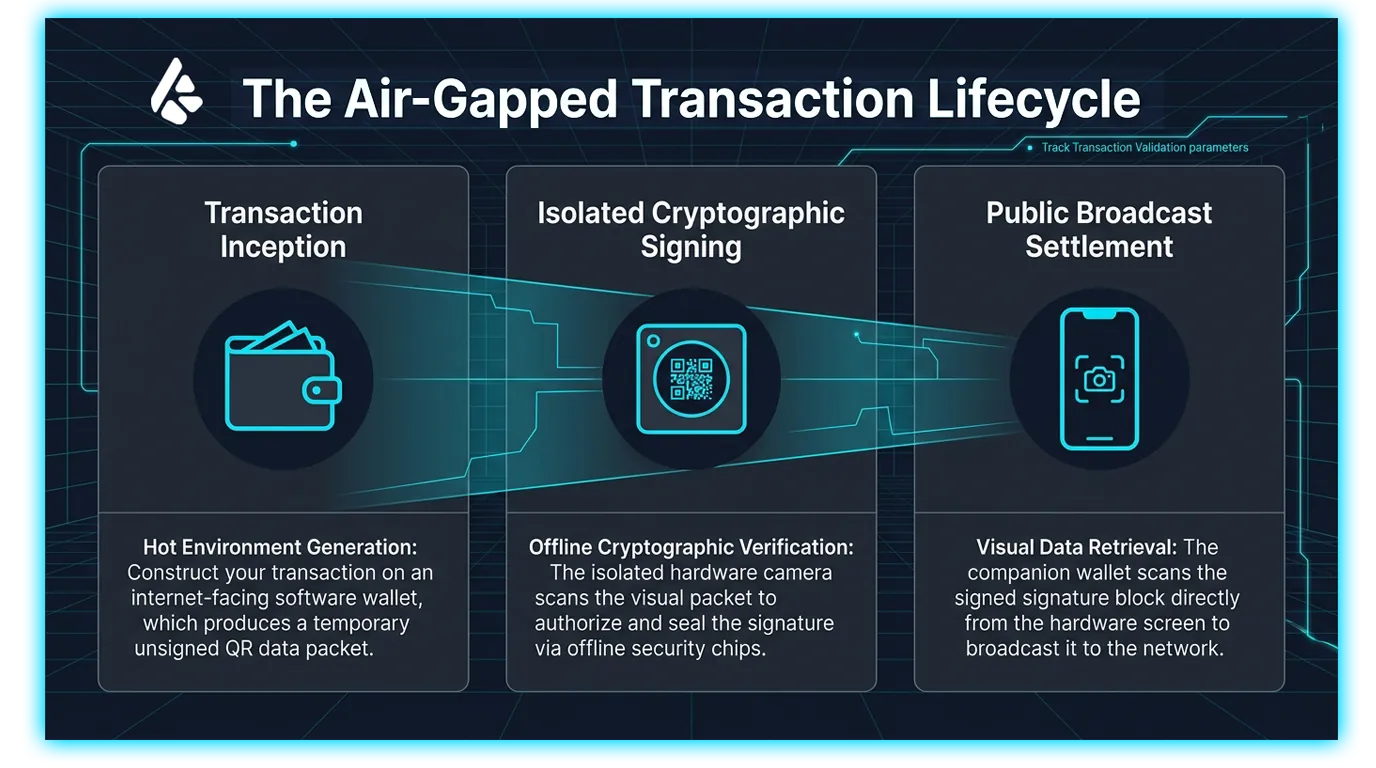
Transaction Construction: You initiate and configure a transaction using a hot companion software application (such as MetaMask, Rabby, or BlueWallet) on your internet-connected smartphone or computer. The software interface packages the unsigned transaction details into an active, visual QR code.
Offline Verification: You use the Keystone's built-in camera to scan the software's QR code. The hardware decodes the raw transaction metrics and displays them clearly on its large screen, allowing you to manually verify the destination address, network fees, and derivation paths in a completely offline environment.
Visual Authorization: Once you approve the transaction using the integrated fingerprint scanner or your local passcode, the device uses its internal secure element chips to sign the transaction. It then displays the finalized cryptographic signature as a new QR code on its screen.
Network Settlement: Finally, you use your companion software wallet's camera to scan the signed QR code from the Keystone display. The software app broadcasts the verified transaction data straight to the public blockchain ledger.
2. Advanced Multi-Signature Configuration & Recovery
Keystone expands beyond single-signature retail security by integrating enterprise-grade custody modules directly into its open-source firmware.
Multi-Signature Integration
- For corporate treasuries, family offices, and high-net-worth individuals, relying on a single private key introduces a single point of failure. Keystone provides native multi-signature (Multisig) coordination capabilities by integrating with advanced bitcoin and smart-contract coordinators like Sparrow, Electrum, and Specter.
- Under a multisig setup, assets are locked inside a shared contract that requires cryptographic signatures from multiple independent hardware devices (e.g., a 2-of-3 or 3-of-5 threshold) before any capital can be transferred, protecting funds from individual device theft.
Shamir Secret Sharing and Multi-Seed Management
- To eliminate the risks of physical backup loss, Keystone supports Shamir Secret Sharing (SLIP-39). This framework allows you to split a single core recovery seed phrase into multiple distinct paper or steel fragments. You can configure a threshold arrangement where any combination of a few fragments can reconstruct the entire wallet, ensuring that if an individual piece is lost or compromised in a disaster, your main portfolio remains safe.
- Furthermore, the hardware engine features advanced Multi-Seed Management, allowing a single unit to store up to three separate recovery phrases simultaneously. This is paired with an on-device fingerprint sensor that replaces standard PIN entries, accelerating transaction signing while providing an implicit layout for separating personal, corporate, and long-term storage portfolios.
3. Head-to-Head Comparison: Keystone wallet vs. Ledger
Choosing a hardware custody partner requires evaluating the trade-offs between open-source transparency, physical connectivity risk, and application integration.
Hardware Security Architecture Comparison
| Technical Feature | Keystone (3 Pro) Architecture | Ledger Ecosystem (Nano/Flex/Stax) |
| Communication Layer | Fully Air-Gapped (Visual QR Codes Only) | Wired USB-C Connections / Bluetooth Wireless |
| Hardware Security | Triple Secure Elements (EAL6+ Certified) | Single Secure Element (EAL5+ / EAL6+ Certified) |
| Source Code Footprint | Open-Source Firmware on Public Repositories | Closed-Source Core Operating System Firmware |
| Physical Interaction | 4-Inch Smartphone-Style Touchscreen & Fingerprint | Smaller Displays, Hardware Buttons or E-Ink Touch |
| Advanced Native Backup | On-Device Shamir Secret Sharing (SLIP-39) | Seed Recovery Cloud Subscription Platforms |
The Open-Source Divide
- The most significant philosophical divergence between Keystone and Ledger centers on code auditability. Keystone maintains open-source firmware repositories on GitHub, allowing independent security firms and individual developers to freely audit the codebase for backdoors, implementation bugs, or software flaws.
- Conversely, while Ledger open-sources its upper application layer, its core operating system firmware remains closed-source under non-disclosure agreements with its chip manufacturers. This configuration requires users to place absolute trust in the manufacturing firm's internal claims rather than allowing open, cryptographic verification of the software stack.
4. Universal Market Telemetry and Trading Surveillance via DEXTools
Maintaining absolute capital security requires verifying external liquidity parameters alongside local hardware defense measures. Utilizing analytical decentralized token suites like DEXTools provides an essential universal platform for contemporary market participants to monitor live trading actions across all public execution layers.
By evaluating structural metrics through the Pair Explorer, tracking institutional flows via the Big Swap Explorer, or monitoring newly initialized liquidity pools inside the Live New Pairs, traders gain the deep on-chain visibility required to audit automated smart contract architectures, track global volume velocity, and manage overall portfolio exposure safely.
You can access DEXTools here and start trading today.
Disclaimer: This article is for informational purposes only and does not constitute investment advice, financial advice, trading advice, or any other kind of advice. DEXTools does not recommend buying, selling, or holding any cryptocurrency or token. Users should conduct their own research and consult with a qualified financial advisor before making any investment decisions. Cryptocurrency investments are volatile and high-risk. DEXTools is not responsible for any losses incurred.
Related Guides
- Ledger vs Trezor 2026: Hardware Wallet Tested Showdown
- Ledger vs Trezor: Hardware Wallet Comparison 2026
- Trezor Tutorial 2026: Setup & Use Your Hardware Wallet
- How to Set Up Trezor Hardware Wallet: Safe 3 and Safe 5 Tutorial (2026)
- How to Use Ledger Hardware Wallet: Complete Security Tutorial (2026)
Frequently Asked Questions
What is an air-gapped hardware wallet?
An air-gapped hardware wallet signs transactions without any direct wired or wireless connection to an online device, often using QR codes to transfer data. The goal is to keep private keys isolated from internet-connected systems.
How does QR code signing work on the Keystone wallet?
With QR code signing, the wallet displays a transaction as a QR code that a companion app scans, signs offline and returns, also via QR code. This avoids connecting the device by USB or Bluetooth during signing.
Why is air-gapped security considered safer?
Keeping the signing device offline reduces the attack surface from malware and remote network attacks that rely on a connection. The private keys stay on a device that is never directly exposed to the internet.
What is the benefit of an open-source hardware wallet?
Open-source firmware allows independent researchers to inspect the code for security issues and verify how it works. This transparency can increase user trust compared with fully closed systems.