CoinGecko Tutorial: Master Crypto Research and Market Analysis (2026)
— By Tony Rabbit in Tutorials

Learn how to use CoinGecko for crypto research, market analysis, exchange trust scores, category tracking, and DEX data with GeckoTerminal in this complete 2026 tutorial.
CoinGecko is one of the most comprehensive cryptocurrency data aggregators in the world, tracking over 14,000 coins across 900+ exchanges. Whether you are a day trader scanning for momentum, a researcher comparing tokenomics, or a developer building crypto tools, CoinGecko provides the data layer you need - all for free.
This tutorial walks you through every major feature of CoinGecko so you can use it like a pro for your crypto research and market analysis in 2026.
What You Will Learn
- Navigate coin rankings and homepage data
- Analyze individual coin pages - price, market cap, volume, supply
- Evaluate exchange trustworthiness with Trust Score
- Discover trending narratives through Categories
- Track your portfolio inside CoinGecko
- Access the CoinGecko API for custom data
- Use GeckoTerminal for on-chain DEX analytics
What Is CoinGecko and Why Traders Use It
Founded in 2014 by TM Lee and Bobby Ong, CoinGecko started as a simple coin ranking site and has grown into a full-blown crypto research platform. Unlike CoinMarketCap (which is owned by Binance), CoinGecko remains independent - a detail that matters when you care about unbiased data.
Traders and researchers rely on CoinGecko because it goes beyond price. You get developer activity scores, community metrics, liquidity depth analysis, exchange trust ratings, and category-level market data that most competitors simply do not offer.
Navigating the Homepage and Coin Rankings
When you land on CoinGecko's homepage, you are greeted with a market overview bar at the top showing total crypto market cap, 24-hour trading volume, Bitcoin dominance, and the total number of coins. This snapshot gives you an instant read on the overall market mood.
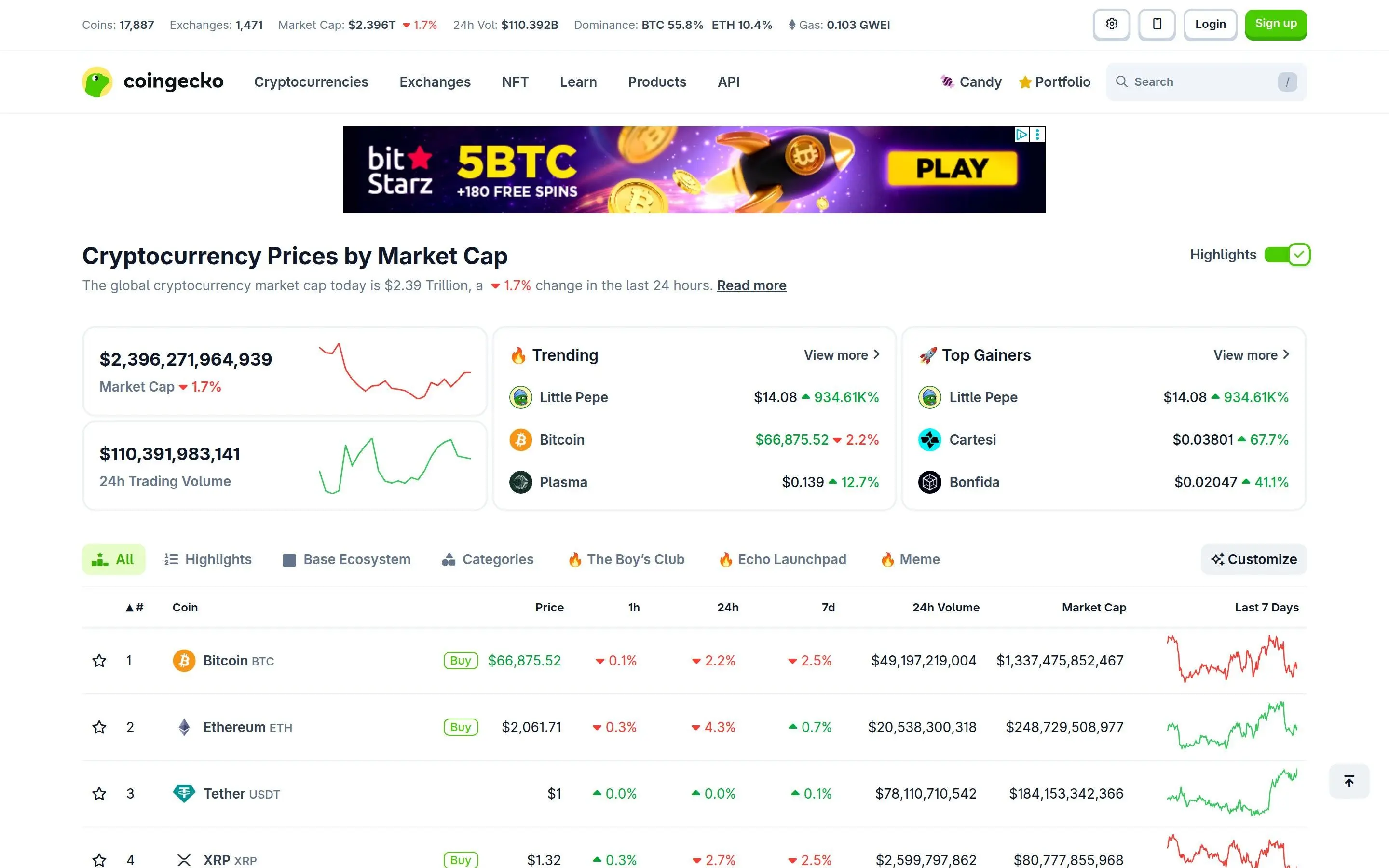
Below that sits the main rankings table. By default coins are sorted by market cap, but you can click any column header to sort by price, 24h change, 7d change, volume, or market cap. The sparkline charts on the right give you a quick visual of 7-day price action without needing to click into each coin.
Key features on the homepage include:
- Trending coins - The fire icon shows the most searched coins in the last 24 hours
- Recently added - New listings that just appeared on CoinGecko
- Top gainers and losers - Fastest movers by percentage change
- Filter by category - Narrow the table to DeFi, NFT, Layer 1, or any other tag
Deep Dive Into Individual Coin Pages
Clicking on any coin takes you to its dedicated page - and this is where CoinGecko truly shines. Let's use Bitcoin as an example to explore what data is available.
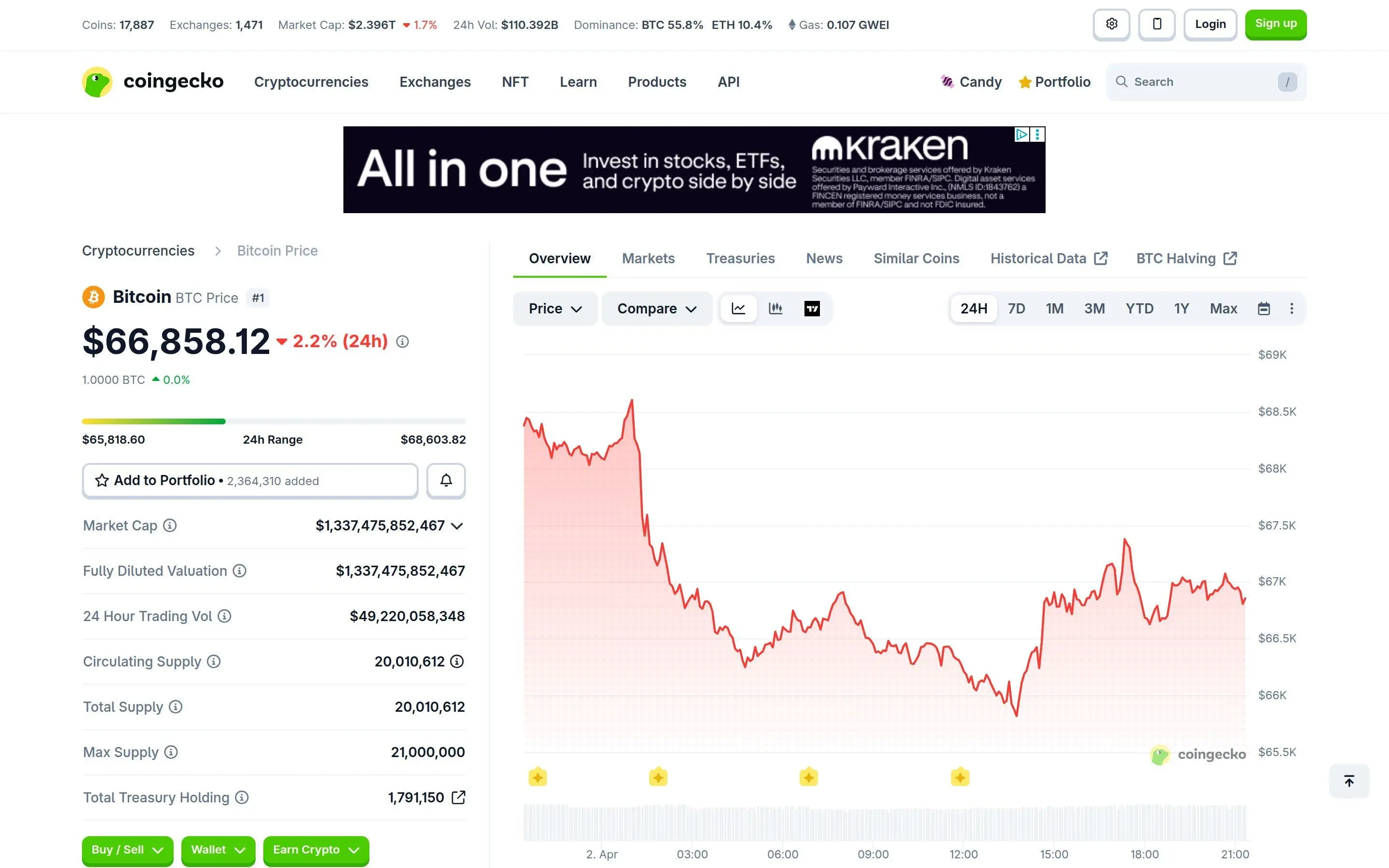
At the top of each coin page, you will find:
- Current price with 24h, 7d, 14d, 30d, and 1y percentage changes
- Market cap and fully diluted valuation (FDV) - critical for comparing relative value
- 24h trading volume and volume-to-market-cap ratio (a high ratio suggests active trading)
- Circulating supply, total supply, and max supply - essential for understanding inflation
- All-time high and all-time low with dates and percentage from current price
Scroll down and you will discover even more data:
- Price chart - Interactive chart with timeframes from 24h to max, plus comparison overlays
- Markets tab - Every exchange pair where the coin trades, with volume and spread data
- Historical data - Daily OHLC data you can export to CSV
- Tokenomics - Supply schedule, unlock events, and distribution charts
- Developer activity - GitHub commits, contributors, and code frequency
- Community score - Social media followers and engagement metrics
Key Metrics to Watch on Coin Pages
| Volume/MCap Ratio | Above 0.1 = high activity. Below 0.01 = low liquidity risk |
| FDV vs Market Cap | Large gap = heavy future dilution from unlocks |
| Circulating/Max Supply | Low ratio means more tokens will enter circulation |
| Developer Score | Active development = team is still building |
Understanding Exchange Trust Score
CoinGecko's exchange ranking page is one of its most valuable features. Instead of just listing exchanges by volume (which can be easily faked through wash trading), CoinGecko assigns a Trust Score from 1 to 10 based on multiple factors.
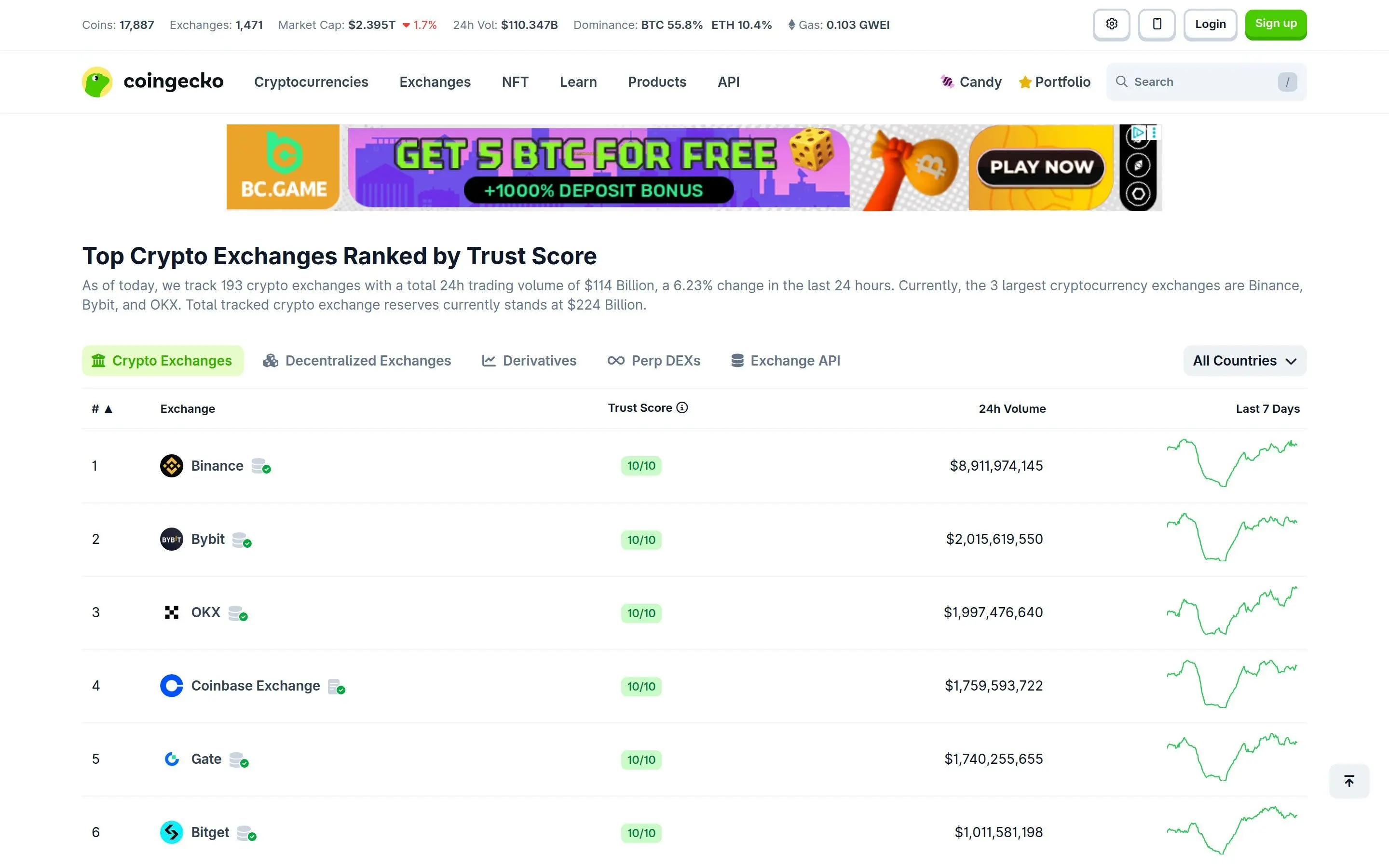
The Trust Score algorithm evaluates:
- Web traffic analysis - Does the reported volume match actual site visitors?
- Order book depth - Are the order books thick enough to support the claimed volume?
- API coverage - Does the exchange provide transparent trade and order book data?
- Regulatory compliance - Is the exchange licensed and operating legally?
- Proof of reserves - Has the exchange published verifiable reserve data?
When choosing an exchange, always check CoinGecko's Trust Score first. Exchanges with scores below 5 should be approached with caution, especially for large trades. The page also lets you filter by exchange type - spot, derivatives, or DEX - and compare normalized volume across platforms.
Using Categories to Discover Narrative Trends
The Categories page is an underrated gem. CoinGecko groups coins into over 300 categories like "Layer 1," "DeFi," "AI Coins," "RWA," "Meme Coins," "DePIN," and many more. Each category shows its total market cap, 24h volume, and percentage change.
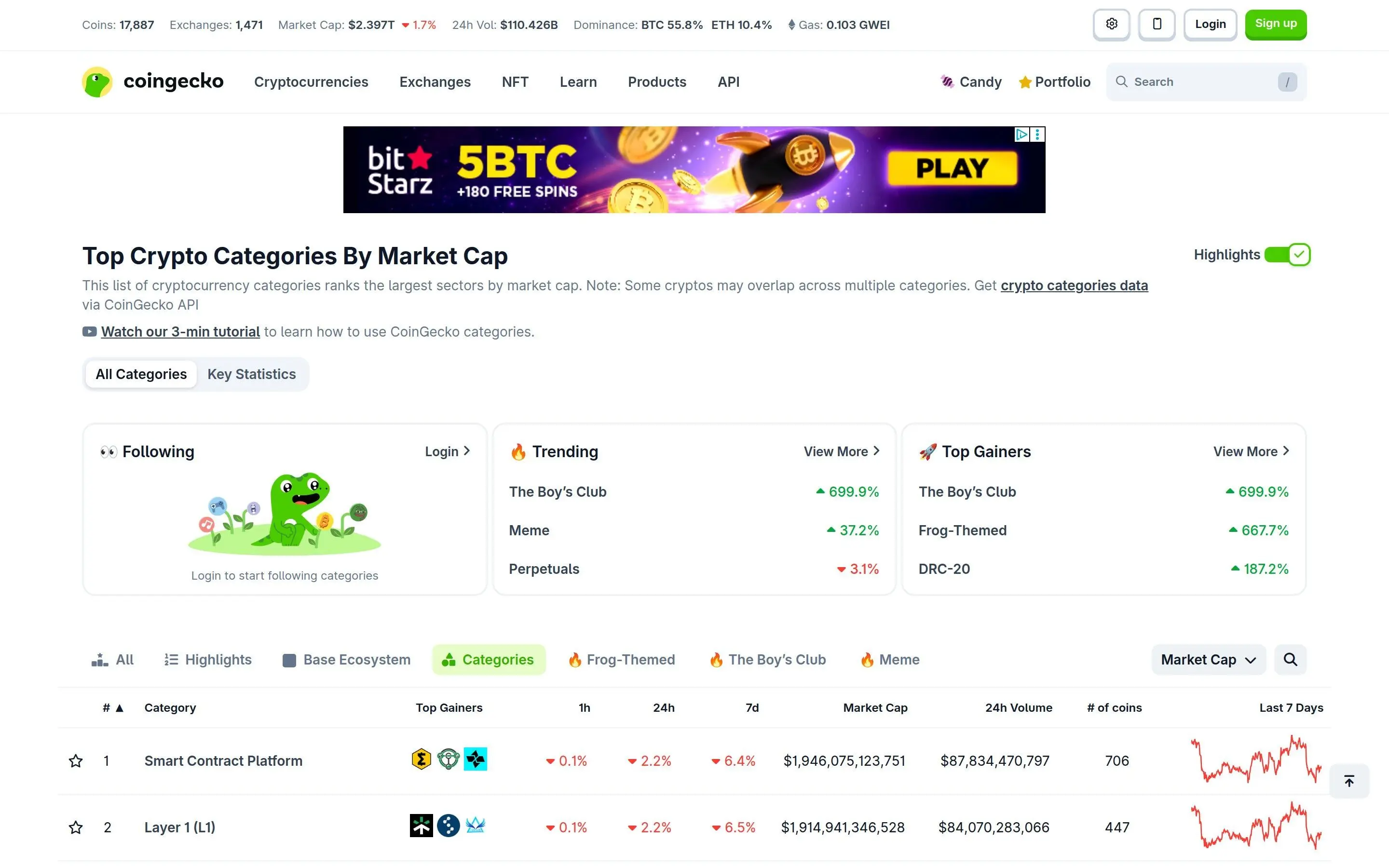
This is extremely useful for narrative trading. Instead of tracking hundreds of individual coins, you can monitor category-level performance to spot which sectors are gaining momentum. When a category starts outperforming the broader market, the coins within it tend to follow.
Sort categories by 24h change to find the hottest narratives right now, or sort by market cap to understand which sectors hold the most capital. You can click into any category to see all the coins it contains, ranked by market cap.
CoinGecko API for Developers
CoinGecko offers one of the most generous free APIs in crypto. The public API (no key required) gives you access to price data, market data, exchange data, trending coins, and more - all with a rate limit of roughly 10-30 calls per minute depending on the endpoint.
For serious projects, CoinGecko offers paid plans (Demo, Analyst, and Pro) with higher rate limits, historical data access, and dedicated support. The API documentation at coingecko.com/en/api is clean and well-organized with interactive examples.
Common API use cases include:
- Building price bots for Discord or Telegram
- Creating custom portfolio dashboards
- Pulling historical data for backtesting strategies
- Monitoring new coin listings programmatically
- Tracking exchange volumes for arbitrage detection
GET https://api.coingecko.com/api/v3/simple/price?ids=bitcoin&vs_currencies=usd&include_24hr_change=true
Portfolio Tracker Features
CoinGecko includes a built-in portfolio tracker that lets you log your holdings and monitor performance over time. You can create multiple portfolios (one for spot, one for DeFi, one for long-term holds) and manually enter your buy prices to track profit and loss.
While it is not as feature-rich as dedicated portfolio apps like CoinStats or Koinly, CoinGecko's tracker has the advantage of being integrated directly into the research platform. When you are already on CoinGecko analyzing a coin, you can add it to your portfolio with one click.
The portfolio tracker supports:
- Unlimited portfolios with custom names
- Manual transaction entry with buy/sell prices
- Profit/loss calculations in any fiat currency
- Portfolio allocation breakdown by coin
- 24h, 7d, and 30d performance charts
GeckoTerminal: On-Chain DEX Data
GeckoTerminal (acquired by CoinGecko in 2023) is the on-chain counterpart to CoinGecko's CEX data. It tracks real-time price, volume, and liquidity data for tokens trading on decentralized exchanges across 200+ blockchain networks.
GeckoTerminal is particularly powerful for:
- New token discovery - Find tokens before they list on centralized exchanges
- Pool analytics - See liquidity depth, transaction count, and holder data for any pool
- Multi-chain coverage - Track DEX activity across Ethereum, Solana, Base, Arbitrum, BSC, and many more
- Trending pools - Discover which liquidity pools are seeing the most activity
- Token security - Quick audit data showing if a token has suspicious contract features
You can access GeckoTerminal directly at geckoterminal.com or through links on CoinGecko coin pages. When viewing a coin on CoinGecko, look for the "DEX" tab to see its on-chain trading data powered by GeckoTerminal.
Tips and Pro Tricks
Advanced CoinGecko Strategies
- Use the "Compare" feature - Overlay multiple coins on the same chart to spot correlation and divergence patterns
- Check FDV vs MCap ratio - A coin trading at 10% of FDV means 90% of tokens are still locked. Large unlocks can crush price
- Monitor the Trending page - Coins trending on CoinGecko often move 24-48 hours before mainstream attention
- Export historical CSV data - Download daily price data and import it into spreadsheets for custom analysis
- Set price alerts - Get notified when a coin hits your target price without staring at charts all day
- Track developer activity - Projects with declining GitHub commits may be losing momentum
- Use categories as a screener - Sort by 24h change to find the hottest sector, then pick the best coin within it
- Cross-reference exchange Trust Score - Before depositing funds to any exchange, verify its score is 7+
CoinGecko vs CoinMarketCap
| Feature | CoinGecko | CoinMarketCap |
|---|---|---|
| Independence | Independent | Binance-owned |
| Exchange Trust Score | Yes (1-10) | Basic rating |
| Developer Metrics | Detailed GitHub data | Limited |
| DEX Data | GeckoTerminal (200+ chains) | DEX tab (limited) |
| Free API | Generous limits | Restrictive |
| Category Analytics | 300+ categories | Categories available |
Final Thoughts
CoinGecko is more than a price tracker - it is a complete research toolkit. From fundamental analysis on coin pages to narrative discovery through categories, exchange vetting through Trust Score, and on-chain DEX analytics through GeckoTerminal, it covers nearly every angle of crypto research.
The key to getting the most out of CoinGecko is making it part of your daily routine. Check trending coins in the morning, monitor category movements throughout the day, and verify exchange trust before making any deposits. Combined with tools like DexScreener for real-time DEX charts and DefiLlama for TVL data, CoinGecko forms a core pillar of any serious crypto researcher's toolkit.
Frequently Asked Questions
Is CoinGecko free to use?
Yes, CoinGecko is completely free for browsing coin data, rankings, categories, exchange info, and portfolio tracking. The API has a free tier as well. Premium plans are only needed for higher API rate limits and advanced data endpoints.
How accurate is CoinGecko's data?
CoinGecko aggregates data directly from exchange APIs and blockchain sources. Its Trust Score algorithm filters out wash trading and fake volume, making it one of the most reliable data sources in crypto. However, always cross-reference important data points with multiple sources.
What is the difference between CoinGecko and GeckoTerminal?
CoinGecko focuses on aggregated data from centralized exchanges (CEX), while GeckoTerminal tracks on-chain data from decentralized exchanges (DEX). GeckoTerminal shows real-time pool data, liquidity metrics, and new token launches across 200+ blockchains. Both are owned by the same company and complement each other.
Can I use CoinGecko's API without paying?
Yes. The free public API provides access to most data including prices, market data, trending coins, and exchange information. Rate limits are approximately 10-30 requests per minute. For production applications requiring higher throughput, consider their paid Demo or Pro API plans.
How do I find new crypto projects on CoinGecko?
Use the "Recently Added" section on the homepage, check the Trending page for rising interest, browse Categories for hot sectors, or use GeckoTerminal to spot tokens trading on DEXs before they get listed on CoinGecko. The Categories page sorted by 24h performance change is particularly useful for finding emerging narratives.
Disclaimer
This article is for educational purposes only and does not constitute financial advice. Cryptocurrency investments carry significant risk. Always do your own research (DYOR) before making any investment decisions. Past performance is not indicative of future results. The tools and platforms mentioned in this article are presented for informational purposes - we do not endorse or guarantee any specific platform.
Related Articles
Frequently Asked Questions
What is CoinGecko?
CoinGecko is a cryptocurrency data aggregator that provides real-time market data, prices, and information on thousands of cryptocurrencies.
How does CoinGecko help with crypto research?
It offers comprehensive data including market cap, trading volume, historical prices, and exchange listings, which are crucial for market analysis and research.
What unique features does CoinGecko offer?
CoinGecko includes features like portfolio tracking, a crypto news aggregator, and an API for developers to access its extensive data.
Is CoinGecko free to use?
Yes, the basic features of CoinGecko are free to use. It also offers premium subscriptions for advanced features and an ad-free experience.
How does CoinGecko compare to CoinMarketCap?
Both are leading crypto data aggregators. CoinGecko is often praised for its detailed metrics and transparent methodology for ranking cryptocurrencies.
Related Guides
- Should I Buy Ethereum (ETH) in 2026? Complete Analysis Framework
- CoinGecko vs CoinMarketCap: Crypto Data Sites Compared (2026)
- Top 5 Crypto Research Platforms in 2026
- How to Use Dune Analytics: Build Better Crypto Dashboards and On-Chain Research (2026)
- How to Use DeFi Llama: Complete TVL and DeFi Research Tutorial (2026)