How to Use Tonkeeper Wallet on TON Safely: Complete Guide (2026)
— By Tony Rabbit in Tutorials
Learn how to use Tonkeeper as a self-custody TON wallet, from setup and seed phrase security to receiving assets, sending safely, using TON Connect, and verifying Jettons before you trade.
Many people first touch TON through Telegram, but Tonkeeper is where TON starts to feel like a real self-custody environment. Instead of leaving your balance inside a chat-native product, Tonkeeper puts the keys, recovery responsibility, and wallet approvals in your hands. That is exactly why experienced users like it, and exactly why beginners need a safer workflow from day one.
Intent check: This page is the self-custody wallet guide. If you want the app-connection layer, read What Is TON Connect and How Do You Use It Safely?. If you want the Telegram-native app layer, read How to Use TON Telegram Bots and Mini Apps Safely
Quick answer: Tonkeeper is a self-custody wallet for TON that lets you create or import a wallet, receive and send TON-native assets, connect to dApps through TON Connect, and manage low-cost on-chain activity without handing custody to a platform. The upside is control. The downside is that if you expose the recovery phrase or approve the wrong action, there is usually no support desk that can reverse it.
- Tonkeeper is about self-custody. You control the wallet, which means you also own the backup and security job.
- It is not the same as Telegram Wallet. Tonkeeper is the better fit when you want a dedicated TON wallet outside a custodial chat flow.
- Receiving is easy, but network mistakes still happen. TON, USDT on TON, and Jettons should be checked carefully before money moves.
- Connecting a wallet is not the same as sending funds. TON Connect sessions still need to be reviewed like any other approval flow.
- Low fees do not remove risk. A fast wallet can still be pointed at a fake Jetton, a poisoned address, or a bad app.
What Tonkeeper is and why TON users pick it
Tonkeeper is a wallet built for the TON ecosystem. In practical terms, it is the place where a user can hold TON, manage TON-based assets such as USDT on TON and Jettons, and approve interactions with TON dApps and Mini Apps. It is popular because it is clean, quick, and native to the way TON is actually used.
Trade TON with Not.Trade, the fastest terminal on TON
Not.Trade is purpose built for TON traders: real-time on-chain charts for every jetton, insider safety scoring (Top 10 wallets, snipers, dev movement, bundlers, LP lock), MCAP-trigger limit orders, multi-wallet sniping, MEV protection and one-click swaps routed across STON.fi and DeDust. It runs natively inside Telegram and as a fast web terminal, with TON Connect non-custodial wallet support.
Read the full Not.Trade guide ->The more important reason people choose it is control. With Tonkeeper, the recovery phrase belongs to the user, not to a platform. That puts Tonkeeper closer to the logic explained in the DEXTools self-custody guide than to a custodial wallet or exchange account. For users who want the broader Telegram-side overview, that still belongs to the umbrella Telegram Wallet and TON tutorial. This page is narrower. It is about using Tonkeeper safely as your self-custody TON wallet.
| Question | Tonkeeper | Custodial Telegram-style wallet |
|---|---|---|
| Who controls the keys? | You | The platform or provider |
| Who can restore the wallet? | Anyone with the recovery phrase | The platform, subject to its account recovery rules |
| Main advantage | Direct control and dApp compatibility | Convenience and simpler onboarding |
| Main risk | User error, bad approvals, lost recovery phrase | Counterparty, withdrawal, or account-control risk |
That tradeoff matters. If you want convenience above all else, Tonkeeper may feel like more responsibility than you need. If you want a wallet that can follow you across swaps, Mini Apps, self-custody storage, and TON Connect sessions, Tonkeeper is much closer to the right tool.
How to create or import a Tonkeeper wallet
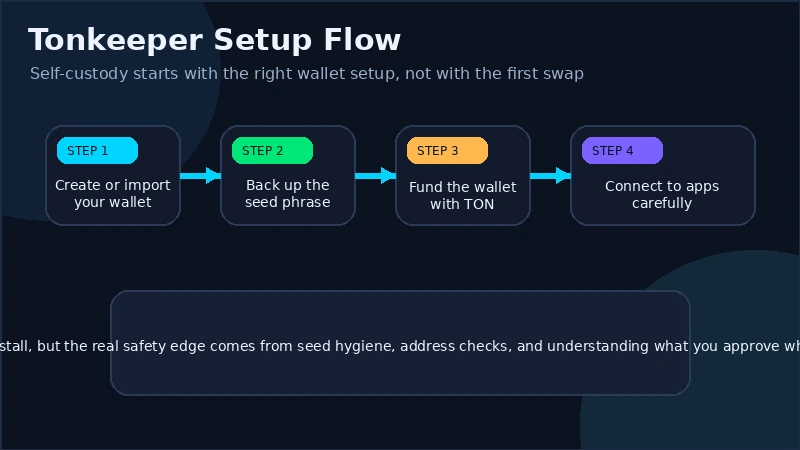
The first safe Tonkeeper habit happens before you even open the wallet. Download it only from an official source. Do not trust sponsored search results, random APK files, or a link forwarded in Telegram by someone claiming to be support. Fake wallet installers are one of the cheapest and most effective ways to steal a seed phrase before the user even funds the wallet.
Once the app is installed, you will usually have two paths: create a new wallet or import an existing one. Creating a new wallet is the right choice for a brand-new user. Importing is for restoration or migration, not for experimentation.
- Create a new wallet if this is your first self-custody TON wallet.
- Write down the recovery phrase offline in the exact order shown.
- Confirm the phrase when the app asks, because that is the last safe moment to prove you copied it correctly.
- Set the local wallet protections such as PIN and biometrics after the phrase is secured.
- Import an existing wallet only when needed, and only in a private environment where no screen-share, browser extension, or fake helper is present.
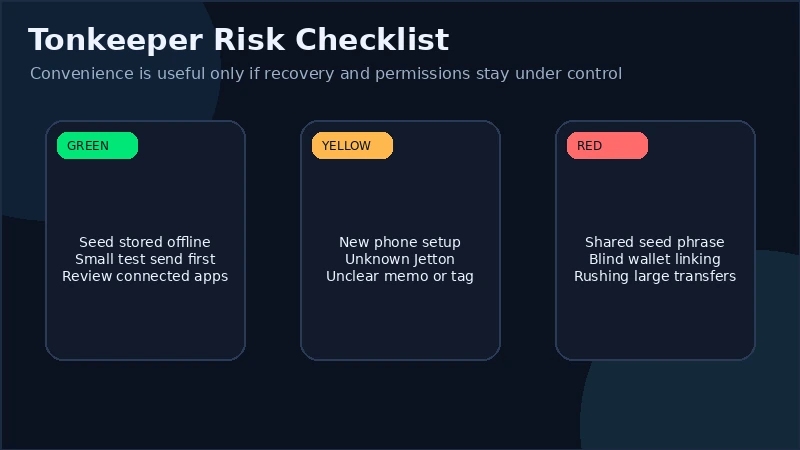
A simple rule helps here: if anyone or anything asks you to type the recovery phrase outside the wallet restoration flow you initiated yourself, stop. Tonkeeper support does not need it. A bridge does not need it. A bot does not need it. A dApp does not need it.
Seed phrase and device security setup
The recovery phrase is the wallet. The app, the phone, and the PIN are just wrappers around it. If the phrase is exposed, the attacker can usually rebuild the wallet elsewhere. If the phone breaks but the phrase is safe, the user can usually recover. That is why the phrase deserves more attention than any single wallet feature.
The biggest beginner mistakes are boring and expensive. People screenshot the phrase, store it in chat drafts, email it to themselves, or hand it to a fake support agent after a small wallet problem. All of those turn a self-custody wallet into a delayed theft event. Keep the phrase offline, legible, and private. If you decide to use any digital storage at all, understand that convenience increases attack surface immediately.
Device security matters too, because many wallet losses do not start with a blockchain exploit. They start with a compromised phone, clipboard malware, or a user approving something while rushing. Turn on a strong device passcode, keep the operating system updated, enable app lock or biometrics inside the wallet, and avoid installing wallet tools on a phone that is already full of experimental software.
There is also an important distinction between a wallet PIN and a recovery phrase. A wallet PIN protects that local app instance. The recovery phrase restores the entire wallet anywhere. Losing the PIN is annoying. Exposing the phrase is catastrophic. If you suspect the phrase was ever visible to someone else, the right reaction is not to hope. It is to create a fresh wallet and move funds.
For readers who want the broader hardening mindset, DEXTools already covers the bigger picture in the crypto security guide and the wallet poisoning explainer. Those pages pair well with Tonkeeper because the wallet itself is only as safe as the habits around it.
How to receive TON, USDT on TON, and Jettons
Receiving assets in Tonkeeper is straightforward, but this is where many cross-network mistakes begin. A wallet can only receive the asset on the network it is built for. That means TON arrives on TON, USDT on TON must actually be the TON version of USDT, and Jettons must be the intended TON token, not just a familiar ticker.
The basic flow is simple. Open the asset or wallet receive screen, copy the address or share the QR code, and send it only to someone who is using the TON network. If the sender is withdrawing from an exchange, make sure they choose TON as the network. Sending ERC-20 USDT or TRC-20 USDT to a TON address because the ticker says USDT is still a network mistake, no matter how well known the token is.
Jettons deserve extra care. On TON, the thing you care about is the correct Jetton identity, not just the display name. Many tokens can share a symbol or a logo style. If you are receiving a lesser-known Jetton, ask for the official token reference first, then compare it. Do not rely on appearance alone.
For larger transfers, use a test amount first. Low network fees make test transactions cheap, which means there is little reason to skip them on a new route, a new sender, or a new asset. Receiving should feel boring. When it feels exciting or urgent, that is usually the moment to slow down.
How to send assets safely, including memo and address checks
Sending is where Tonkeeper users become operators instead of observers. The wallet can make execution fast, but it cannot know whether the destination you pasted is wise. That is your job.
Start with the full destination context. Who is receiving the funds? Is it a personal wallet, an exchange deposit address, a bridge route, or a dApp payment request? If the destination is an exchange or service that requires a memo, tag, or comment, that extra field matters as much as the address itself. Missing a required memo can strand the funds in a support queue. Adding a random memo where none is requested is not helpful either.
| Send check | Why it matters |
|---|---|
| Verify the destination source | Copy the address from the official destination, not from chat history or an old screenshot. |
| Check the network and asset | TON address plus the wrong asset or network is still a mistake. |
| Review memo or comment fields | Some services need them, and the wallet cannot guess that for you. |
| Send a test amount first | Especially useful for first-time transfers and service deposits. |
| Read the final confirmation screen | This is the last chance to catch a pasted scam address or wrong token. |
TON users should also know that wallet addresses can appear in different display formats. Modern wallets usually handle this well, but that does not mean you should manually edit or transform the address yourself. Copy from the destination, paste carefully, and avoid "fixing" formatting by hand.
Finally, stay alert to address poisoning. Attackers send tiny transfers from lookalike addresses so the victim later copies the wrong address from recent activity. That scam is covered more fully in the wallet poisoning guide, but the short version is simple: never trust a recent address just because it looks familiar.
How to connect Tonkeeper to dApps and Mini Apps with TON Connect
One reason Tonkeeper matters on TON is that it is not only a storage wallet. It is also the approval layer for apps. When a dApp or Mini App wants wallet access, it usually uses TON Connect to request a session. That lets the app ask the wallet to connect without asking the user to type a seed phrase into a website, which is exactly how it should be.
The safe workflow is straightforward. Open the official dApp or Mini App, tap the connect-wallet option, choose Tonkeeper if prompted, and review the wallet pop-up carefully. Tonkeeper should show you what app is asking for a connection and what kind of action is being requested. Connecting is not the same as sending funds. Later, if the app asks for a swap, deposit, or signature, that should arrive as a separate approval.
That distinction matters because many users think "I only connected my wallet" means nothing risky happened. In reality, a bad app can still queue dangerous follow-up requests once the session exists. Read the domain, understand the action, and reject any request that feels out of scope. If you want the protocol-level breakdown, use the dedicated TON Connect guide after this page.
Fees, Battery, and why gasless does not mean free
TON is popular partly because network fees are low and the user experience can feel smoother than on more expensive chains. Tonkeeper also exposes concepts such as Battery or sponsored-fee style flows that can make some actions feel gasless from the user's point of view. That is helpful, but it can also create false confidence if the user stops thinking about costs entirely.
Gasless does not mean free in the economic sense. It usually means the fee is being abstracted, prepaid, sponsored, or paid in another supported asset through a wallet feature. Someone is still covering the cost. The right beginner mindset is to treat Battery and similar tools as convenience layers, not as magic.
It is still wise to keep a small TON balance available. Not every app or transfer path will be sponsored. If you receive a token but have no TON for an unsupported action, you may discover that the wallet is easy to view and harder to use until you top up gas. This becomes especially important if you plan to interact with swaps, bridges, or newer apps where the fee path is not always the same.
Low fees are a reason to use test transactions more often, not a reason to skip them. They make safe habits cheaper.
Common Tonkeeper mistakes and scam patterns
- Downloading a fake wallet app: always start from an official source, not a forwarded link or ad result.
- Saving the recovery phrase in a vulnerable place: screenshots, notes synced to the cloud, and chat messages are common failure points.
- Trusting a token name or logo: USDT labels and Jetton tickers can still point to the wrong asset.
- Copying an address from recent history: this is how poisoning scams turn a familiar-looking address into a loss.
- Approving a wallet action without reading it: connection requests, swaps, and transfers should always be reviewed separately.
- Using one wallet for everything: many users keep a cleaner main wallet and a smaller exploration wallet for new dApps and Mini Apps.
That last point is underrated. Self-custody does not mean every balance needs to live in one hot wallet. Segmentation is a practical security tool, especially on a network designed to be used actively.
A practical DEXTools workflow before you swap or chase TON activity
Tonkeeper is the wallet layer. DEXTools is where you slow down and verify market reality before you touch a Jetton or a fast-moving TON narrative. If a token shows up in a group, a Mini App, or a wallet search result, do not swap just because the wallet made the token easy to find.
- Start with the real token identifier. Search the contract or official token reference, not only the ticker.
- Inspect liquidity and recent transactions. A clean logo means nothing if the market is thin or disorderly.
- Check price impact before you size up. The fee may be low while slippage is still ugly.
- Verify the token contract before trading. DEXTools pairs well with the token verification guide for exactly this reason.
- Keep security context in view. If the opportunity arrived through a random DM, fake support account, or copied bot link, assume the wallet is the last defense, not the first.
The clean way to use Tonkeeper is not to treat it as a one-tap buy button. Use it as your self-custody execution tool, then use DEXTools and the related security guides to decide whether the thing you are about to touch deserves access to that wallet at all.
Frequently asked questions
Is Tonkeeper the same as Telegram Wallet?
No. Tonkeeper is a self-custody wallet built for TON, while Telegram Wallet-style products are often more custodial or chat-integrated. The difference is mainly about who controls the keys and who carries the recovery responsibility.
Can Tonkeeper hold USDT on TON and Jettons?
Yes. Tonkeeper is commonly used to hold TON-native assets such as TON itself, USDT on TON, and Jettons. The important part is confirming that the asset is actually on TON and is the intended token.
Do I still need TON in my wallet if some actions are gasless?
Usually yes. Sponsored or Battery-style flows can help, but not every action uses them. Keeping a small TON balance is still the safer operating habit.
What should I do if I exposed my Tonkeeper recovery phrase?
Assume the wallet is compromised, create a fresh wallet, and move funds as soon as possible. Do not wait for a problem to become visible.
Is connecting Tonkeeper to a dApp the same as sending funds?
No. A connection request usually creates a session, while a transfer, swap, or deposit should appear as a separate approval. You still need to review every later action carefully.
Final takeaway: Tonkeeper is one of the best ways to use TON as a real self-custody network, but that only helps if the user acts like the wallet owner and not like a passive app user. Back up the phrase correctly, verify every asset and destination, review every TON Connect request, and use DEXTools before you chase anything new.
Disclaimer: This draft is for educational purposes only and does not constitute investment, financial, legal, or trading advice. Wallet interfaces, fees, and supported features can change over time.
Related Guides
- TON Wallet Drainer Scams: Complete Avoidance Guide (2026)
- How to Use Telegram Wallet and TON - Complete Tutorial 2026
- How to Snipe TON Memecoins with Not.Trade (2026 Guide)
- How to Buy Toncoin (TON) in 2026: Exchanges, Wallet Setup and First Purchase Guide
- What Is Toncoin (TON)? Beginner Guide Explained 2026
- How to Use STON.fi on TON Safely
Frequently Asked Questions
What is Tonkeeper?
Tonkeeper is a self-custody wallet for the TON blockchain that lets you store Toncoin and Jettons, send and receive assets, and connect to TON apps. Because it is self-custody, you alone control the keys.
How do you back up a Tonkeeper wallet?
When you create a wallet, Tonkeeper shows a recovery phrase that you must write down and store offline. This phrase is the only way to restore access, so it should never be shared or photographed.
What is TON Connect in Tonkeeper?
TON Connect is a standard that lets your wallet connect to TON apps so you can approve actions like swaps or signing. You should only connect to apps you trust and review each request before approving.
How do I verify a Jetton before trading it in Tonkeeper?
Check the token's contract address against a trusted source rather than relying on the name or symbol alone, since names can be copied. Verifying the exact contract helps you avoid imitation or scam tokens.