How to Use DEXScreener: Token Screener Tutorial (2026)
— By Tony Rabbit in Tutorials
Learn how to use DEXScreener to find, filter and analyze new tokens. A step-by-step screener tutorial to spot trends and avoid scams in 2026.
DexScreener is a free, real-time multi-chain DEX analytics platform that tracks every trading pair across over 80 blockchains. It provides instant access to charts, liquidity data, volume, and new pair alerts, making it an essential tool for crypto traders to research tokens and analyze on-chain data.
- Search tokens by name, symbol, or contract address.
- Filter by specific blockchains like Solana, Ethereum, or Base.
- Analyze price charts, volume, liquidity, and market cap.
- Use the New Pairs feed to discover freshly created tokens.
- Set up watchlists and alerts for saved tokens.
DexScreener is one of the most essential tools in any crypto trader's arsenal. This free, real-time token screener tracks every DEX pair across more than 80 blockchains, giving you instant access to charts, liquidity data, and new pair alerts. Whether you're hunting memecoins on Solana or tracking DeFi tokens on Ethereum, DexScreener is where most traders start their research.
This tutorial walks you through every feature of DexScreener - from basic pair searching to advanced screener filters, watchlists, and the Moonshot token launcher.
What Is DexScreener?
DexScreener is a multi-chain DEX analytics platform that aggregates trading data from decentralized exchanges across every major blockchain. Think of it as the Bloomberg terminal for DeFi - it shows you every trading pair, its price action, volume, liquidity, and on-chain data in real time.
Unlike centralized exchange trackers like CoinGecko or CoinMarketCap, DexScreener pulls data directly from on-chain DEX contracts. This means you see tokens the moment they start trading, often hours or days before they appear on centralized platforms.
Step 1 - Navigate the DexScreener Interface
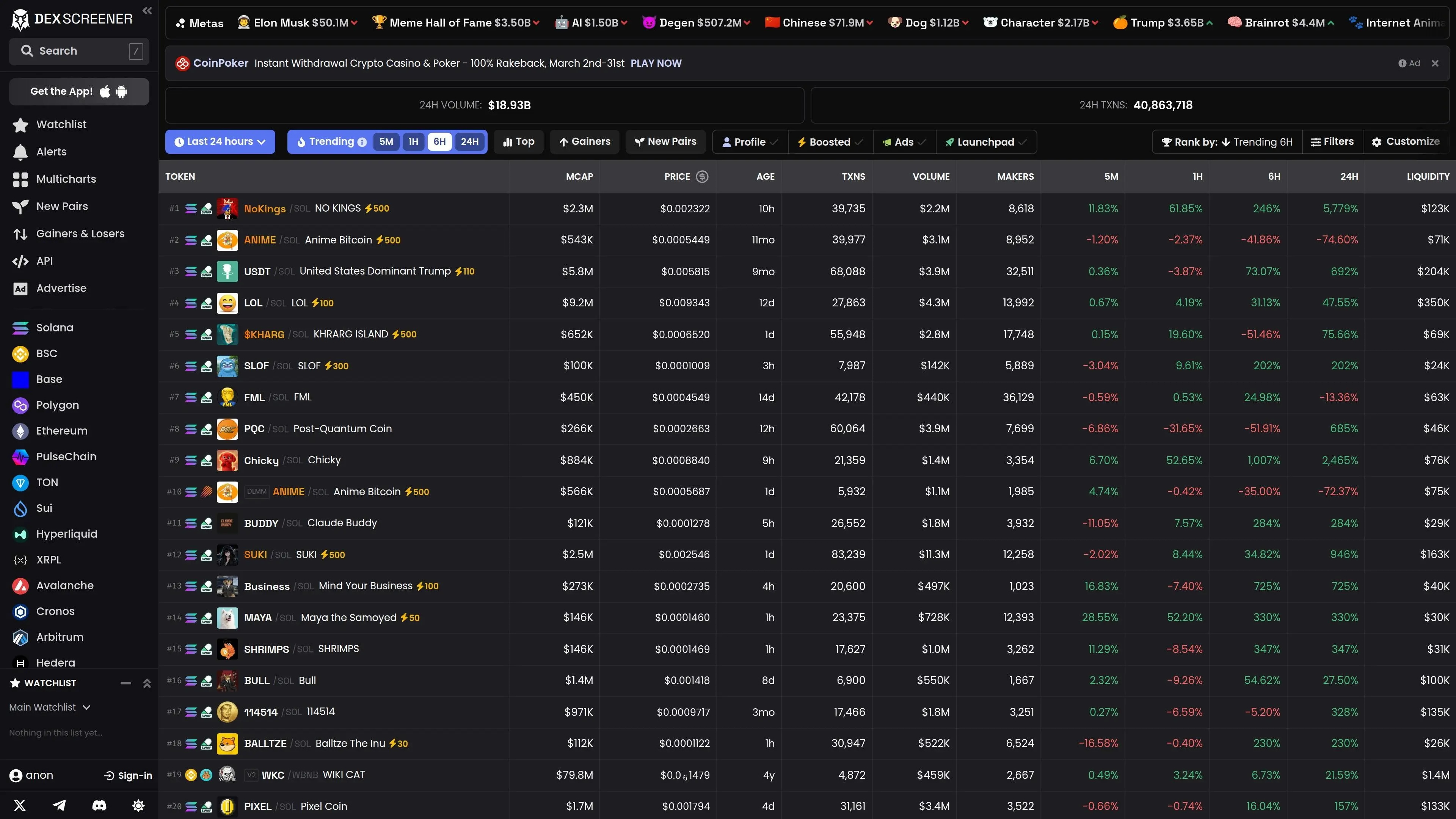
DexScreener requires no account to use. Simply visit dexscreener.com and you're ready to go. The homepage shows trending pairs across all chains.
The main navigation includes:
- Search Bar - Search any token by name, symbol, or contract address
- Chain Selector - Filter by specific blockchain (Solana, Ethereum, Base, etc.)
- Trending - Top-performing tokens by volume and price change
- New Pairs - Freshly created trading pairs across all chains
- Watchlist - Your saved tokens (requires free account)
- Moonshot - DexScreener's own token launch platform
Step 2 - Search and Analyze Token Pairs
The most common use case is researching a specific token. Paste the contract address into the search bar for the most accurate result. Searching by token name works too, but contract addresses eliminate confusion from duplicate names.
When you open a pair, DexScreener shows you:
- Price chart with TradingView integration (candlestick, line, area)
- Volume - 5m, 1h, 6h, and 24h trading volume
- Liquidity - Total liquidity in the pool
- Market cap - Calculated from circulating supply
- Transactions - Number of buys and sells with ratio
- Makers - Unique wallets trading
- Contract verification - Whether the contract is verified on-chain
- • Liquidity: Below $5,000 = high slippage risk
- • Buy/Sell ratio: 90%+ buys with few sells = potential pump and dump
- • Makers count: Low unique makers = few real traders
- • Age: Very new + very high volume = exercise caution
Step 3 - Use the New Pairs Feed
The New Pairs page is where alpha hunters spend most of their time. It shows tokens the moment their first DEX liquidity pool is created.
Filter new pairs by chain to focus on your preferred ecosystem. For Solana memecoin trading, filter to Solana and sort by volume or transaction count to find tokens gaining early traction.
Combine DexScreener's new pairs with DEXTools charts for deeper analysis. Each platform shows slightly different data, and using both gives you a more complete picture.
Step 4 - Advanced Screener Filters
DexScreener's screener lets you filter the entire DEX universe with custom criteria:
- Price Change % - Filter by 5m, 1h, 6h, 24h performance
- Volume - Minimum/maximum trading volume
- Liquidity - Set liquidity floors to avoid low-cap traps
- Market Cap - Target specific market cap ranges
- Age - How long the pair has been trading
- Transaction Count - Minimum buys/sells
Example Filter: Finding Momentum Plays
Set 1h price change above 20%, liquidity above $50,000, and more than 200 transactions in the last hour. This surfaces tokens with real buying momentum and enough liquidity to enter and exit positions.
Step 5 - Watchlists and Alerts
Create a free DexScreener account to save tokens to your watchlist. You can create multiple watchlists (e.g., "Solana Memes", "ETH DeFi", "Research") and get email or push notifications for price movements.
Price alerts are available for specific pairs - set upper and lower thresholds and DexScreener notifies you when the price crosses your targets.
Step 6 - Using DexScreener for Research (DYOR)
DexScreener is an essential part of any DYOR (Do Your Own Research) process. Here's a quick checklist:
- Paste the token's contract address into DexScreener
- Check liquidity (above $10K for safer trades)
- Review the buy/sell ratio (balanced is better)
- Look at holder count and top holder concentration
- Check if the token appears on multiple DEXes (more legitimate)
- Review the chart pattern - organic growth or pump-and-dump shape?
- Cross-reference with block explorers for contract verification
DexScreener vs DEXTools
Both platforms are valuable. Many traders use DexScreener for quick scanning and new pair discovery, then switch to DEXTools for deeper analysis with DEXTScore and trading features. For pair explorers specifically, see our Pair Explorer guide.
Screener Filters That Surface Early Tokens
DexScreener offers powerful filters to help you discover promising tokens before they go parabolic.Safety Defaults
When using DexScreener, it is crucial to prioritize safety and understand the tool's limitations.Keep exploring