How to Use BscScan: Track BNB Chain Transactions, Tokens and Contracts (2026)
— By Whatsertrade in Tutorials

Learn how to use BscScan to verify BNB Chain transactions, check BEP-20 token contracts, inspect wallets and read contract activity safely in 2026.
BscScan is a blockchain explorer for BNB Chain, allowing users to track transactions, tokens, and smart contracts. It's a crucial safety tool for verifying wallet interactions, swaps, bridges, and token contracts, especially given the rapid pace of new token listings and activity within the BNB Chain ecosystem.
Intent check: If you only need broad explorer basics, start with our general blockchain explorer guide. This article is specifically about BscScan for BNB Chain users and BEP-20 token checks.
BscScan is one of the most useful safety tools on BNB Chain because that ecosystem moves fast, lists a lot of new tokens and produces more situations where users need to verify what happened after a wallet interaction. If you are checking a swap, a bridge, a token contract or a suspicious airdrop, BscScan is often the fastest route to the truth.
That is why the query keeps demand over time. BNB Chain stays active, token launches keep happening, and users constantly need a reliable way to confirm transactions, contract addresses and wallet behavior without trusting a project UI.
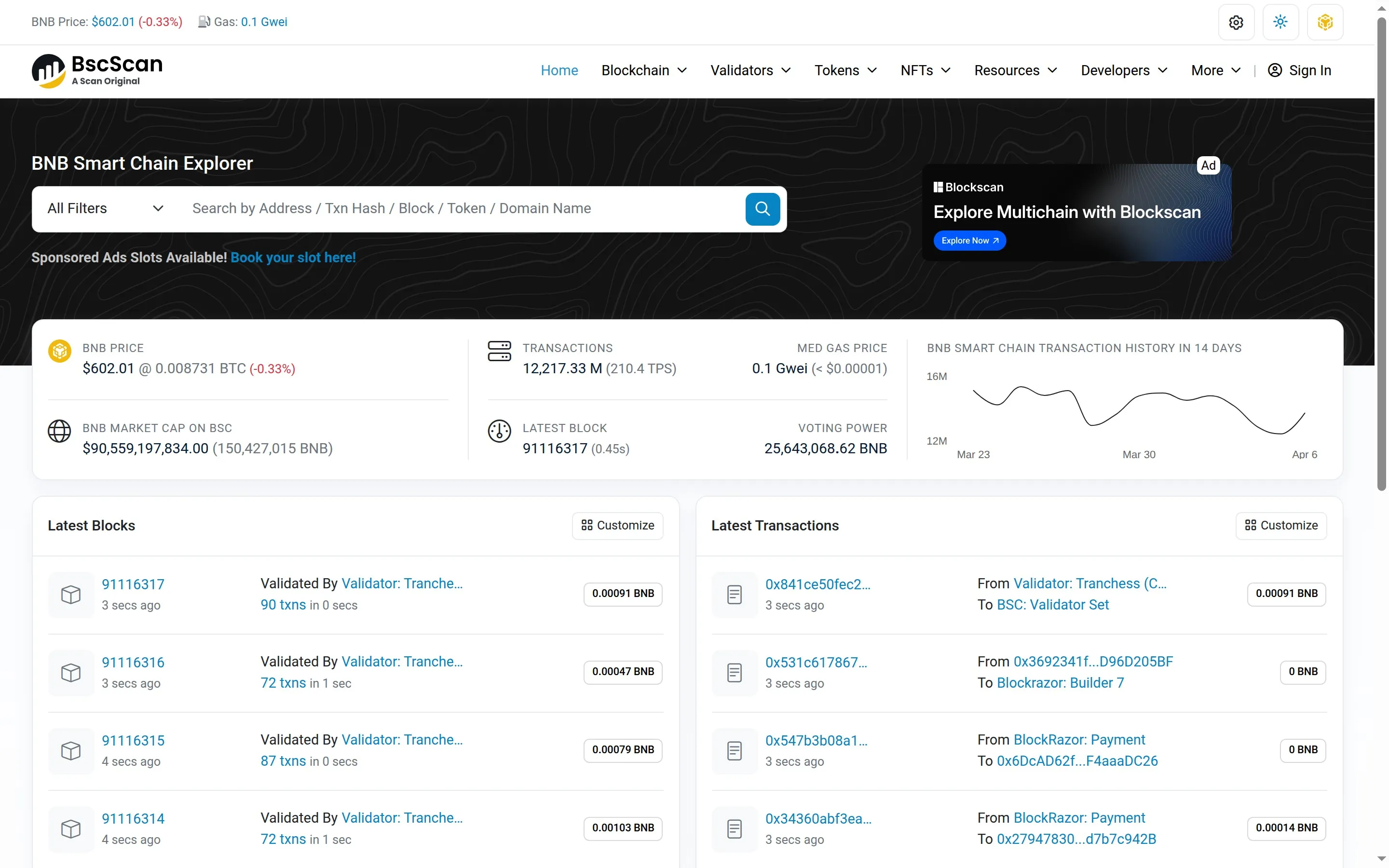
Why BscScan matters on BNB Chain
BNB Chain is accessible, fast and busy. Those are strengths, but they also mean users run into more token clones, more rushed launches and more contract interactions where details matter. BscScan is the reality check that sits underneath that activity.
If a project tells you a token contract is "official," BscScan is where you verify it. If a transfer says it succeeded but the receiving wallet still looks wrong, BscScan is where you confirm the asset path. If a staking or minting action feels opaque, BscScan is where the contract call becomes visible.
The cleanest way to navigate BscScan
The strongest BscScan workflow is simple. Start from the transaction when you have it, move to the wallet for behavior context, then open the token or contract page for identity and logic checks.
How to use BscScan before buying a smaller token
This is where BscScan becomes more than an explorer. It becomes a filter. Before buying a newer or thinner-liquidity token, compare the contract address from the project's site, DEX listing and BscScan. Then look at holders, recent transfers and whether the contract is verified.
You are not looking for perfect purity. You are looking for obvious reasons to walk away. BscScan is excellent for spotting mismatched contract addresses, tiny holder concentration hidden behind hype, or activity patterns that look more promotional than organic.
How this article avoids cannibalizing our other explorer content
We already cover explorers more broadly in our top blockchain explorers roundup and in our Etherscan and Solscan guide. So this page should not pretend to be the universal explorer tutorial.
The stronger editorial angle is BNB Chain-specific: BEP-20 verification, BNB Chain wallet checks, contract inspection for fast-moving listings and practical token due diligence on BscScan.
Common mistakes on BscScan
The main mistake is moving too fast from a chart to an approval or purchase without validating the contract. Another is assuming a successful transaction means the result was economically good. Onchain success only means the network executed the action you signed. It does not mean the token is trustworthy.
The last mistake is reading only one page. The best answers usually come from combining the transaction, wallet and token pages instead of treating any single screen as complete.
Final take
If you are active on BNB Chain, BscScan is one of the highest-leverage tools you can learn. It helps you verify what happened, compare what the front end promised with what the chain recorded, and slow down before interacting with questionable contracts.
FAQ
Related Guides
- How to Use PolygonScan: Track Polygon Transactions, Tokens and Contracts (2026)
- How to Use Arbiscan: Track Arbitrum Transactions, Contracts and Bridge Activity (2026)
- What Is NodeReal: BNB Chain Infrastructure, RPC and Data APIs (2026)
- What is BNB Chain? Smart Chain vs opBNB vs Greenfield
- Best Telegram Bots for BNB Chain 2026: Top 5 Compared
- Soulbound Tokens (SBTs) Explained
Frequently Asked Questions
What is BscScan and what is it for?
BscScan is a block explorer for BNB Chain that lets you search transactions, wallet addresses, tokens and smart contracts. It is used to confirm onchain activity and review contract details.
How do I check a BEP-20 token contract on BscScan?
Search the token name or contract address on BscScan to open the token page, which shows the contract address, total supply, holders and transfers. Confirm you are viewing the official contract before interacting with the token.
How can I verify a BNB Chain transaction on BscScan?
Enter the transaction hash in the BscScan search bar to open its details page showing status, block, timestamp and gas used. A status of success means the transaction was confirmed onchain.
How do I spot a suspicious token on BscScan?
On a block explorer you can review details such as the holder distribution, contract verification status and recent transfers to look for warning signs. Doing your own research and confirming the official contract address helps reduce the risk of scam tokens.