Send Crypto From Coinbase to Trust Wallet Safely (2026)
— By Tony Rabbit in Tutorials
Learn how to safely send crypto from Coinbase to Trust Wallet, ensuring your assets reach their self-custody destination without common transfer mistakes.
Transferring cryptocurrency from a centralized exchange like Coinbase to a self-custody wallet such as Trust Wallet is a fundamental step for many crypto users seeking greater control over their digital assets. The process, while straightforward, requires meticulous attention to detail, particularly regarding the asset, receiving address, and crucial blockchain network. This comprehensive guide will walk you through every step to ensure a safe and successful transfer, helping you avoid common pitfalls and empowering you to manage your crypto securely in 2026 and beyond.
Why Transfer from Coinbase to Trust Wallet?
Coinbase excels as an on-ramp for purchasing cryptocurrencies with fiat currency and offers a user-friendly interface for trading. However, its primary function is as a centralized exchange. Trust Wallet, on the other hand, is a non-custodial (self-custody) wallet, meaning you hold the private keys and have complete control over your assets. Users typically transfer crypto to Trust Wallet for several key reasons:
- Enhanced Security and Control: Moving assets off an exchange minimizes counterparty risk and gives you full ownership.
- dApp Interaction: Trust Wallet is a gateway to the decentralized web (Web3), allowing you to interact with decentralized applications (dApps), participate in DeFi, NFTs, and more.
- Staking and Yield Opportunities: Many on-chain staking and yield farming protocols require assets to be held in a self-custody wallet.
- Privacy: While blockchain transactions are public, self-custody offers a degree of privacy from centralized exchange surveillance.
- Long-Term HODLing: For assets you plan to hold for extended periods, a self-custody wallet is generally considered more secure than an exchange.
The Golden Rulebook for Crypto Transfers
Before initiating any transfer, internalize these fundamental rules:
- Asset Match: The wallet must be configured to receive the exact token you are sending.
- Receiving Address Accuracy: A wrong address can lead to irreversible loss of funds. Always copy and paste.
- Network Alignment: This is the most critical and common point of failure. The sending network on Coinbase MUST match the receiving network on Trust Wallet.
- Test First: For significant amounts or first-time transfers, always send a small test amount.
Step-by-Step Guide: Coinbase to Trust Wallet Transfer
Follow these steps carefully to ensure a smooth and secure transfer of your crypto assets.
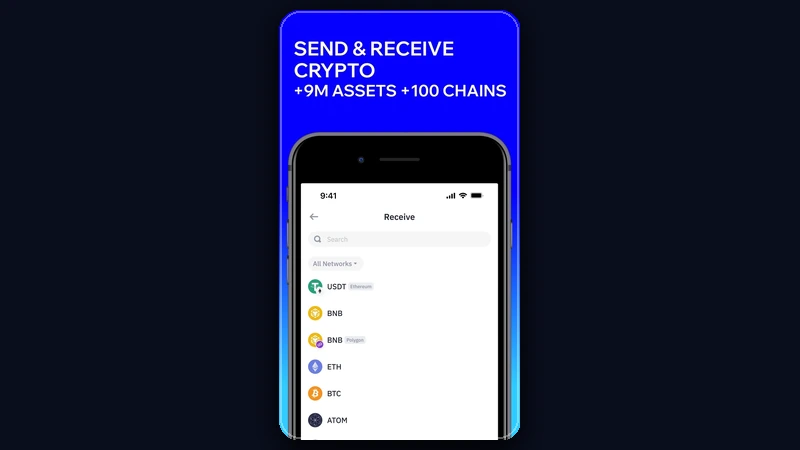
- Step 1: Open Trust Wallet and Select Receive. Launch your Trust Wallet app. On the main screen, tap the 'Receive' button.
- Step 2: Choose the Exact Asset and Network. Search for the specific cryptocurrency you wish to receive (e.g., Ethereum, Solana, USDC). After selecting the asset, Trust Wallet will present you with available networks for that asset. This is crucial: select the network that Coinbase will be sending from. For example, if you're sending ETH, you'll likely choose 'Ethereum' (ERC-20). If you're sending USDC, you might choose 'Polygon' or 'BNB Smart Chain (BEP20)' depending on your intention.
- Step 3: Copy the Trust Wallet Receiving Address. Once you've selected the asset and its corresponding network, Trust Wallet will display your unique receiving address for that specific asset on that specific network. Tap the 'Copy' button to copy this address to your clipboard. Double-check that the address starts with the correct prefix for the chosen network (e.g., '0x' for Ethereum/EVM chains, 'bc1' for Bitcoin).
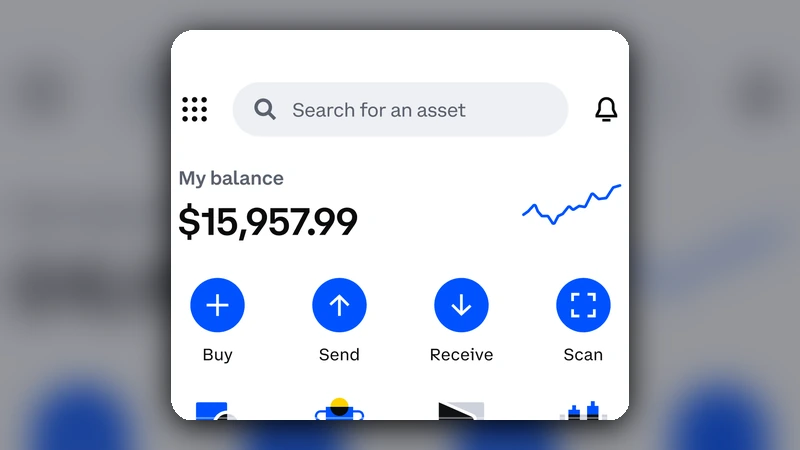
- Step 4: Open Coinbase and Initiate a Send. Log into your Coinbase account (web or mobile app). Navigate to the 'Send / Receive' section. This is usually prominent on the dashboard or under the 'Assets' tab.
- Step 5: Select the Asset to Send. Choose the cryptocurrency you intend to send from your Coinbase portfolio. Ensure it's the exact same asset you selected in Trust Wallet.
- Step 6: Enter the Amount and Paste the Address. Input the amount of crypto you wish to send. In the 'To' or 'Recipient' field, paste the receiving address you copied from Trust Wallet. Do not type it manually.
- Step 7: Crucially, Select the Matching Network on Coinbase. After pasting the address, Coinbase will often attempt to auto-detect the network. However, it's imperative to manually verify and select the correct blockchain network from the available options. This network MUST precisely match the network you selected in Trust Wallet. For instance, if you copied an Ethereum (ERC-20) address from Trust Wallet, ensure you select 'Ethereum' as the network on Coinbase. If you copied a BNB Smart Chain (BEP20) address, select 'BNB Smart Chain' or 'BSC'.
- Step 8: Review All Transaction Details. Before confirming, meticulously review every detail: the asset, the amount, the receiving address, and most importantly, the network. A small mistake here can lead to permanent loss of funds.
- Step 9: Perform a Small Test Transaction (Highly Recommended). For your first transfer, or for any substantial amount, send a minimal amount first (e.g., $5-10 worth of crypto). This allows you to confirm the entire process works correctly without risking a large sum.
- Step 10: Confirm and Send. If everything looks correct (and especially after a successful test send), proceed to confirm the transaction. You may need to enter a 2FA code or biometric authentication.
- Step 11: Verify Funds in Trust Wallet. Once Coinbase indicates the transaction is complete (this may take a few minutes to an hour depending on network congestion), open your Trust Wallet. The transferred funds should appear in your wallet balance. If not immediately visible, ensure you are viewing the correct asset and that the network filter (if available) is set correctly.
Understanding Network Compatibility
The concept of blockchain networks is often the most confusing aspect for new users. Think of different blockchains (Ethereum, Solana, Polygon, BNB Smart Chain, etc.) as separate railway lines. While they might transport similar types of cargo (crypto tokens), they operate independently. Sending cargo from an Ethereum train station to a Solana train station will result in loss because they are not connected in that way.
Withdrawal Review Checklist
Before hitting 'Send,' run through this quick checklist:
Common Coinbase to Trust Wallet Mistakes to Avoid
These errors are frequently made by beginners and can lead to lost funds:
- Choosing the Wrong Network: This is the most common and catastrophic mistake. Sending ERC-20 ETH to a BEP-20 address, or vice versa, will result in lost funds.
- Assuming Address Alone Solves Everything: While the address is critical, it's intrinsically linked to the network. An Ethereum address is distinct from a Solana address, even if the token name is the same.
- Skipping the Test Withdrawal: Overconfidence or impatience can be costly. A small test transaction is cheap insurance.
- Typing the Address Manually: Always copy and paste. Malicious software can sometimes alter copied addresses, so a quick visual check of the first and last few characters after pasting is also a good habit.
- Ignoring Network Fees: While Coinbase often covers withdrawal fees, network transaction fees (gas fees) still apply and can fluctuate. Ensure you understand any potential costs.
- Not Confirming in Trust Wallet: Don't assume the transfer is successful just because Coinbase says it is. Always verify the funds have arrived in Trust Wallet before proceeding with any other actions.
What if My Funds Don't Arrive? Troubleshooting Tips
If your crypto hasn't appeared in Trust Wallet after a reasonable time, don't panic. Here's what to check:
- Transaction Status on Coinbase: Check the transaction history on Coinbase. Is the status 'Completed' or 'Pending'? If pending, it might just be network congestion.
- Blockchain Explorer: Copy the transaction ID (TxID) from Coinbase and paste it into the appropriate blockchain explorer (e.g., Etherscan for Ethereum, BscScan for BNB Smart Chain, Polygonscan for Polygon). This will show you the real-time status of your transaction on the blockchain.
- Trust Wallet Network Selection: Ensure you have the correct network selected in Trust Wallet. Sometimes, assets might be on a different network than you expect, and Trust Wallet needs to be configured to display it.
- Add Custom Token: If it's a less common token, you might need to manually add it to Trust Wallet using its contract address on the correct network.
- Trust Wallet Support: If all else fails, contact Trust Wallet support. Provide them with the transaction ID and details.
How DEXTools Helps Your Self-Custody Journey
While DEXTools doesn't directly facilitate transfers between Coinbase and Trust Wallet, it plays a vital role in your broader self-custody journey. Once your assets are in Trust Wallet, DEXTools becomes an invaluable resource for:
- Real-time Price Tracking: Monitor the performance of your assets across various decentralized exchanges.
- Token Research: Analyze new and existing tokens, check liquidity, trading volume, and community sentiment before interacting with dApps or making further investments.
- Market Insights: Stay informed about market trends and identify potential opportunities or risks for the assets held in your Trust Wallet.
By leveraging tools like DEXTools in conjunction with your self-custody wallet, you gain a more holistic and informed approach to managing your decentralized portfolio.
Conclusion
Sending crypto from Coinbase to Trust Wallet is a foundational skill for anyone serious about engaging with the decentralized ecosystem. By diligently following the steps outlined, paying close attention to asset and network compatibility, and always performing a test transaction for important transfers, you can confidently move your assets into self-custody. This empowers you with greater control, security, and access to the vast world of Web3 applications.
Frequently Asked Questions
Is it safe to send crypto from Coinbase to Trust Wallet?
Yes, it is generally safe if you follow the correct steps, especially ensuring the asset, receiving address, and blockchain network all match. The primary risk is user error, not the transfer process itself.
How long does it take to transfer crypto from Coinbase to Trust Wallet?
Transfer times vary depending on the cryptocurrency and network congestion. Bitcoin can take 10-60 minutes, while Ethereum and other faster chains might complete in 1-5 minutes. Always check the transaction status on Coinbase and a blockchain explorer.
What happens if I send crypto to the wrong network?
If you send crypto to an incompatible network (e.g., ERC-20 ETH to a BEP-20 address), the funds are almost certainly lost and unrecoverable. This is the most common and critical mistake to avoid.
Are there fees for sending crypto from Coinbase to Trust Wallet?
Coinbase typically does not charge a direct withdrawal fee, but you will pay the network transaction fee (gas fee) required by the blockchain itself. These fees vary based on network congestion and the asset being sent.
Can I send any crypto from Coinbase to Trust Wallet?
You can send most cryptocurrencies supported by both Coinbase and Trust Wallet. However, you must ensure that Trust Wallet supports the specific asset on the specific blockchain network you intend to use for the transfer.
How do I find my Trust Wallet receiving address?
In Trust Wallet, tap 'Receive', then select the specific cryptocurrency you want to receive. The app will then display your unique receiving address for that asset on its primary network, or allow you to choose a specific network if multiple are supported for that asset.
Why should I move my crypto from Coinbase to Trust Wallet?
Moving crypto to Trust Wallet gives you full self-custody, meaning you control your private keys. This enhances security, allows interaction with dApps, participation in DeFi, and provides greater control over your assets compared to keeping them on a centralized exchange.
What if my crypto doesn't show up in Trust Wallet after sending?
First, check the transaction status on Coinbase and then on a blockchain explorer using the transaction ID. Ensure you have the correct network selected in Trust Wallet and that the asset is visible. For less common tokens, you might need to add them manually using their contract address.
Can I reverse a crypto transfer from Coinbase?
No, blockchain transactions are irreversible once confirmed. This is why meticulous verification of the address and network before sending is paramount.