How to Use Backpack Exchange: Complete Solana Trading Tutorial (2026)
— By Tony Rabbit in Tutorials
Learn how to use Backpack Exchange for KYC, deposits, spot trading, perpetual futures, fees and risk controls. This page focuses on the exchange workflow, not standalone wallet setup.
Backpack Exchange is a regulated cryptocurrency exchange founded by Armani Ferrante and Tristan Yver, known for its connection to the Solana ecosystem. It facilitates trading activities including spot markets and perpetual futures, requiring account setup, KYC, and funding. The platform also offers risk controls for traders.
Backpack Exchange has quickly become one of the most talked-about platforms in the Solana ecosystem, but this page is specifically about the exchange workflow: account setup, KYC, funding, spot markets, perpetual futures, fees, and trading risk controls.
Need the self-custody product instead? Use our Backpack Wallet guide for setup, backup, wallet funding, app connections and security hygiene.
Built by the team behind Mad Lads and the Coral protocol, Backpack sits in an unusual middle ground: it feels close to the Solana ecosystem, but the core user journey here is still exchange usage rather than standalone wallet onboarding.
What Is Backpack Exchange?
Backpack Exchange is a regulated cryptocurrency exchange founded by Armani Ferrante and Tristan Yver. Ferrante is best known as the creator of the Anchor framework, which has become the standard development toolkit for building programs on Solana. The exchange launched with a focus on the Solana ecosystem but has since expanded to support multiple chains and assets.
What sets Backpack apart from other exchanges is its dual nature. It operates both a centralized exchange (CEX) for spot and perpetual futures trading, and a browser extension wallet known as Backpack Wallet. The wallet introduced the concept of xNFTs - executable NFTs that function as decentralized applications running directly inside the wallet interface.
The exchange is backed by notable investors and has secured regulatory licenses in multiple jurisdictions. This regulatory-first approach has helped it build trust among users who want a compliant trading experience without sacrificing performance or the Solana-native feel.
Key Features at a Glance
- Spot Trading: Trade popular Solana tokens and major cryptocurrencies with competitive fees
- Perpetual Futures: Access leveraged trading on select pairs with up to 20x leverage
- Backpack Wallet: A standalone browser extension wallet with xNFT support
- MPC Custody: Multi-party computation technology for secure fund storage
- Regulatory Compliance: Licensed and KYC-compliant across multiple regions
- Low Fees: Competitive maker/taker fee structure with volume-based discounts
- Staking: Earn rewards by staking supported tokens directly on the platform
Setting Up Your Backpack Exchange Account
Getting started with Backpack Exchange is straightforward. Follow these steps to create your account and begin trading on one of Solana's leading platforms.
Step 1: Visit the Backpack Exchange Website
Navigate to backpack.exchange in your web browser. Make sure you are on the official domain to avoid phishing scams. Bookmark the page after your first visit for safe future access.
Step 2: Create Your Account
Click the "Sign Up" button in the top right corner. You will need to provide:
- A valid email address
- A strong, unique password (use a password manager)
- Acceptance of the terms of service
After submitting, check your email for a verification link and click it to confirm your account. You can also sign up using a Google or Apple account for convenience.
Step 3: Enable Two-Factor Authentication (2FA)
Before doing anything else, enable 2FA on your account. Go to Settings and then Security to set up either:
- Authenticator App (Recommended): Use Google Authenticator, Authy, or a similar TOTP app
- SMS Verification: Less secure but still better than no 2FA
Save your backup codes in a secure location. If you lose access to your 2FA device without backup codes, account recovery can be a lengthy process.
KYC Verification Process
Backpack Exchange requires identity verification (Know Your Customer, or KYC) to comply with international regulations. This is mandatory for all users who want to trade and withdraw funds.
Basic Verification (Level 1)
Basic verification requires:
- Your full legal name
- Date of birth
- Country of residence
- A government-issued photo ID (passport, driver's license, or national ID card)
- A selfie for facial verification
This process typically takes between 2 and 15 minutes for automated approval. Once verified, you gain access to spot trading, deposits, and withdrawals with standard limits.
Advanced Verification (Level 2)
For higher withdrawal limits and access to all features, you may need to complete advanced verification:
- Proof of address (utility bill, bank statement, or government letter dated within the last 3 months)
- Source of funds declaration
- Additional identity documentation if requested
Advanced verification can take up to 48 hours but is usually completed within a few hours during business days.
Depositing Funds to Backpack Exchange
Once your account is verified, you can deposit funds to start trading. Backpack supports multiple deposit methods and chains.
Crypto Deposits
To deposit cryptocurrency:
- Click "Deposit" in the top navigation or from your wallet/portfolio page
- Select the asset you want to deposit (SOL, USDC, BTC, ETH, etc.)
- Choose the network (Solana, Ethereum, Bitcoin, etc.)
- Copy the deposit address or scan the QR code
- Send funds from your external wallet to this address
Important tips for deposits:
- Always double-check the network matches between your sending wallet and the Backpack deposit address
- Solana deposits (SOL, SPL tokens) are typically confirmed within seconds
- Bitcoin deposits require multiple confirmations and can take 30 to 60 minutes
- Ethereum deposits usually confirm within a few minutes
- There is no minimum deposit for most assets, but very small amounts may not cover network fees
Fiat On-Ramp
Backpack has integrated fiat on-ramp partners that allow you to purchase crypto directly with credit/debit cards or bank transfers. The available methods vary by region, but commonly include:
- Credit and debit card purchases (Visa, Mastercard)
- Bank transfers (SEPA for European users)
- Third-party payment providers like MoonPay or Banxa
Note that fiat purchases may carry additional fees from the payment processor, typically ranging from 1.5% to 3.5% depending on the method and region.
Spot Trading on Backpack Exchange
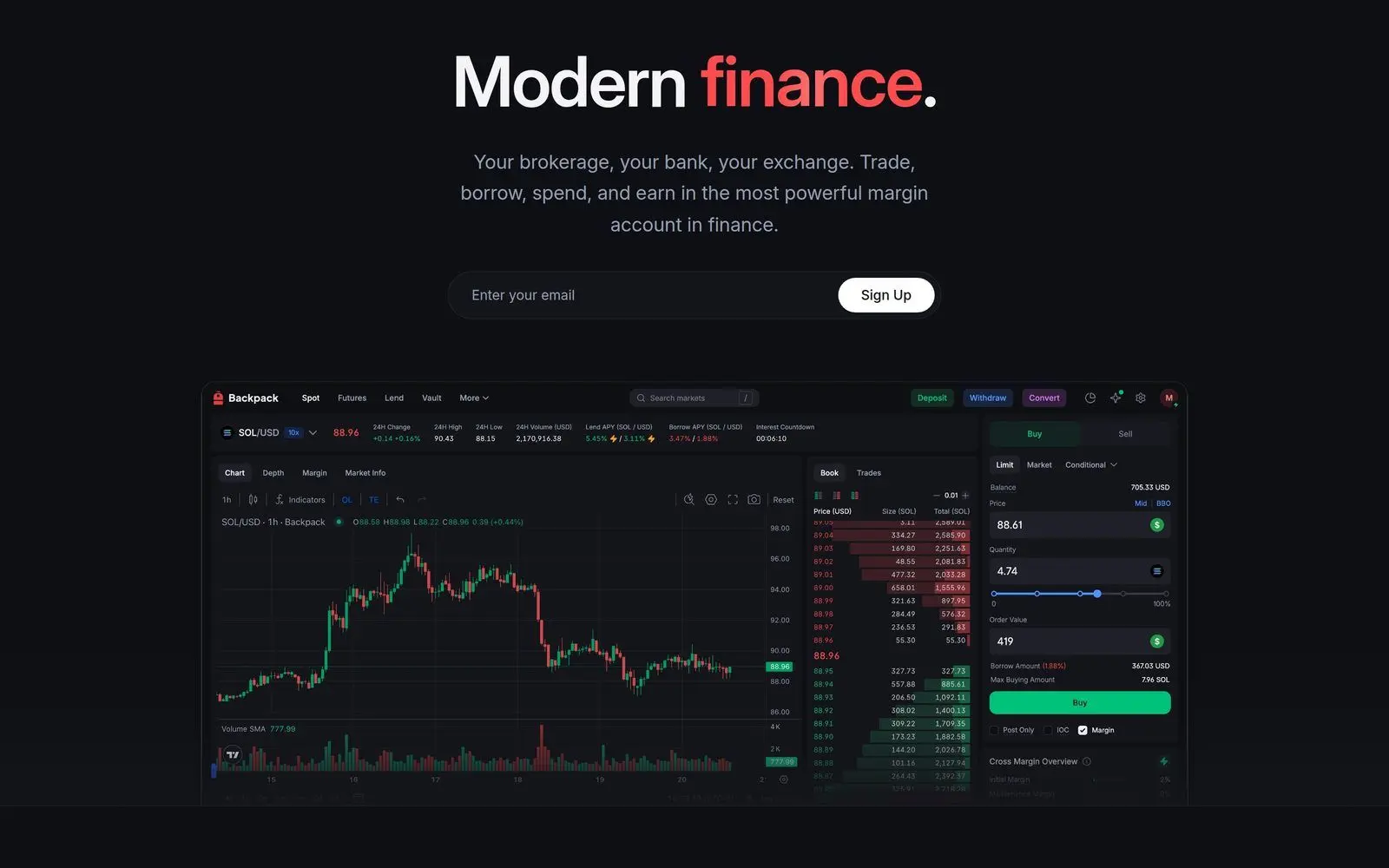
Spot trading is the core functionality of Backpack Exchange. The trading interface is clean and intuitive, designed to work well for both beginners and experienced traders.
Navigating the Trading Interface
The spot trading page includes:
- Price Chart: TradingView-powered charts with full technical analysis tools
- Order Book: Real-time buy and sell orders with depth visualization
- Trade History: Recent executed trades on the selected pair
- Order Entry Panel: Where you place your buy and sell orders
- Open Orders / Order History: Track your active and past trades
Placing Your First Trade
To execute a spot trade on Backpack:
- Select your trading pair from the markets list (e.g., SOL/USDC)
- Choose the order type: Market, Limit, or Stop-Limit
- Enter the amount you want to buy or sell
- Review the order details including estimated fees
- Click "Buy" or "Sell" to submit the order
Order Types Explained
Market Order: Executes immediately at the best available price. Best for quick entries and exits when you prioritize speed over price precision.
Limit Order: Sets a specific price at which you want to buy or sell. The order will only execute at your specified price or better. Limit orders that add liquidity to the order book qualify for lower maker fees.
Stop-Limit Order: Combines a trigger price with a limit order. When the market hits your stop price, a limit order is placed at your specified limit price. Useful for setting stop-losses or breakout entries.
Popular Trading Pairs
Backpack Exchange offers a wide range of Solana-native tokens alongside major cryptocurrencies. Some of the most popular pairs include:
- SOL/USDC - The flagship Solana trading pair
- BTC/USDC - Bitcoin against USDC
- ETH/USDC - Ethereum against USDC
- JUP/USDC - Jupiter exchange token
- PYTH/USDC - Pyth Network oracle token
- WEN/USDC - Popular Solana memecoin
- BONK/USDC - Solana's original dog coin
Perpetual Futures Trading
For traders seeking leveraged exposure, Backpack offers perpetual futures contracts. This is an advanced feature that carries significant risk and is not recommended for beginners.
Understanding Perpetuals on Backpack
Perpetual futures (or "perps") are derivative contracts that let you trade with leverage without an expiration date. On Backpack, you can:
- Go long (profit when price goes up) or short (profit when price goes down)
- Use leverage up to 20x on select pairs
- Trade with USDC as collateral
- Set take-profit and stop-loss orders
How to Open a Perpetual Futures Position
- Navigate to the "Futures" or "Perpetuals" tab in the trading interface
- Select the perpetual contract you want to trade (e.g., SOL-PERP)
- Choose your leverage level using the leverage slider
- Select your order type (Market or Limit)
- Enter your position size
- Review margin requirements and liquidation price
- Click "Long" or "Short" to open your position
Risk Management for Futures
Trading perpetual futures with leverage amplifies both gains and losses. Follow these risk management guidelines:
- Start with low leverage: 2x to 3x is plenty for most traders. Higher leverage dramatically increases liquidation risk.
- Always set stop-losses: Define your maximum acceptable loss before entering a trade.
- Size your positions wisely: Never risk more than 1-2% of your total portfolio on a single trade.
- Monitor funding rates: Perpetual contracts use funding rates to keep the contract price close to the spot price. High funding rates can eat into your profits over time.
- Understand liquidation: If your position moves against you enough to deplete your margin, it will be liquidated. Know your liquidation price before entering.
Backpack Wallet - The xNFT Experience
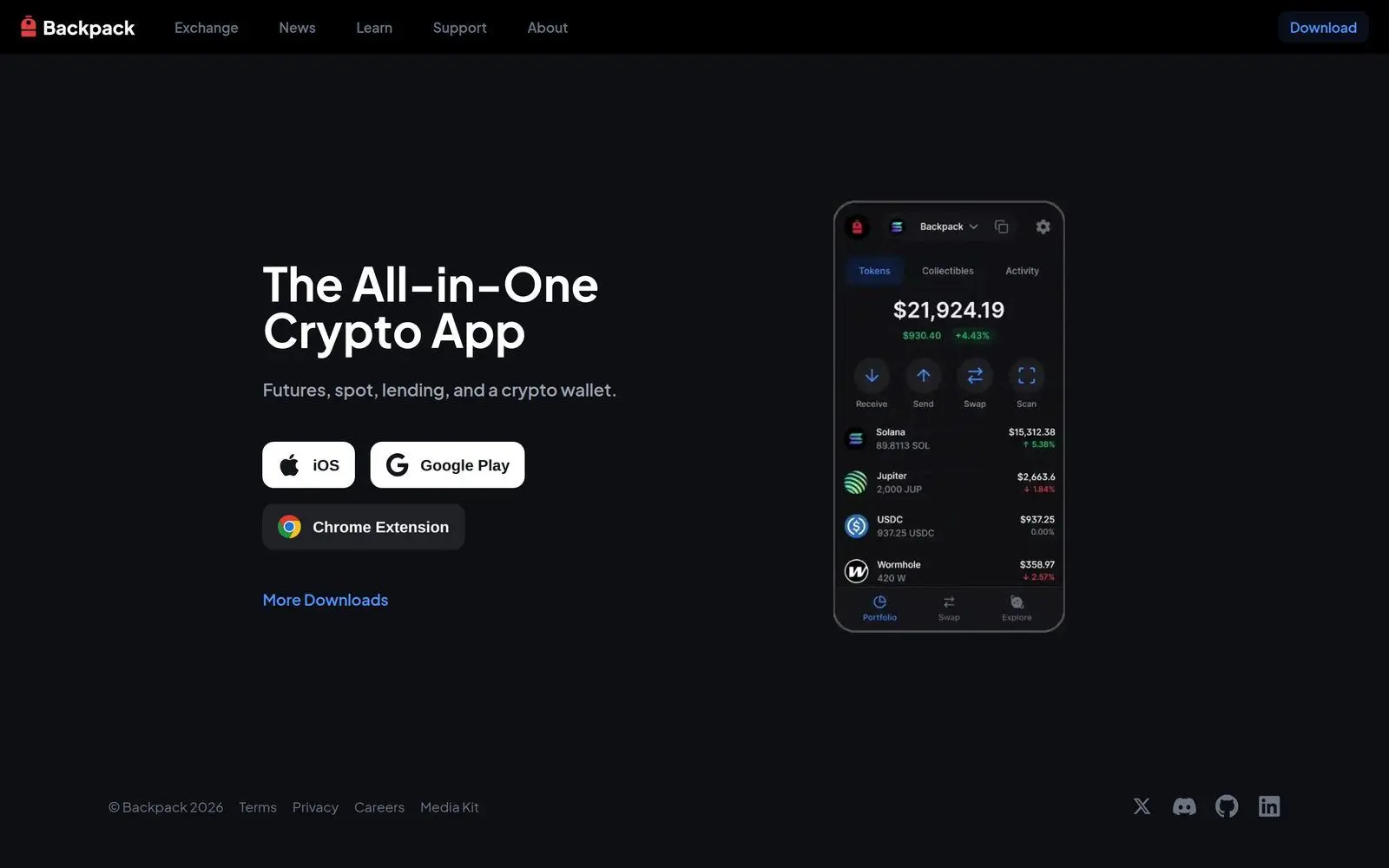
Beyond the exchange, Backpack also offers a standalone browser extension wallet that has become a popular choice in the Solana ecosystem. This section of our Backpack exchange tutorial covers the wallet's unique features and how to use them.
Installing Backpack Wallet
- Visit the Chrome Web Store (or your browser's extension store)
- Search for "Backpack Wallet" or navigate directly from the official Backpack website
- Click "Add to Chrome" (or equivalent for your browser)
- Create a new wallet or import an existing one using your seed phrase
- Set a strong password for the extension
- Back up your recovery phrase and store it offline in a secure location
What Are xNFTs?
The standout feature of Backpack Wallet is xNFT support. xNFTs (executable NFTs) are a new token standard that turns NFTs into fully functional applications. Instead of just being a static image or collectible, an xNFT can be an entire decentralized application that runs inside your wallet.
Think of xNFTs like apps on your phone, but they live on the blockchain and run inside your wallet. Examples include:
- DEX interfaces: Swap tokens directly inside the wallet
- Portfolio trackers: Monitor your holdings without visiting external sites
- Gaming: Play blockchain games from within the wallet
- DeFi dashboards: Manage lending, staking, and yield farming positions
- NFT marketplaces: Browse and buy NFTs without leaving the wallet
Using Backpack Wallet with DeFi
Backpack Wallet functions as a standard Solana wallet for all DeFi interactions. You can connect it to any Solana dApp just like you would with Phantom or Solflare:
- Visit any Solana DeFi protocol (Jupiter, Raydium, Marinade, etc.)
- Click "Connect Wallet"
- Select "Backpack" from the wallet options
- Approve the connection in the wallet popup
- You can now interact with the protocol using your Backpack Wallet
Connecting Backpack Wallet to Backpack Exchange
One of the smoothest experiences is connecting your Backpack Wallet directly to the exchange. This allows for seamless transfers between your self-custody wallet and your exchange account, reducing friction when moving between DeFi and centralized trading.
Staking on Backpack Exchange
Backpack offers staking services for select tokens, allowing you to earn passive rewards while keeping your assets on the platform.
How to Stake
- Navigate to the "Earn" or "Staking" section of the platform
- Browse available staking opportunities and their current APY rates
- Select the token you want to stake
- Enter the amount to stake
- Confirm the staking transaction
Staking Considerations
- Lock-up periods: Some staking options have lock-up periods during which you cannot withdraw your tokens. Check the terms before committing.
- APY fluctuation: Annual percentage yields are variable and can change based on network conditions and total staked amount.
- Compounding: Some staking rewards auto-compound, while others require manual claiming and restaking.
- Risk: Staking on a centralized exchange means you are trusting the exchange with custody of your tokens. For maximum security, consider native staking through your own wallet.
Fees on Backpack Exchange
Understanding the fee structure is essential for any Backpack exchange tutorial. Backpack offers competitive rates compared to other major exchanges.
Spot Trading Fees
Base Tier (0-30 day volume under $100K):
- Maker fee: 0.10%
- Taker fee: 0.10%
Higher Volume Tiers:
- Fees decrease progressively with higher 30-day trading volumes
- Top-tier traders can access maker fees as low as 0.02% and taker fees as low as 0.04%
- Volume is calculated across both spot and futures markets
Perpetual Futures Fees
- Maker fee: 0.02% (base tier)
- Taker fee: 0.06% (base tier)
- Funding rates: Variable, paid/received every 8 hours depending on market conditions
Deposit and Withdrawal Fees
- Deposits: Free for all crypto deposits (network fees still apply on the sender's side)
- Withdrawals: Vary by asset and network. Solana withdrawals are extremely cheap (fractions of a cent). Bitcoin and Ethereum withdrawals are subject to current network fee conditions.
Security Best Practices
Security should be your top priority when using any cryptocurrency exchange. Here is how to keep your Backpack account safe.
Account Security
- Enable 2FA immediately: Use an authenticator app, not SMS
- Use a unique password: Never reuse passwords across platforms
- Set up withdrawal whitelisting: Only allow withdrawals to pre-approved addresses
- Enable email confirmations: Require email approval for withdrawals
- Check login history regularly: Monitor for unauthorized access attempts
- Beware of phishing: Always verify you are on the correct URL before entering credentials
Backpack's Security Infrastructure
Backpack Exchange employs several security measures to protect user funds:
- MPC (Multi-Party Computation) Wallets: Private keys are split across multiple parties, eliminating single points of failure
- Cold Storage: The majority of user funds are stored in offline cold wallets
- Regular Audits: Smart contracts and platform code undergo regular third-party security audits
- Insurance: The exchange maintains insurance coverage for potential security incidents
- Regulatory Oversight: Operating under regulatory frameworks adds an additional layer of accountability
Backpack vs Other Solana Exchanges
How does Backpack stack up against other popular options for trading Solana tokens? Here is a comparison to help you decide.
Backpack vs Jupiter (DEX)
- Type: Backpack is a CEX; Jupiter is a DEX aggregator
- KYC: Backpack requires KYC; Jupiter does not
- Fees: Comparable for most trades, though Jupiter fees vary by route
- Token Selection: Jupiter has access to every SPL token; Backpack lists select tokens
- Futures: Backpack offers perps; Jupiter launched its own perps product
- Best for: Backpack excels at larger orders with less slippage; Jupiter is better for accessing long-tail tokens
Backpack vs Binance (for Solana Trading)
- Solana Focus: Backpack is Solana-native with deeper ecosystem integration
- Token Listings: Backpack lists Solana ecosystem tokens faster
- Wallet Integration: Backpack Wallet provides seamless CEX-to-DeFi bridging
- Volume: Binance has significantly higher overall volume
- Best for: Backpack wins for Solana-focused traders; Binance for multi-chain variety
Backpack vs Phantom Wallet
- Type: Backpack offers both an exchange and wallet; Phantom is wallet-only (with a built-in swap)
- xNFTs: Backpack Wallet supports xNFTs; Phantom does not
- Swap: Both offer in-wallet token swaps
- User Base: Phantom has a larger user base; Backpack Wallet is growing
- Best for: Backpack if you want xNFT functionality and an exchange; Phantom for a battle-tested daily wallet
Tips for Getting the Most Out of Backpack
Now that you have covered the core sections of this guide, here are some pro tips to enhance your experience:
- Use limit orders for better prices: Market orders are convenient but limit orders save you money on fees and slippage.
- Check the announcements: Backpack frequently lists new tokens and runs trading competitions. Follow their Twitter/X account and check the announcements page regularly.
- Explore xNFTs: The xNFT ecosystem is still young but growing. Check the Backpack Wallet's app store to discover new tools and utilities.
- Withdraw to self-custody: Do not keep more funds on any exchange than you need for active trading. Transfer the rest to your Backpack Wallet or a hardware wallet.
- Track your trades: Use the export feature to download your trade history for portfolio tracking and tax purposes.
- Use DEXTools for analysis: Before trading any token on Backpack, research it on DEXTools to check liquidity, holder distribution, and price action on DEX markets.
Getting Started - Quick Checklist
Ready to dive in? Here is your quick-start checklist for this Backpack exchange tutorial:
- Create your account at backpack.exchange
- Enable 2FA with an authenticator app
- Complete KYC verification (have your ID ready)
- Deposit funds (SOL or USDC recommended for Solana trading)
- Place your first spot trade
- Install Backpack Wallet for DeFi access
- Explore xNFT applications in the wallet
- Set up withdrawal whitelisting for security
Video: Backpack Exchange Tutorial
Frequently Asked Questions
Is Backpack Exchange safe?
Backpack Exchange is built by the team behind Mad Lads and Coral (creators of Anchor framework). It is regulated, requires KYC, and uses MPC wallet technology for secure custody. However, as with any exchange, you should not store large amounts long-term. Transfer funds to self-custody wallets for safekeeping.
What are the fees on Backpack Exchange?
Backpack offers competitive fees starting at 0.1% maker and 0.1% taker for spot trading. Perpetual futures fees start at 0.02% maker and 0.06% taker. Fees decrease with higher trading volume tiers, rewarding active traders with progressively better rates.
Does Backpack Exchange require KYC?
Yes, Backpack requires identity verification (KYC) to comply with regulations. Basic verification requires a government ID and takes a few minutes. Full verification unlocks higher withdrawal limits and access to all platform features.
What is the Backpack Wallet?
Backpack Wallet is a separate browser extension wallet for Solana that supports xNFTs (executable NFTs). It functions like Phantom but with the added ability to run applications directly inside the wallet through xNFT technology. You can install it independently from using the exchange.
Can I use Backpack Exchange in the US?
Backpack Exchange availability varies by jurisdiction. Some features may be restricted in certain regions including the US. Check their terms of service for the latest regional availability and compliance requirements before signing up.
Start Trading Smarter with DEXTools
Backpack Exchange gives you a powerful platform for trading Solana tokens, but smart trading starts with solid research. Before you buy any token on Backpack or any other exchange, head to DEXTools.io to analyze real-time DEX data, check token liquidity, review holder distribution, and spot potential red flags.
DEXTools provides the on-chain intelligence you need to trade with confidence - whether you are buying on a centralized exchange like Backpack or swapping directly on a DEX. Pair your Backpack exchange experience with DEXTools analytics and take your Solana trading to the next level.