Zapper Tutorial: Navigate DeFi Dashboards and Manage Multi-Chain Portfolios (2026)
— By Tony Rabbit in Tutorials
A complete Zapper tutorial for 2026 covering portfolio tracking, token discovery, NFT monitoring, social features, swaps, and multi-chain DeFi management.
ZAPPER TUTORIAL - 2026 GUIDE
Zapper has become one of the most useful interfaces in crypto for following onchain activity, reviewing token markets, tracking NFT collections, and keeping a multi-chain portfolio readable without jumping across ten different tabs.
Multi-chain
Track assets across major networks
Social
Live onchain feed with public wallet activity
Free
Browse first, connect only when ready
What Zapper Is and Why It Matters in DeFi
Zapper started as a DeFi dashboard, but in 2026 it feels more like an onchain operating layer for retail and power users alike. It combines portfolio visibility, token discovery, NFT tracking, swap routing, and a social feed built around real wallet activity. Instead of relying on anonymous posts, Zapper links conversation to observable onchain behavior, which makes the signal much more useful when you are trying to understand where attention and capital are moving.
That combination is the reason Zapper still matters. A lot of crypto interfaces are either good at analytics, good at portfolio views, or good at community. Zapper sits in the middle. You can open the homepage to spot trending assets, jump into a token page, review related social chatter, and then check how that fits into your broader cross-chain portfolio without leaving the same ecosystem.
Understanding the Main Interface
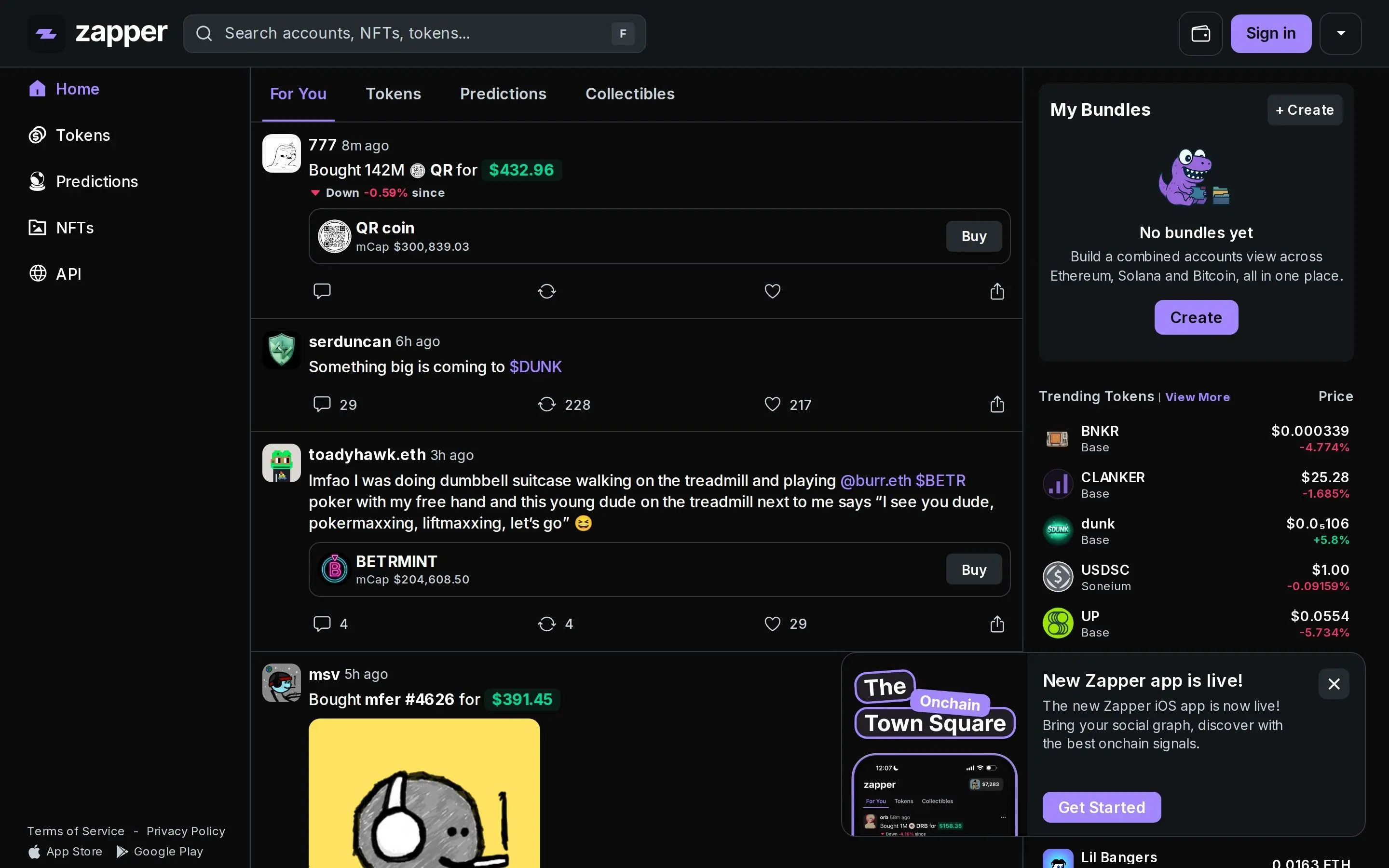
The current Zapper homepage is the best place to get oriented. The left sidebar acts as the main navigation layer, with access to Home, Tokens, Predictions, NFTs, and the API section. In the center, the main feed displays wallet activity and social posts. On the right, Zapper highlights trending tokens and utility modules such as Bundles, which let you merge multiple wallets into one combined view.
This layout is useful because it mirrors how many DeFi users actually work. The feed gives you context, the sidebar gives you structure, and the right column gives you quick market cues. You are not forced to choose between portfolio tracking and discovery because both happen in the same session.
Interface note
Older references to a dedicated /explore page are outdated. At the time of capture, that route returned a 404 page. Discovery now happens primarily through the main feed, token pages, and NFT rankings, which is where the product currently feels strongest.
Connecting a Wallet and Building a Portfolio View
You can browse Zapper without signing in, but connecting a wallet is what turns it into a true portfolio dashboard. The purple Sign In button in the upper right opens the wallet connection flow. Zapper supports the familiar options, including MetaMask, WalletConnect, and other popular wallet providers. The connection process is non-custodial, so you are signing a message rather than transferring funds or handing over private keys.
Once connected, Zapper can map your balances, transaction history, NFTs, and DeFi positions across multiple chains. This is where the platform becomes especially useful for users who do not keep everything in one address. Many people have one wallet for long-term holds, another for active trading, and a third for NFTs or experimental protocols. Zapper handles that fragmentation with Bundles, which let you combine several wallets into one cleaner summary.
That bundled view matters more than it sounds. A lot of portfolio mistakes come from incomplete visibility. If you cannot see your stablecoins on Base, your NFT exposure on Ethereum, and your DeFi positions on Arbitrum in one place, it becomes harder to manage overall risk. Zapper solves that by collapsing the mess into a unified dashboard.
Multi-Chain Coverage and What It Means in Practice
Multi-chain support is not just a marketing line here. It is the core reason to use Zapper. The platform is designed around the reality that capital flows between ecosystems. Ethereum still anchors a huge amount of DeFi activity, but serious users also spend time on Polygon, Arbitrum, Optimism, Base, Solana, and other networks depending on fees, liquidity, incentives, and market momentum.
In practical terms, this means you can open one interface and understand whether your money is concentrated on a single chain, spread too thinly across many chains, or unintentionally sitting idle in stablecoins and low-conviction positions. That kind of visibility is the first step to better portfolio management.
Reading Token Pages and DeFi Position Clues
Zapper token pages bring market data and social context together. Rather than showing only price and volume, the page layers in conversation, wallet activity, and swap access. That matters because price alone rarely tells the full story in DeFi. A chart can move because smart money is rotating in, because one chain is suddenly attracting attention, or because a speculative narrative is burning hot for a few hours. Zapper helps you read the context around that move.
The token page below shows the kind of layout that makes this useful: charting, headline stats, liquidity information, and a swap panel on the same screen. For active traders, this reduces friction. For longer-term portfolio managers, it shortens the time between noticing a trend and evaluating whether it deserves capital.
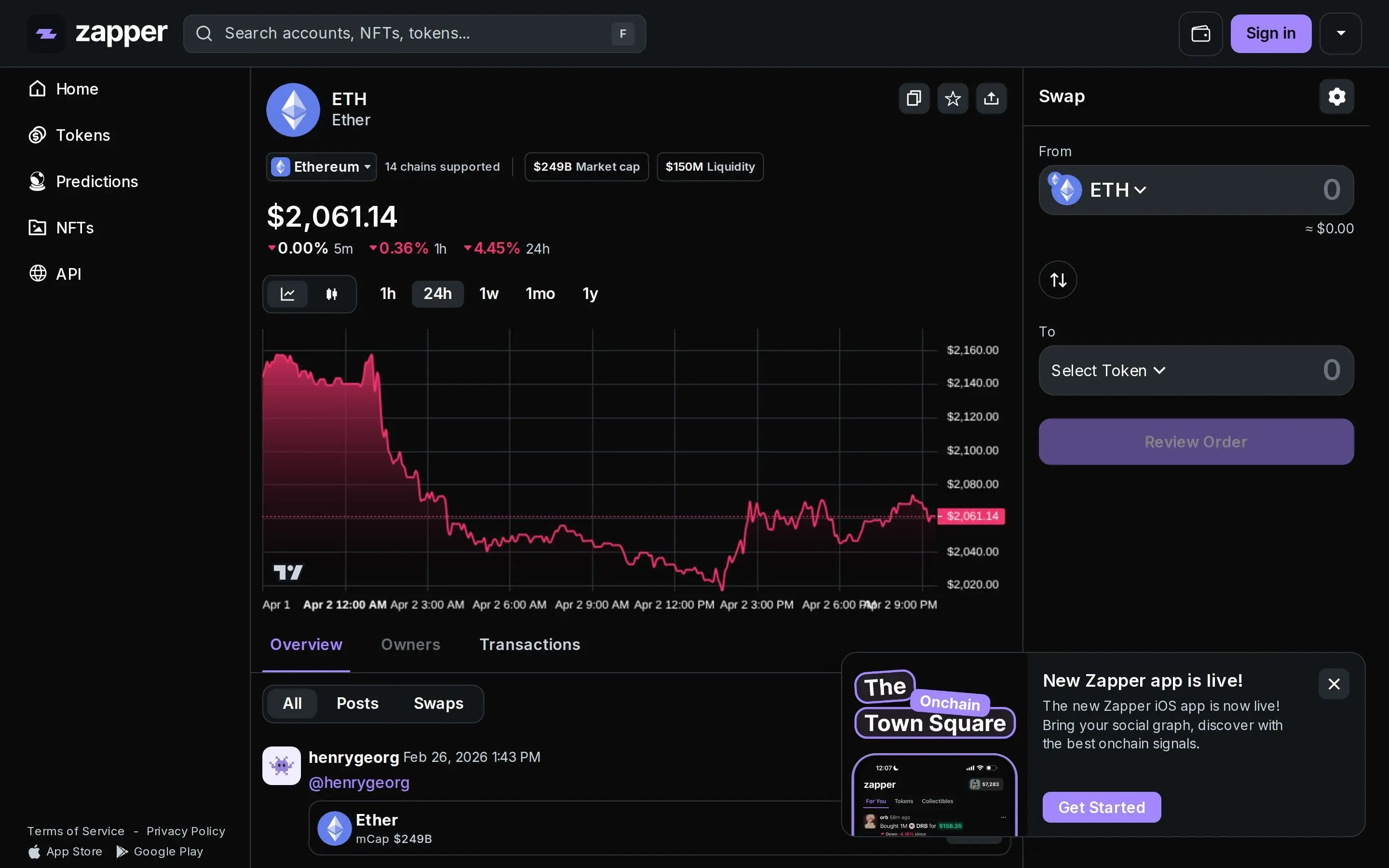
Even if you are not constantly trading, token pages are useful for position review. If you hold ETH, OP, ARB, or a more speculative asset, Zapper gives you a fast sense of where liquidity sits, whether the asset is trending, and how the surrounding conversation looks. That makes it easier to decide whether to hold, reduce, rotate, or simply keep watching.
Why this helps with DeFi positions
Zapper is especially strong when you want to understand the overlap between portfolio exposure and market behavior. If a position is underperforming, the answer may not be inside your wallet alone. It may show up in falling liquidity, cooling community interest, or a visible rotation toward another chain or narrative.
NFT Portfolio Tracking and Collection Discovery
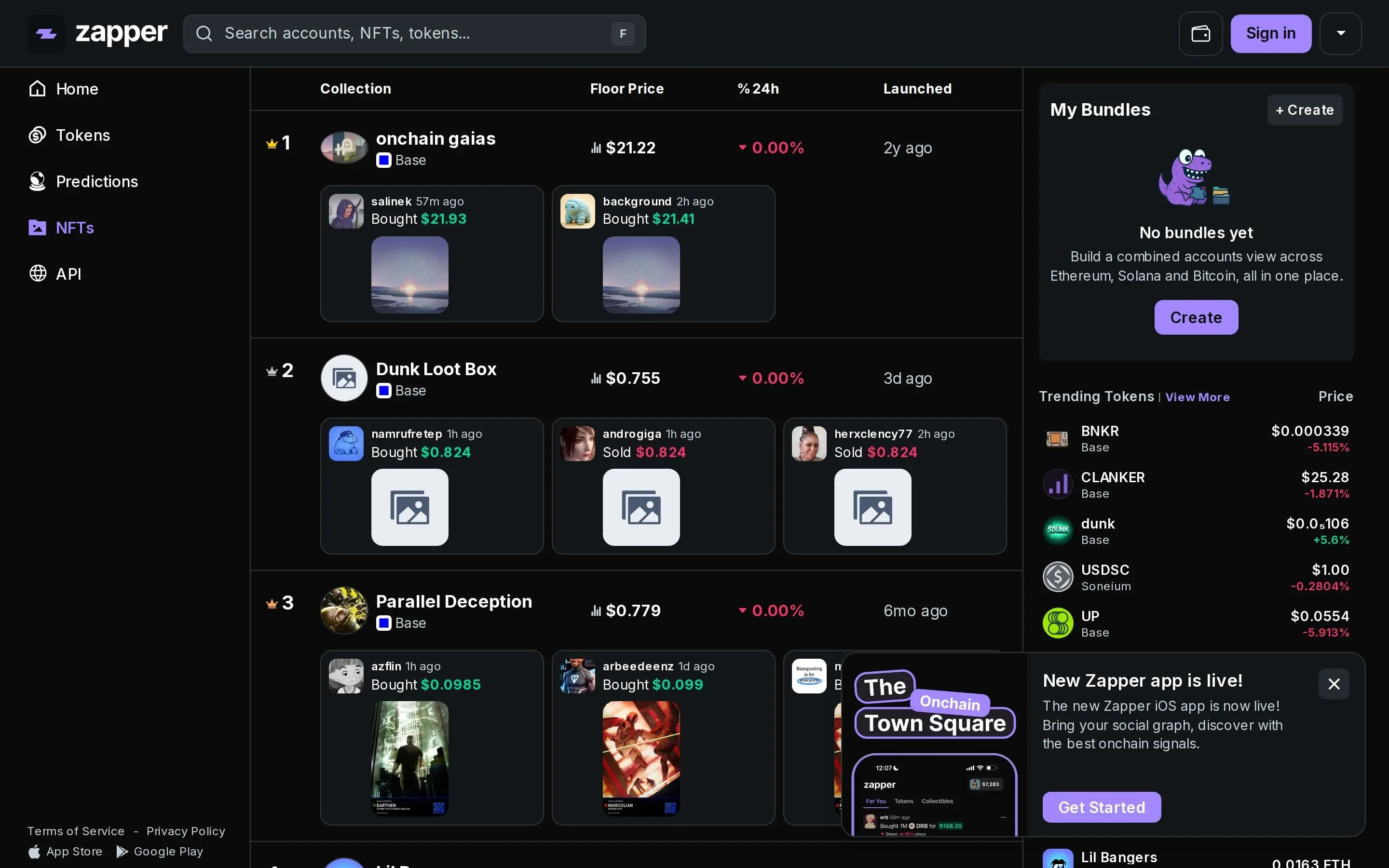
Zapper is also one of the cleaner places to keep NFT exposure readable. The NFT section gives you ranked collections, floor-price movement, recent sales activity, and visual previews that are easier to scan than raw wallet explorers. If you hold NFTs across chains, this matters because the standard wallet experience is still fragmented and often poor for comparison.
What makes the NFT view useful is that it is not isolated from the rest of the product. NFT activity can feed into the social layer, and social attention can lead you back into wallet or market analysis. That loop is part of what makes Zapper sticky. It is not just a tracker. It is a discovery engine with enough structure to remain useful after the novelty wears off.
Zapper Quests, XP, and the Social Layer
Zapper leans into gamification through Quests and XP. The idea is simple: the more you explore, interact, and participate in the ecosystem, the more progress your profile reflects. This system is not the main reason to use the platform, but it does encourage users to move beyond passive tracking. For new users, that can be helpful because it turns an intimidating interface into a guided exploration path.
The social layer is more important. Zapper's feed acts as an event stream for the onchain crowd. You can see token purchases, NFT activity, predictions, reposts, and community discussion tied to wallets and assets. That creates a much more transparent environment than generic crypto timelines where nobody knows whether the poster is actually taking the trades they talk about.
If you are selective about who you follow, this feed can become a real research surface. It is not a substitute for analysis, but it is a fast way to notice where conviction is building, where narratives are cooling off, and which wallets keep showing up early around new trends.
Swap Routing and Bridge Aggregation
One of Zapper's more practical strengths is that it does not stop at observation. You can move from discovery to execution with the built-in swap flow. The platform aggregates swap routes across liquidity sources so you can compare pricing and execute from a token page instead of copying contract addresses into a separate terminal or DEX interface.
That matters even more when you work across chains. DeFi portfolio management is no longer about picking a token and waiting. It often involves moving stablecoins, rotating risk between ecosystems, and reducing friction when a new opportunity appears on Base, Arbitrum, or Optimism before the rest of the market catches up. By combining swaps and bridge-aware workflows in one place, Zapper shortens the path between research and action.
Swap use case
Use token pages to move directly from research into execution when you find a pair you already understand and want to trade without extra interface switching.
Bridge use case
Keep capital flexible across ecosystems instead of letting it sit stranded on the wrong chain when a better opportunity appears elsewhere.
Practical Tips for Managing a Multi-Chain Portfolio with Zapper
1. Use Bundles early
Do not wait until your wallet setup becomes messy. Combining addresses early gives you a cleaner baseline for net worth, exposure, and performance tracking.
2. Review chain concentration weekly
A portfolio can become chain-heavy without you noticing. Zapper makes it easier to see when too much of your risk depends on one ecosystem staying hot.
3. Follow wallets, not noise
The feed becomes much more useful when you follow wallets with visible discipline instead of chasing every fast-moving account that gets attention for a day.
4. Treat social signals as prompts, not instructions
Zapper is excellent for finding what deserves attention. It is not a reason to skip your own review of token risk, liquidity, unlocks, or protocol exposure.
5. Keep idle capital visible
Stablecoins and dormant assets often hide in side wallets. Zapper helps surface that dead capital so you can decide whether it should stay defensive or be redeployed.
Frequently Asked Questions
What is Zapper?
Zapper is a DeFi dashboard that allows users to manage their crypto assets and investments across multiple blockchain networks from a single interface.
How does Zapper help with DeFi portfolio management?
Zapper simplifies DeFi portfolio management by aggregating data from various protocols and displaying it in an easy-to-understand format. Users can track their assets, liabilities, and yields across different platforms.
What kind of activities can I perform on Zapper?
On Zapper, users can monitor their portfolio, invest in various DeFi protocols, swap tokens, and bridge assets between different blockchains.
Which blockchains does Zapper support?
Zapper supports a wide range of popular blockchains, including Ethereum, Polygon, Binance Smart Chain, Avalanche, Optimism, Arbitrum, and many others.
Is Zapper free to use?
Zapper offers a free-to-use platform for managing DeFi portfolios. Users only pay the standard network transaction fees associated with their on-chain activities.
Related Guides
- How to Use Dune Analytics: Build Better Crypto Dashboards and On-Chain Research (2026)
- DeBank Tutorial: Track DeFi Portfolios and Smart Money Wallets (2026)
- How to Use Exodus Wallet: Portfolio and Multi-Chain Guide (2026)
- How to Use Aave: Deposit, Borrow, Repay and Manage Health Factor (2026)
- How to Read On-Chain Data: Metrics, Wallet Flows and Dashboards (2026)