Send Crypto From Kraken to MetaMask Safely (2026)
— By Tony Rabbit in Tutorials

Learn how to send crypto from Kraken to MetaMask safely by matching the right wallet address, asset, and network, with key beginner mistakes to avoid.
Sending crypto from Kraken to MetaMask is a very practical evergreen tutorial because users keep making the same mistake over and over: the asset is right, the address looks right, but the network is wrong. That is how a normal withdrawal turns into a recovery problem.
This guide is built to solve that exact issue. It walks through how to move assets from Kraken into MetaMask safely, what to check before withdrawing, and how to avoid common chain-selection errors.
Quick answer
- Copy the receiving address from MetaMask first, then choose the matching network inside Kraken.
- Only send assets that MetaMask can actually receive on the chain you select.
- For meaningful amounts, use a small test withdrawal first.
Before You Withdraw: Know What MetaMask Actually Supports
MetaMask is mainly an EVM wallet. That means it works for Ethereum and EVM-compatible chains, not as a universal destination for every network an exchange may expose. So before you send anything from Kraken, confirm that the asset and network combination makes sense for MetaMask.
If you want the wallet basics first, read our MetaMask tutorial.
Kraken to MetaMask rulebook
Kraken to MetaMask transfer flow
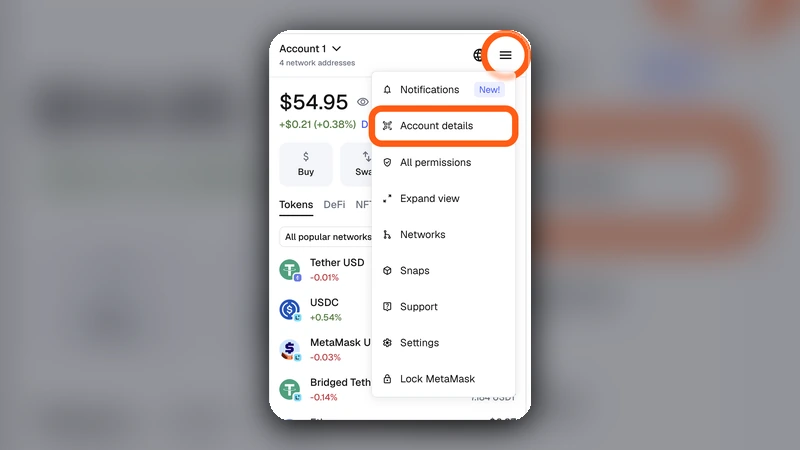
Step 1: Copy the MetaMask Address from the Correct Network Context
Open MetaMask and make sure you know which chain you want to receive on. Then copy the wallet address directly from the wallet. Even if EVM addresses often look identical across chains, the chain you choose on Kraken still decides where the asset lands operationally.
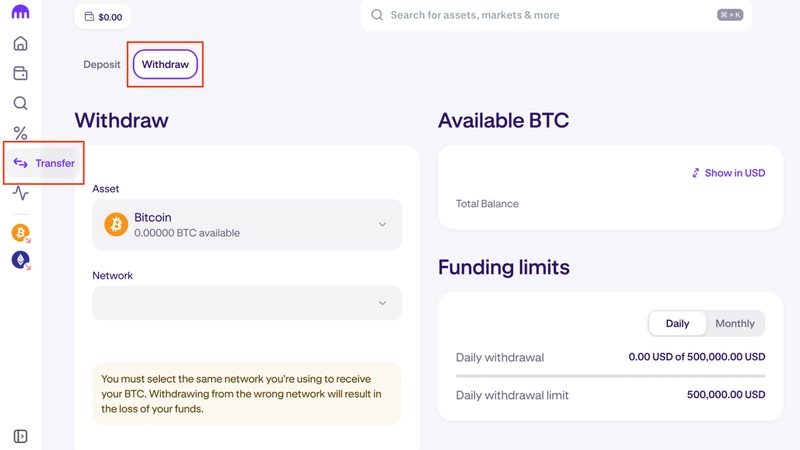
Step 2: Set Up the Withdrawal on Kraken Carefully
Inside Kraken, choose the asset, paste the address, and review the available withdrawal network or route. Slow down here. This is the decision point that matters most.
What to review before you confirm
Step 3: Send a Small Test First
A test withdrawal is still the cheapest insurance in crypto. If the first small amount lands correctly in MetaMask, you can send the rest with much more confidence.
Step 4: If the Funds Do Not Show Up, Check the Chain First
In many cases, the transfer completed correctly but the wallet is showing the wrong network or the token is not visible yet. Do not assume funds are gone before you verify chain context.
- Check Kraken withdrawal status
- Check the receiving chain in MetaMask
- Confirm whether the token needs to be visible on that chain
- Review the route selected on Kraken
Common Kraken to MetaMask Mistakes to Avoid
Mistakes that keep repeating
Video Tutorial

Frequently Asked Questions
Can I send ETH from Kraken to MetaMask?
Yes, as long as the destination chain and wallet setup match what you select on Kraken.
Why does MetaMask not show the funds right away sometimes?
Often because the wallet is looking at the wrong chain or the token is not visible in the current network view.
Is Kraken to MetaMask basically the same as Coinbase or Binance to MetaMask?
The logic is the same: address plus network plus asset must match. The interface changes, but the risk pattern is identical.
Related reading
Disclaimer: This article is for educational purposes only and does not constitute investment, tax, or legal advice. Kraken withdrawal routes and supported networks can change over time. Always confirm the live asset and chain before sending funds.