The 2026 Guide to Creating and Securing Your Ethereum Wallet
Learn key strategies to create and protect your Ethereum wallet in 2026, keeping your digital assets safe while navigating the DeFi world.
The 2026 Ultimate Guide: How to Create and Secure Your Ethereum Wallet
- As of March 31, 2026, the Ethereum ecosystem has transformed into a global financial layer. Following the successful implementation of the Pectra and Fusaka upgrades, the network is more efficient than ever, and self-custody has become the gold standard for personal finance.
- Whether you are looking to trade the latest tokens, participate in decentralized finance (DeFi), or simply hold assets for the long term, your journey begins with creating an Ethereum wallet. This guide provides a comprehensive, step-by-step tutorial on setting up your digital identity and securing your funds in the 2026 landscape.
Understanding the Basics: What is an Ethereum Wallet?
Before we dive into the technical steps, it is important to understand what a wallet actually is. Contrary to popular belief, an Ethereum wallet does not "store" your ETH. Your ETH lives on the blockchain. The wallet is a tool that stores your private keys, which are essentially the digital signatures required to move your funds.
In 2026, we categorize wallets into two main types:
Smart Accounts (ERC-4337/EIP-7702): These are the modern standard. They allow for "social recovery" (regaining access without a seed phrase) and batch transactions to save on gas.
EOAs (Externally Owned Accounts): This is the traditional model used by apps like MetaMask, where a 12 to 24 word seed phrase is the only way to access your funds.
What is an Ethereum Wallet Address?
- An Ethereum wallet address is a public identifier that looks like a long string of letters and numbers starting with 0x. For example: 0x742d35Cc6634C0532925a3b844Bc454e4438f44e.
- Think of this address as your "IBAN" or email address for the blockchain. You can share this address with anyone so they can send you ETH or tokens. Because it is public, anyone can look up the balance of this address on a block explorer like Etherscan, but no one can move the funds without your private keys.
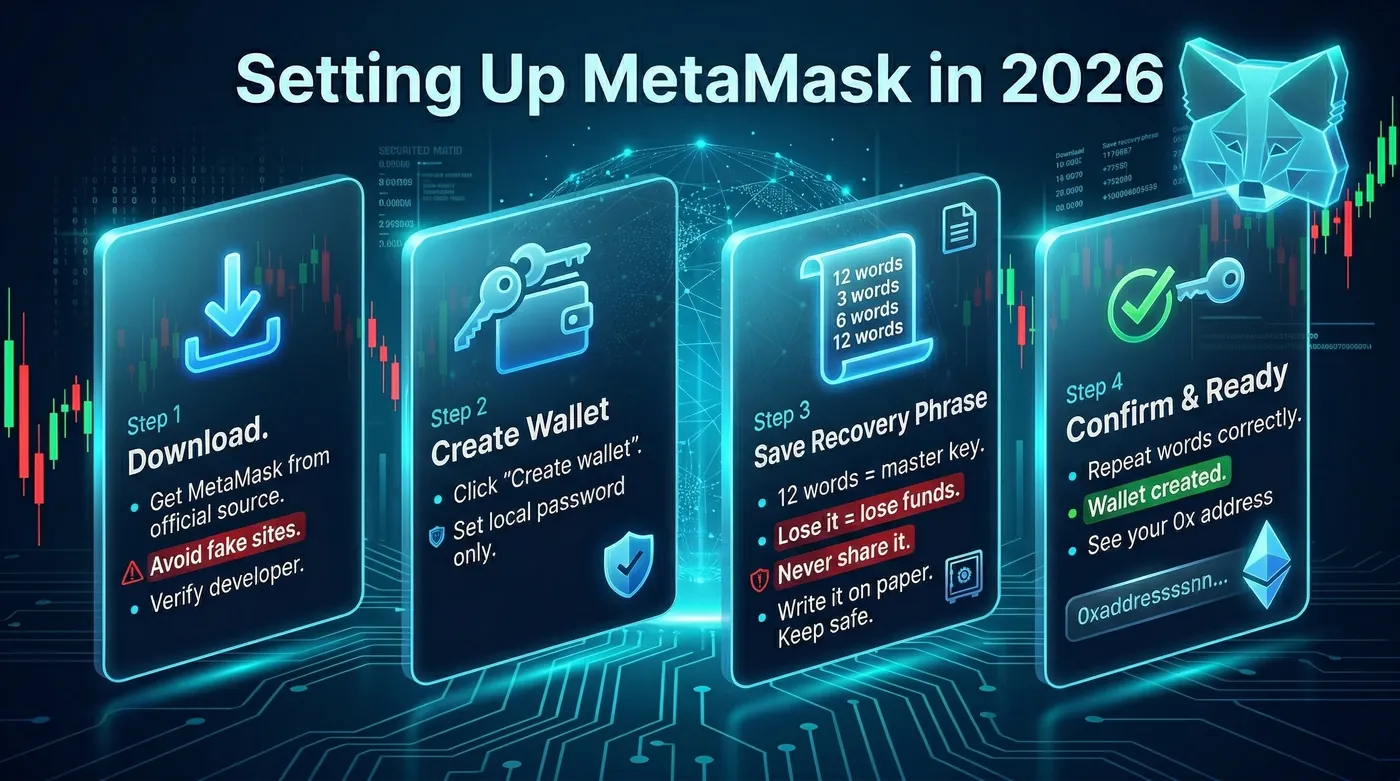
Step-by-Step Tutorial: Setting Up MetaMask in 2026
MetaMask remains the most widely used gateway to the Ethereum ecosystem. While newer "Smart Wallets" are gaining ground, MetaMask’s versatility across different browsers and its integration with Layer 2 networks like Base and Arbitrum make it a must-have tool.
Step 1: Download and Installation
Visit the official MetaMask website or your mobile device’s app store. It is critical to ensure you are downloading the genuine application. In 2026, sophisticated phishing sites often mimic the design of the official page. Always verify the developer name and the number of downloads. Once downloaded, add the extension to your browser (Chrome, Brave, or Edge) or open the mobile app.
Step 2: Create a New Wallet
Open the app and select Create a new wallet. You will be asked to create a local password. This password only unlocks the app on your current device; it is not your master key. If you lose this password, you can still recover your funds using your Secret Recovery Phrase.
Step 3: Back Up Your Secret Recovery Phrase
This is the most important part of the process. MetaMask will show you 12 words. These words are the "Master Key" to your money. If you lose them, your money is gone forever. If someone else gets them, they can steal your money instantly.
Do not take a screenshot.
Do not save it in your email or cloud storage.
Do write it down on a piece of paper and store it in a secure, fireproof location.
Step 4: Confirm the Phrase
MetaMask will ask you to repeat the words in the correct order to ensure you have recorded them accurately. Once confirmed, your wallet is ready. You will now see your unique 0x address at the top of the interface.
How to Add ETH to Your MetaMask
Once your wallet is set up, it will be empty. You need to add ETH to pay for transaction fees (gas) and to trade. In 2026, there are two primary ways to do this:
Method 1: Direct Purchase (Fiat-to-Crypto Ramps)
MetaMask has integrated services like MoonPay, Transak, and PayPal directly into the app.
Click the Buy button.
Choose your region and payment method (Credit Card, Apple Pay, or Bank Transfer).
Follow the identity verification (KYC) steps.
Once the payment is processed, the ETH will appear directly in your MetaMask wallet within minutes.
Method 2: Transfer from a Centralized Exchange
If you already have ETH on an centralized (CEX) exchange:
Copy your MetaMask address (starts with 0x).
Go to the Withdraw section of your exchange.
Select Ethereum (ETH) and paste your MetaMask address.
Important: Ensure you select the correct network. If you want the ETH on Ethereum Mainnet, select "Ethereum". If you want it on a faster Layer 2 like Arbitrum, make sure both the exchange and your MetaMask are set to that network.
Hot Wallets vs. Cold Wallets: Which Should You Use?
Choosing the right storage strategy is about balancing convenience and security. In 2026, most serious users use a combination of both.
Hot Wallets (e.g., MetaMask, Phantom, Coinbase Wallet)
A "Hot Wallet" is connected to the internet.
Pros: Fast, convenient for daily trading, and easily connects to dApps.
Cons: Vulnerable to malware, phishing, and "drainer" scripts if you interact with a malicious website.
Best for: Small amounts of "spending money" or active trading.
Cold Wallets (e.g., Ledger, Trezor, Keystone)
A "Cold Wallet" (Hardware Wallet) keeps your private keys offline.
Pros: Maximum security. Even if your computer is infected with a virus, a hacker cannot steal your funds because the transaction must be physically confirmed on the device.
Cons: Costs money to buy the hardware ($80 to $200) and is less convenient for quick trades.
Best for: Long-term savings and large amounts of ETH.
Example: An investor named Alex keeps 0.5 ETH in his MetaMask (Hot Wallet) for daily swaps and NFT minting. However, he keeps 20 ETH on his Ledger (Cold Wallet) for long-term storage. To make a trade with his large savings, he must connect the Ledger to his computer and press a physical button to authorize the move.
The 2026 Ethereum Security Checklist
The 2026 landscape is full of opportunity, but security must be your priority. Follow this checklist to protect your assets:
Never Share Your Seed Phrase: No legitimate support team, developer, or website will ever ask for your 12 words.
Use a Hardware Wallet: If your total balance exceeds $1,000, buy a hardware wallet immediately.
Check Your Approvals: Regularly use tools to revoke "Infinite Approvals" given to apps you no longer use. This prevents old dApps from being a backdoor to your wallet.
Bookmark Official Sites: Phishing is the number one cause of fund loss. Only use bookmarked links for your favorite exchanges and wallets.
Enable 2FA on Everything: While your wallet uses a seed phrase, the email and exchange accounts you use to buy ETH should be protected with hardware-based 2FA (like a YubiKey) or an authenticator app. Avoid SMS-based 2FA.
Summary of Key Points
Ethereum Wallets store the private keys required to access your funds on the blockchain.
The Wallet Address is a public string starting with 0x used to receive funds.
MetaMask is the industry-standard software wallet for interacting with the Ethereum ecosystem.
Secret Recovery Phrases are the most critical piece of security; they must be stored offline and never shared.
Hot Wallets offer convenience for trading, while Cold Wallets offer maximum security for long-term holding.
2026 Standards like Smart Accounts and Layer 2 integration have made wallets more powerful but require users to be vigilant against new types of phishing.
Now that you have successfully created your wallet and understand how to secure your ETH, you are ready to participate in the future of finance.
To monitor your portfolio and discover new opportunities across the Ethereum network, we invite you to use the Ethereum dashboard on DEXTools here. It is a world-class platform designed to help you trade safely by providing real-time security audits, price charts, and deep market analysis. Start exploring the ecosystem with the best tools available today!
Disclaimer: This article is for informational purposes only and does not constitute investment advice, financial advice, trading advice, or any other kind of advice. DEXTools does not recommend buying, selling, or holding any cryptocurrency or token. Users should conduct their own research and consult with a qualified financial advisor before making any investment decisions. Cryptocurrency investments are volatile and high-risk. DEXTools is not responsible for any losses incurred.
Related Guides
- What Is ENS: Ethereum Name Service, Wallet Names and Web3 Identity (2026)
- How to Use Uniswap: Wallet Connect, Swap, Slippage and LP Basics (2026)
- What Was the Ethereum Merge: Complete Retrospective Guide (2026)
- What Is viem: TypeScript Clients, Transports and Ethereum App Logic (2026)
- What Is UPEG? Unipeg Token Explained, From Ethereum Liquidity to the NFT Angle
Frequently Asked Questions
What is an Ethereum wallet?
An Ethereum wallet is a tool that stores your private keys, which are necessary to access and move your ETH on the blockchain. It does not actually store your ETH, as your assets exist on the blockchain.
How do I create an Ethereum wallet using MetaMask?
To create an Ethereum wallet with MetaMask, download the app, create a new wallet, set a local password, and back up your Secret Recovery Phrase. Confirm the phrase to finalize the setup.
What is a Secret Recovery Phrase?
A Secret Recovery Phrase is a 12-word master key that allows you to recover your Ethereum wallet. It is crucial to keep it secure, as losing it means losing access to your funds.
How can I add ETH to my MetaMask wallet?
You can add ETH to your MetaMask wallet by using fiat-to-crypto ramps integrated within the app, or by transferring ETH from another wallet.
What are the types of Ethereum wallets in 2026?
In 2026, Ethereum wallets are categorized into Smart Accounts, which allow for social recovery and batch transactions, and Externally Owned Accounts (EOAs), which rely on a seed phrase for access.