How to Check if Liquidity Is Locked (Free Checker 2026)
— By AliceOnChain in Tutorials

Learn how to check if a token's liquidity is locked in under a minute. Free step-by-step guide for Uniswap, PancakeSwap, DEXScreener and any DEX.
To check a token's liquidity lock, analyze its status, duration, and platform using tools like DEXTools. Verify if liquidity is locked through a third-party locker, check the lock percentage and owner, and identify red flags like unlocked liquidity or dangerous contract functions to avoid rug pulls.
- Use DEXTools to check lock status
- Verify lock platform (Unicrypt, Team Finance, PinkSale)
- Confirm lock duration (minimum 6 months recommended)
- Check lock percentage (ideally 80%+)
- Analyze contract for dangerous functions
Intent check: This page owns the lock-status check: whether LP tokens are actually locked, for how long, and with what locker contract. If you want the broader market-quality view of pool depth and tradability, read How to Read Liquidity Pool Data Before Buying a Token.
Why Checking Liquidity Locks Is Essential Before Buying Tokens
In the fast-paced world of Decentralized Finance (DeFi), understanding how to check liquidity lock is one of the most crucial skills to avoid scams like rug pulls. Imagine spotting the next big altcoin, but without verifying if the liquidity is locked, you could lose your entire investment in seconds.
This comprehensive guide walks you through everything you need to know about liquidity locks - what they are, how to verify them using DEXTools and other tools, and how to identify the red flags that separate safe investments from traps.
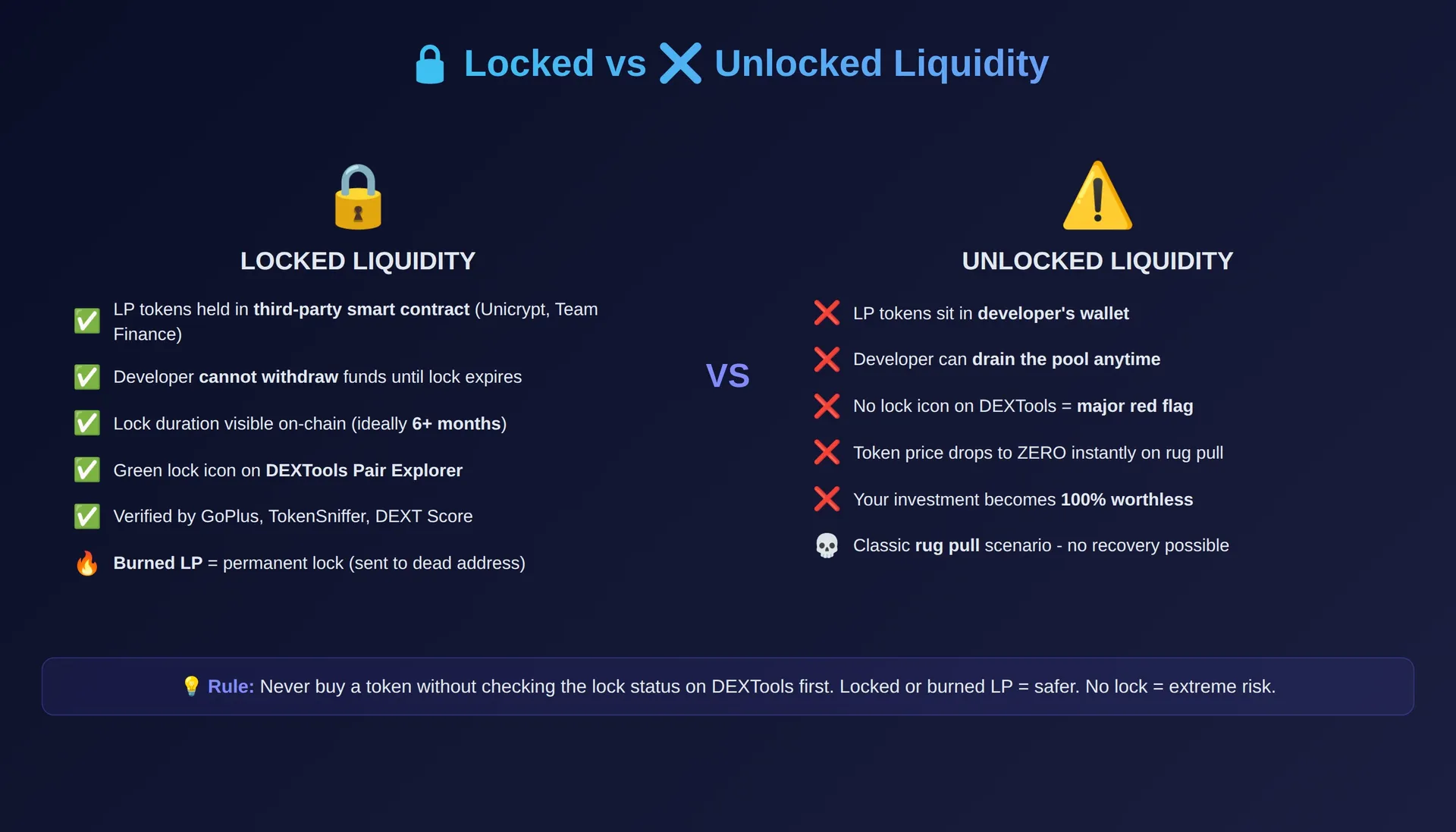
What Is a Liquidity Lock and Why Does It Matter?
When a new token launches on a DEX like Uniswap or Raydium, the developer creates a liquidity pool by pairing their token with ETH, SOL, or another base currency. This pool is what allows traders to buy and sell the token.
A liquidity lock means the developer has sent their LP (Liquidity Provider) tokens to a third-party smart contract that prevents withdrawal for a set period. Without a lock, the developer can remove all the paired ETH/SOL from the pool at any moment - this is called a rug pull.
Locked vs. Unlocked vs. Burned Liquidity
| Type | What It Means | Safety Level | Can Dev Withdraw? |
|---|---|---|---|
| Unlocked | LP tokens in developer's wallet | Dangerous | Yes, anytime |
| Locked (Time) | LP tokens in a locker contract | Moderate-Safe | Only after lock expires |
| Burned | LP tokens sent to dead address | Safest | Never - permanent |
How to Check Liquidity Lock: Step-by-Step Guide Using DEXTools
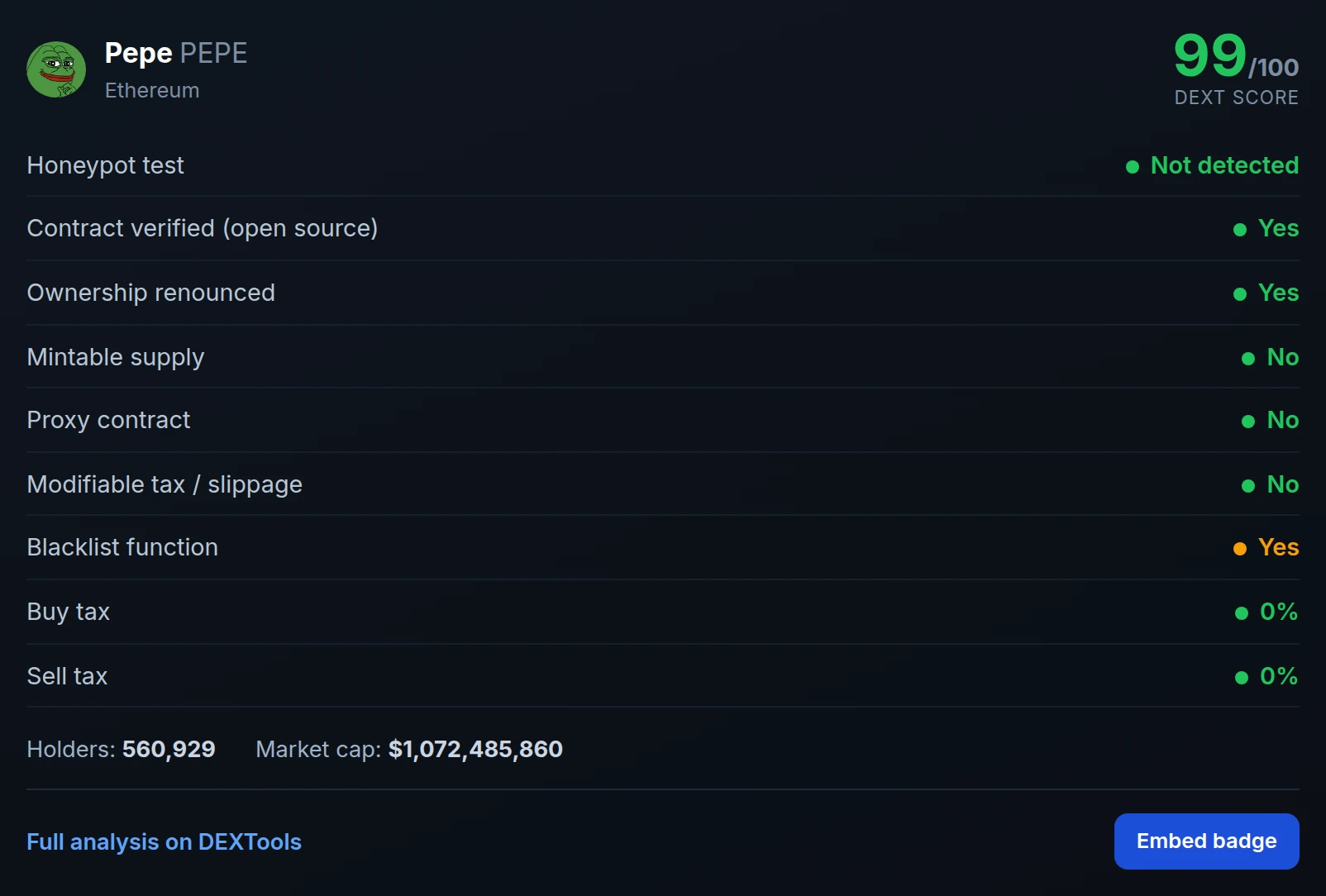
DEXTools is the most powerful platform for verifying liquidity locks before buying any token. Here's exactly how to do it:
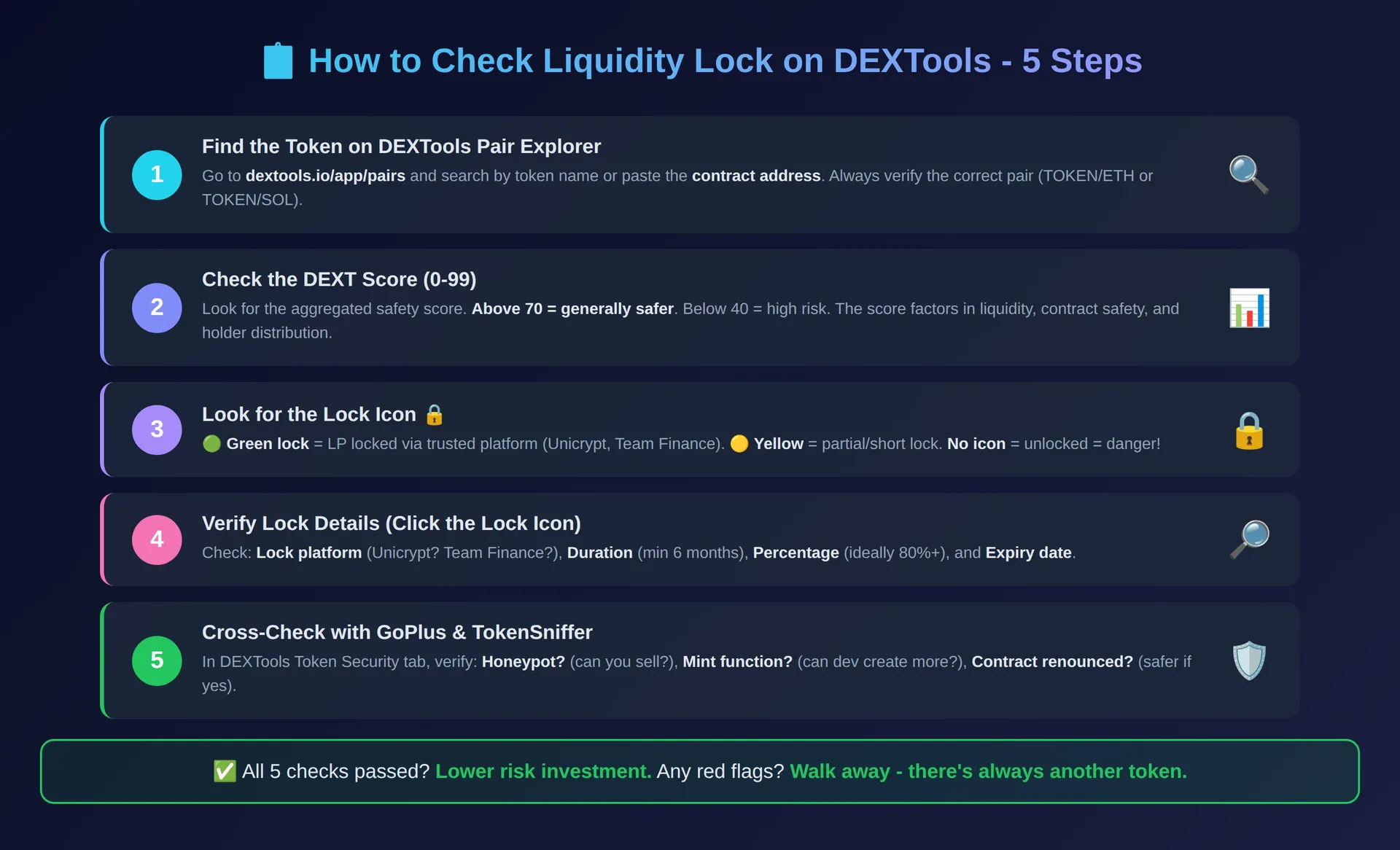
Step 1: Find the Token on DEXTools
Navigate to DEXTools Pair Explorer and search for the token by name or contract address. Select the correct pair (e.g., TOKEN/ETH or TOKEN/SOL). Always verify the contract address matches what you're looking for - scam tokens often use similar names.
Step 2: Check the DEXT Score
In the token information panel, look for the DEXT Score. This aggregated score (0-99) evaluates multiple factors including:
- Liquidity lock status - Is it locked? For how long?
- Contract analysis - Any dangerous functions?
- Holder distribution - Is it concentrated in few wallets?
- Trading activity - Organic or bot-driven volume?
A DEXT Score above 70 is generally considered safer, but always investigate individual components rather than relying solely on the number.
Step 3: Inspect the Liquidity Lock Icon
In the liquidity section of the Pair Explorer, look for the lock icon next to the LP information:
- Green Lock: Liquidity is locked through a verified third-party locker (Unicrypt, Team Finance, PinkSale)
- Yellow/Orange Lock: Partially locked or short lock duration
- No Lock Icon: Liquidity is completely unlocked - proceed with extreme caution
Step 4: Verify Lock Details
Click on the lock icon to see the full details:
- Lock Platform: Which service locked the liquidity (Unicrypt, Team Finance, etc.)
- Lock Duration: When does it expire? Minimum 6 months is recommended
- Lock Percentage: What % of total LP is locked? Ideally 80%+
- Lock Owner: Who controls the lock when it expires?
Step 5: Cross-Check with Token Security Tools
DEXTools integrates with auditing platforms like GoPlus Security and TokenSniffer to provide additional analysis. In the "Token Security" section, verify:
- Liquidity locked percentage
- Whether the contract is renounced
- If there's a mint function (can create more tokens)
- Honeypot detection (can you actually sell?)
Learn more about these tools in our complete guide to smart contract scanners.
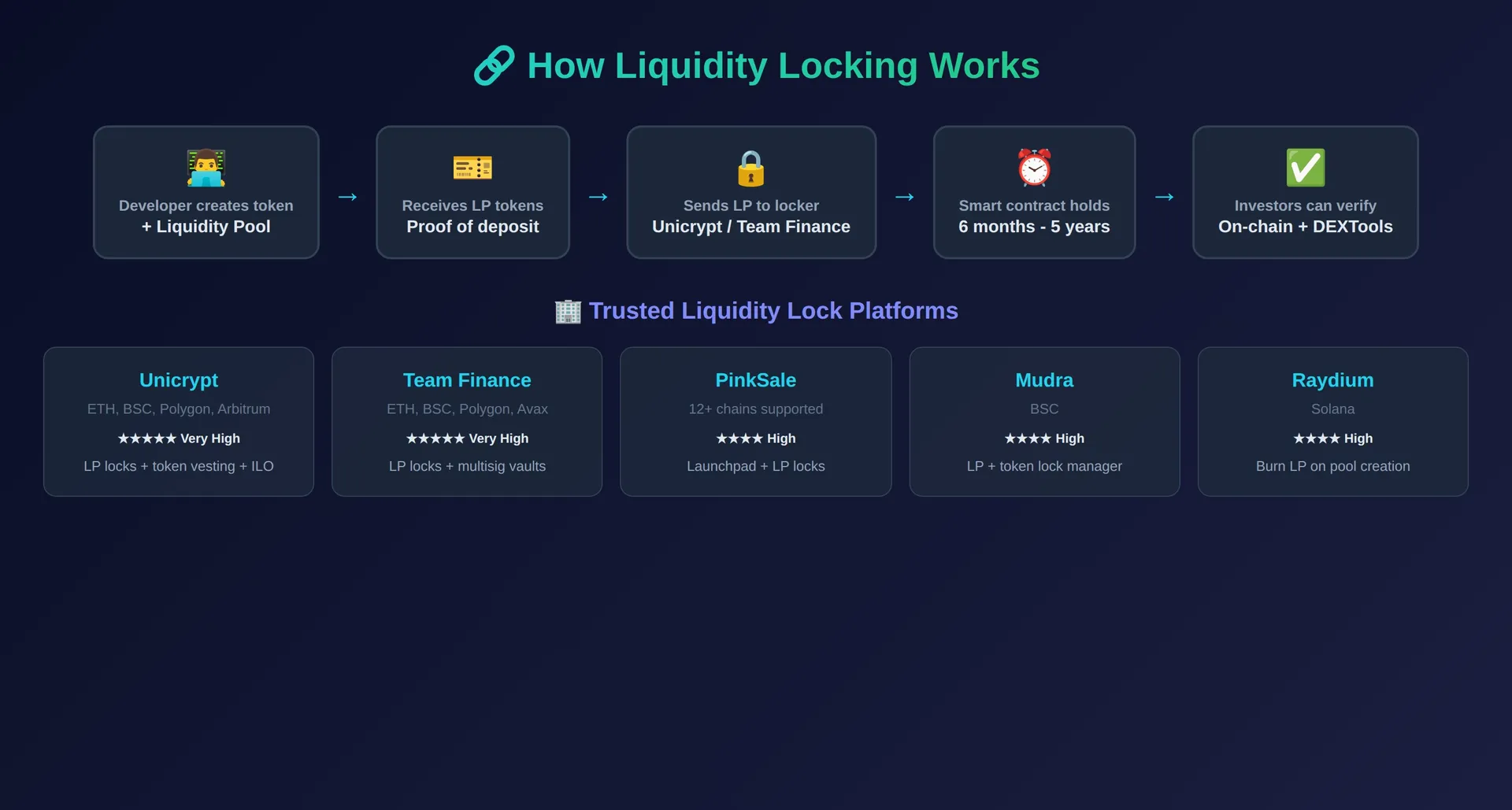
Top Liquidity Lock Platforms in 2026
| Platform | Chains | Features | Trust Level |
|---|---|---|---|
| Unicrypt (UNCX) | ETH, BSC, Polygon, Arbitrum | LP locks, token vesting, ILO launchpad | Very High |
| Team Finance | ETH, BSC, Polygon, Avalanche | LP locks, token locks, multisig vaults | Very High |
| PinkSale | Multi-chain (12+) | Launchpad + LP locks, fair launches | High |
| Mudra | BSC | LP locks, token locks, manager dashboard | High |
| Raydium (Built-in) | Solana | Burn LP on pool creation | High (if burned) |
Advanced Tips: Double-Check Liquidity Locks
While DEXTools provides excellent analysis, advanced investors take extra steps to verify security.
Verify Liquidity Burn on the Blockchain
Some developers permanently burn LP tokens by sending them to a dead or null address (e.g., 0x000...dead or 0x000...0000). This makes the liquidity completely untouchable - forever. To verify this:
- Click on the "Holders" tab in the liquidity section on DEXTools
- Look at the top LP holder addresses
- If the largest holder is a null/dead address, the liquidity has been burned
- You can verify on Etherscan or Solscan by checking the LP token holders directly
Check the Unlock Date Carefully
Short-duration locks are a major red flag. A developer who locks liquidity for only 7-30 days may plan to rug pull once the lock expires. Always verify:
- Minimum 6 months: For small-cap tokens, this is the bare minimum
- 1+ year preferred: Serious projects lock for 1-5 years
- Auto-renewing locks: Some use locks that extend automatically
- Multiple lock periods: Sometimes devs split LP across different lock dates
Key Red Flags to Avoid
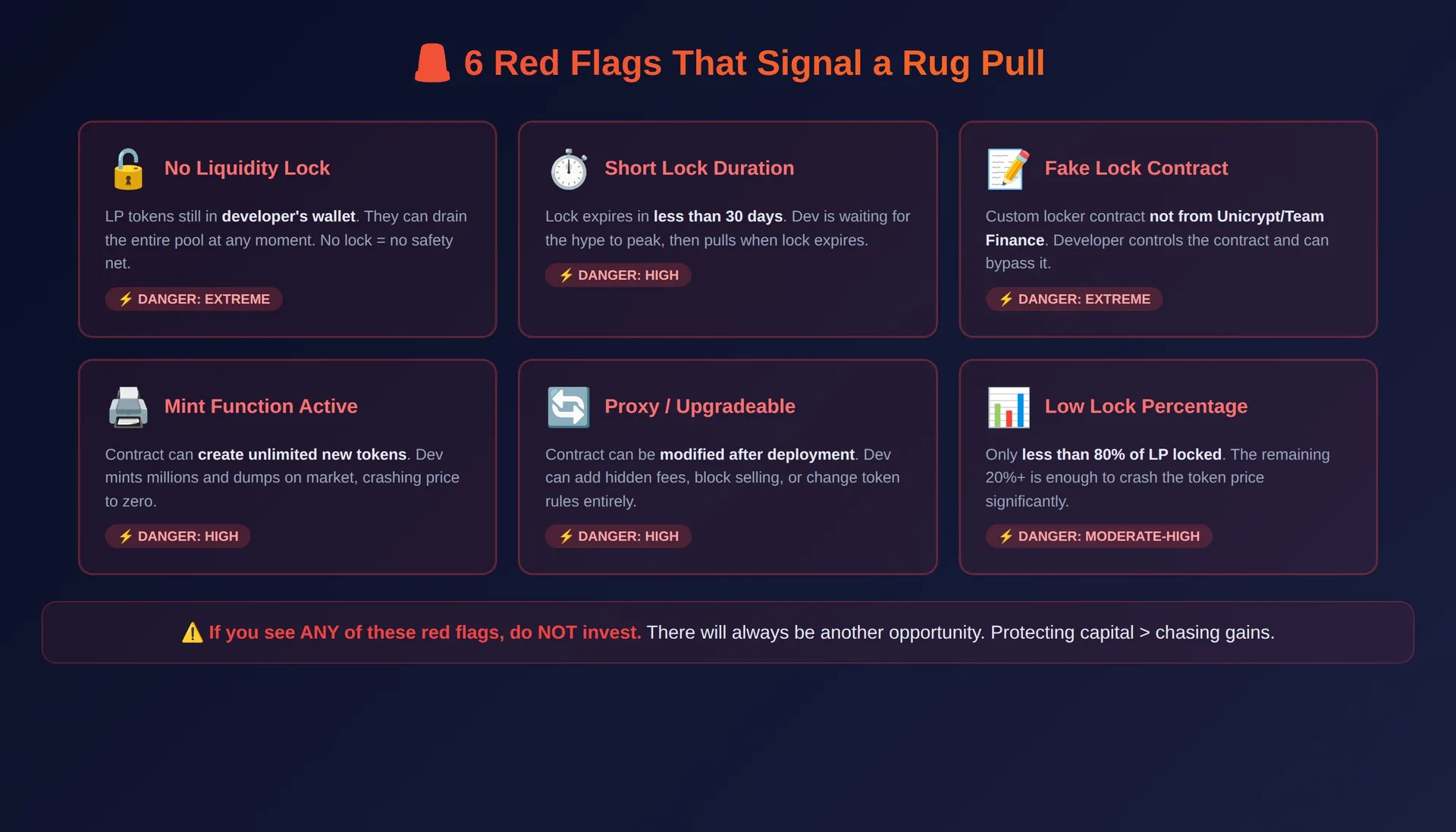
Knowing how to check liquidity lock is critical, but scammers continually evolve their tactics. Watch for these warning signs:
- Fake Lock Contracts: Developers may deploy their own "locker" contract that they can control. Always verify the lock is through a recognized platform like Unicrypt or Team Finance - not a custom contract.
- Low Lock Percentage: If less than 80% of liquidity is locked, the remaining unlocked portion can still cause significant damage if removed.
- Very Short Lock Duration: Locks under 30 days are almost always red flags. The dev is likely waiting to pull once the hype dies.
- Proxy/Upgradeable Contracts: If the token contract allows upgrades, the developer can change the rules even if liquidity is locked.
- Multiple Small Pools: Some scammers create many small liquidity pools across different DEXs. They lock one pool to look legit while keeping others unlocked.
- Active Mint Function: Even with locked liquidity, if the contract can mint new tokens, the developer can create unlimited supply and dump on the market.
Real-World Rug Pull Examples
Understanding past rug pulls helps you recognize the patterns:
- The Classic Pool Drain: Dev creates token, adds liquidity, waits for price to pump, then removes all ETH from the pool. Token price drops to zero instantly. See our rug pull checklist for more patterns.
- The Slow Rug: Instead of pulling all liquidity at once, the dev gradually sells their token holdings while liquidity remains "locked." The price slowly bleeds to zero. Learn to spot these in our slow rug signals guide.
- The Mint-and-Dump: Liquidity is locked, but the contract has a mint function. Dev creates millions of new tokens and dumps them on the market, diluting existing holders to nothing.
Quick Liquidity Check Checklist
Before buying ANY new token, run through this checklist:
- Open the pair on DEXTools Pair Explorer
- Check DEXT Score - is it above 70?
- Look for the green lock icon on liquidity
- Verify lock duration - minimum 6 months?
- Check lock percentage - above 80%?
- Verify through a recognized locker (Unicrypt, Team Finance, PinkSale)
- Check if contract is renounced or has dangerous functions
- Review holder distribution - any wallet with more than 5% (excluding locked/burned)?
- Use honeypot detection to confirm you can sell
- Verify on the blockchain explorer (Etherscan/Solscan) for final confirmation
Integrating Liquidity Checks Into Your Trading Workflow
The best traders make liquidity verification an automatic part of their process:
- Use DEXTools Pair Explorer as your first stop for any new token
- Set up DEXTools alerts to catch tokens early with verified locks
- Cross-reference with whale tracking tools to see if smart money is buying
- Use Telegram trading bots with built-in safety checks before executing trades
- Always DYOR beyond just the liquidity lock
Conclusion: Always Verify Liquidity Before Investing
Mastering how to check liquidity lock is the single best defense against rug pulls and DeFi scams. The process takes less than 2 minutes and can save your entire investment. Before putting money into any token:
- Use DEXTools to inspect the token pair and DEXT Score
- Verify the liquidity lock status, duration, and percentage
- Cross-check with blockchain explorers for on-chain confirmation
- Watch for advanced scams like fake locks, proxy contracts, and mint functions
- When in doubt, don't invest - there will always be another opportunity
Whether you're a seasoned trader or new to DeFi, vigilance is key. Use tools like DEXTools to verify liquidity locks and trade with confidence.
Disclaimer
This article is for informational purposes only and does not constitute investment advice, financial advice, trading advice, or any other kind of advice. DEXTools does not recommend buying, selling, or holding any cryptocurrency or token. Users should conduct their own research and consult with a qualified financial advisor before making any investment decisions. Cryptocurrency investments are volatile and high-risk. DEXTools is not responsible for any losses incurred.
Where to Check a Lock: Unicrypt and Team Finance
Verifying a token's liquidity lock is crucial for assessing its safety, and several platforms facilitate this process.
Liquidity-Lock Red Flags
- Custom Contract. Liquidity locked through a custom contract instead of a recognized locker like Unicrypt or Team Finance can be a red flag, as custom contracts may lack transparency or security.
- Insufficient Lock. Less than 80% of LP locked is concerning, since the unlocked portion can still be pulled, potentially leading to a rug pull.
- Short Duration. Lock durations under 30 days are generally considered insufficient, as they offer little long-term security for investors.
- Necessary, Not Sufficient. Remember that a liquidity lock is necessary but not sufficient on its own; always combine it with contract and holder checks for a comprehensive assessment.
Keep exploring
Frequently Asked Questions About Liquidity Locks
How do I check if liquidity is locked?
Use DEXTools Pair Explorer to see the liquidity lock status. Look for the green lock icon next to the LP information. You can also check directly on lock platforms like Team.Finance, Unicrypt, or PinkSale. Locked liquidity means the developer cannot remove trading funds, significantly reducing rug pull risk.
What percentage of liquidity should be locked?
Ideally, at least 80-100% of LP tokens should be locked. Anything below 80% means the developer retains enough unlocked liquidity to significantly impact the price if withdrawn. The best projects lock 95-100% of their liquidity.
How long should liquidity be locked for?
A minimum of 6 months is recommended for small-cap tokens. Serious, long-term projects typically lock liquidity for 1-5 years or permanently burn LP tokens. Locks shorter than 30 days are major red flags.
What is the difference between locked and burned liquidity?
Locked liquidity is held in a smart contract for a set time period - the developer can access it when the lock expires. Burned liquidity means the LP tokens were sent to a dead address (0x000...dead) and can never be recovered. Burned liquidity is the safest option for investors.
Can a rug pull still happen with locked liquidity?
Yes, in certain cases. If the contract has a mint function, the developer can create new tokens and dump them. If the contract is upgradeable (proxy), they can change the rules. If only a portion of liquidity is locked, they can drain the unlocked portion. Always check for these additional risks beyond just the lock.
What are the best tools to check liquidity locks?
The top tools include: DEXTools (Pair Explorer + DEXT Score), GoPlus Security API, TokenSniffer, Unicrypt/UNCX Network, Team Finance, and blockchain explorers like Etherscan and Solscan. Using multiple tools together gives you the most complete picture.
Is it safe to invest in a token with no liquidity lock?
Generally no. Tokens without liquidity locks carry extreme rug pull risk. However, some legitimate projects may have unlocked liquidity if the team is doxxed, the project is audited, or liquidity is managed through a transparent multisig wallet. Even in these cases, the risk is significantly higher than with locked or burned liquidity.
Related: Rug Pull Checklist 2026 | Smart Contract Scanners | Slow Rug Pull Signals | Honeypot Detection Guide | Token Safety Verification
Video Tutorial

Frequently Asked Questions
Q: What is a liquidity lock in cryptocurrency?
A: A liquidity lock prevents developers from removing funds from a decentralized exchange (DEX) liquidity pool, ensuring traders can always exchange tokens.
Q: Why is a liquidity lock important for investors?
A: A liquidity lock protects investors from 'rug pulls,' where project developers drain liquidity, leaving investors with worthless tokens.
Q: How can I check if liquidity is locked for a token?
A: You can use blockchain explorers or third-party liquidity locker checkers by entering the token's contract address.
Q: What information does a liquidity checker provide?
A: A liquidity checker typically shows the percentage of liquidity locked, the lock duration, and the locking smart contract's address.
Q: What are common types of liquidity locking services?
A: Popular services include Unicrypt, DXsale, and Team.Finance, which provide smart contracts for locking liquidity for a specified period.
Related Guides
- LP Lock Expiry Risk: What Happens When Token Liquidity Unlocks?
- How to Read Liquidity Pool Data Before Buying a Token (2026)
- How to Check if a Token Can Be Sold (2026)
- How to Check Buy and Sell Tax Before Buying a Token (2026)
- FDV vs Market Cap in Crypto: How to Read Unlock Risk Before You Buy (2026)
- Insufficient Liquidity for This Trade: Fix