How to Use Morpho: Complete Vault and Lending Tutorial (2026)
— By Tony Rabbit in Tutorials

Learn how to use Morpho in 2026, from choosing the right vault and network to understanding exposure, liquidity, curator context, and safer first-time deposit workflow.
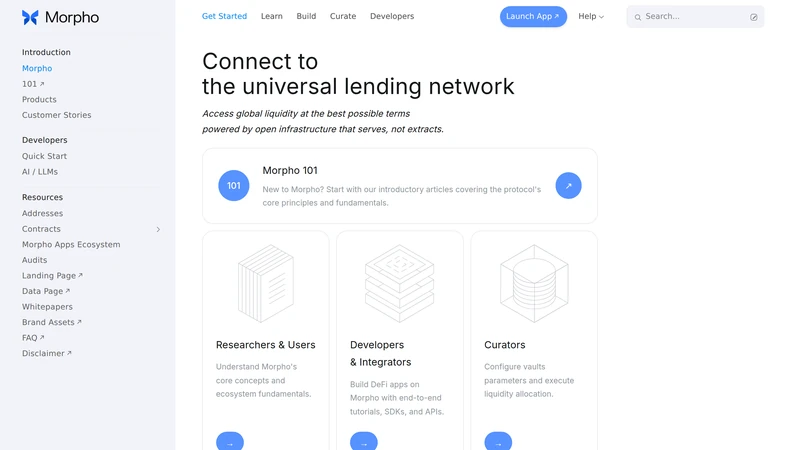
Morpho gets much easier once you stop thinking of it as one monolithic app and start thinking in layers. The docs describe Morpho as a decentralized, noncustodial lending protocol on the EVM, while the interface exposes different ways to interact with that protocol, especially through vaults and markets. For most users, that means the real first decision is not “Should I click deposit?” It is “Which product layer am I actually using?”
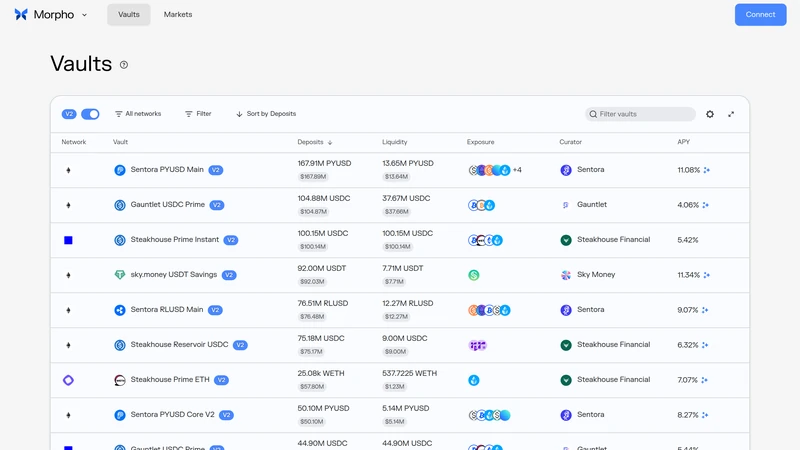
If you are new to Morpho, the cleanest entry point is usually the vaults interface. The app shows network, deposits, liquidity, exposure, curator, and APY on one screen, which is exactly the information a careful user needs before committing capital. The Morpho docs position the protocol as open, permissionless, and overcollateralized, but the first good user habit is much simpler than that: read the vault like a product, not like a yield number.
Quick answer
- Start with Vaults if you are new. They are usually easier to understand than jumping straight into direct market-level decisions.
- Before depositing, review network, exposure, curator, liquidity, and APY. Morpho shows those fields because they change the risk profile.
- Do not chase the highest yield first. Choose the vault whose asset, strategy context, and chain actually match what you want to hold.
What Morpho Is Best Used For
Morpho is best used as a flexible EVM lending layer where users can choose between simpler vault-based earning flows and more direct market-level activity. The docs explain that the protocol is immutable, noncustodial, and designed for overcollateralized lending and borrowing. In practice, that gives you two very different user experiences: a curated vault path that feels easier to start with, and a more direct market path that demands more protocol literacy.
That is why beginners should usually start on the vault side. The vault interface gives you a product-like summary with visible deposits, liquidity, exposure, curator, and APY. Those fields are not decorative. They tell you what you are actually entering, how large the venue is, and who is shaping the strategy. If you cannot explain those columns, you are not ready to size the deposit.
When Morpho is a strong fit
What to Prepare Before You Use Morpho
Before using Morpho, decide the network and asset you actually want exposure to. The app lets you filter by network, search vaults, and compare liquidity and APY, but those tools only help if you know what you are looking for. If you would not be comfortable holding the underlying asset or strategy context, the vault is already a poor fit no matter how attractive the number looks.
You should also decide whether you want the simplicity of a vault or the directness of markets. Beginners rarely benefit from pretending those are the same experience. Start with the format you can actually monitor. DeFi gets safer when the product matches your current level of clarity.
The four checks that matter before depositing into Morpho
How to Use Morpho Step by Step
The clean first-time Morpho workflow is to open the app, stay on the Vaults view, filter to the network you care about, and compare a small number of candidates instead of scanning the whole table emotionally. Once you choose a vault, review its key details, connect the wallet on the correct network, and only then consider a small deposit.
That sequence matters because Morpho is built for serious on-chain capital deployment, not idle clicking. The protocol may be elegant, but the user still has to choose the right container for their funds. When in doubt, smaller size and clearer understanding beat a larger deposit into a vault you only half understand.
A safe first-time Morpho workflow
- Open the app and stay on the Vaults screen for your first pass through Morpho.
- Filter by network, then compare exposure, liquidity, curator, and APY across a few realistic options.
- Choose one vault whose underlying context actually matches the asset exposure you want.
- Connect the wallet on the correct network and use a small initial deposit if you are learning.
- Revisit the position after deposit and make sure you still understand what product you are holding.
Common Morpho Mistakes to Avoid
The first mistake is chasing yield without reading the rest of the row. Morpho shows liquidity, exposure, and curator for a reason. The second mistake is mixing up vaults and markets. They serve related but different user goals. A beginner who wants a cleaner entry point usually does better on vaults than on raw market construction.
The Morpho mistakes worth avoiding
How to Troubleshoot Vault Confusion or Wrong Network Setup
If the interface feels confusing, zoom back out instead of clicking deeper at random. Ask whether you meant to be in Vaults or Markets, whether the network filter is correct, and whether the vault you are reading even matches the asset exposure you wanted. Morpho becomes much clearer when you re-check the product layer first.
If the issue is network setup, verify the wallet chain and asset balance before assuming the vault itself is the problem. A large share of DeFi friction is still user-side context mismatch. DEXTools can help on the token verification side when you need to confirm the asset and chain context before or after moving funds.
Frequently Asked Questions
What is Morpho used for?
Morpho is a decentralized, noncustodial lending protocol on the EVM. In practice, many users interact with it through vaults and markets exposed in the Morpho app interfaces.
What is the difference between Morpho vaults and markets?
Vaults are curated products designed for simpler earning workflows, while markets expose more direct lending and borrowing primitives. Beginners usually find vaults easier to start with.
Is Morpho custodial?
No. The Morpho docs describe the protocol as noncustodial, meaning users retain control of their assets through on-chain smart contract interactions rather than handing funds to a centralized intermediary.
What should I review before depositing into a Morpho vault?
Review the network, the vault exposure, liquidity, curator, and APY. The app makes all of those visible for a reason.
Can DEXTools help before using Morpho?
Yes. DEXTools can help you verify token and chain context before you move assets or use a vault strategy that depends on a specific network and exposure profile.
Related DEXTools tutorials
Disclaimer: This article is for educational purposes only and does not constitute investment or financial advice. Morpho vaults and markets involve smart contract risk, network risk, strategy risk, and changing liquidity conditions, so always verify the product and start small.