How to Use Raydium: Solana Swaps & Liquidity (2026)
— By Tony Rabbit in Tutorials

Learn how to use Raydium on Solana: swap tokens, provide liquidity and farm yield. A step-by-step 2026 Raydium tutorial for beginners.
Intent check: This page owns the broader Raydium product walkthrough, including swaps, liquidity pools, and CLMM participation. If you only want the trading-focused execution path for placing and managing Solana swap trades, read How to Trade on Raydium.
Introduction: What Is Raydium?
Raydium is the largest decentralized exchange (DEX) built natively on the Solana blockchain. It serves as the core trading infrastructure for the Solana ecosystem, powering a significant portion of all on-chain token swaps. If you trade on Solana, you will interact with Raydium - whether directly or through aggregators like Jupiter.
What sets Raydium apart from other DEXs is its hybrid AMM (Automated Market Maker) model and its deep integration with Solana's ecosystem, including the creation of liquidity pools for tokens launched on Pump.fun. In 2026, Raydium processes billions of dollars in daily volume and remains the most important piece of Solana DeFi infrastructure.
Track Raydium pools and token pairs in real-time on DEXTools.
Where this page fits Raydium is the better fit when you care about deep Solana liquidity, pool creation, and CLMM exposure close to new token flows. If you want the cleaner UX and a stronger Whirlpools angle, compare with Orca.
Why Use Raydium?
- Deepest liquidity on Solana - More liquidity means less slippage on your trades
- Sub-second swaps - Transactions confirm in under 1 second thanks to Solana's speed
- Fees under $0.01 - Drastically cheaper than Ethereum-based DEXs
- Concentrated Liquidity (CLMM) - Advanced pools that offer higher capital efficiency for LPs
- First listing for many tokens - New Solana tokens often get their first liquidity pool on Raydium
- Earn yield - Provide liquidity and earn trading fees + RAY rewards
Step 1: Connect Your Wallet
To use Raydium, you need a Solana wallet with some SOL for gas fees.
- Go to raydium.io/swap
- Click "Connect Wallet" in the top right corner
- Select your wallet (Phantom, Solflare, or any Solana-compatible wallet)
- Approve the connection in your wallet popup
Tip: Make sure you have at least 0.05 SOL in your wallet to cover transaction fees, even though individual transactions cost less than $0.01.
Step 2: How to Swap Tokens
Swapping is the most common action on Raydium. Here's how:
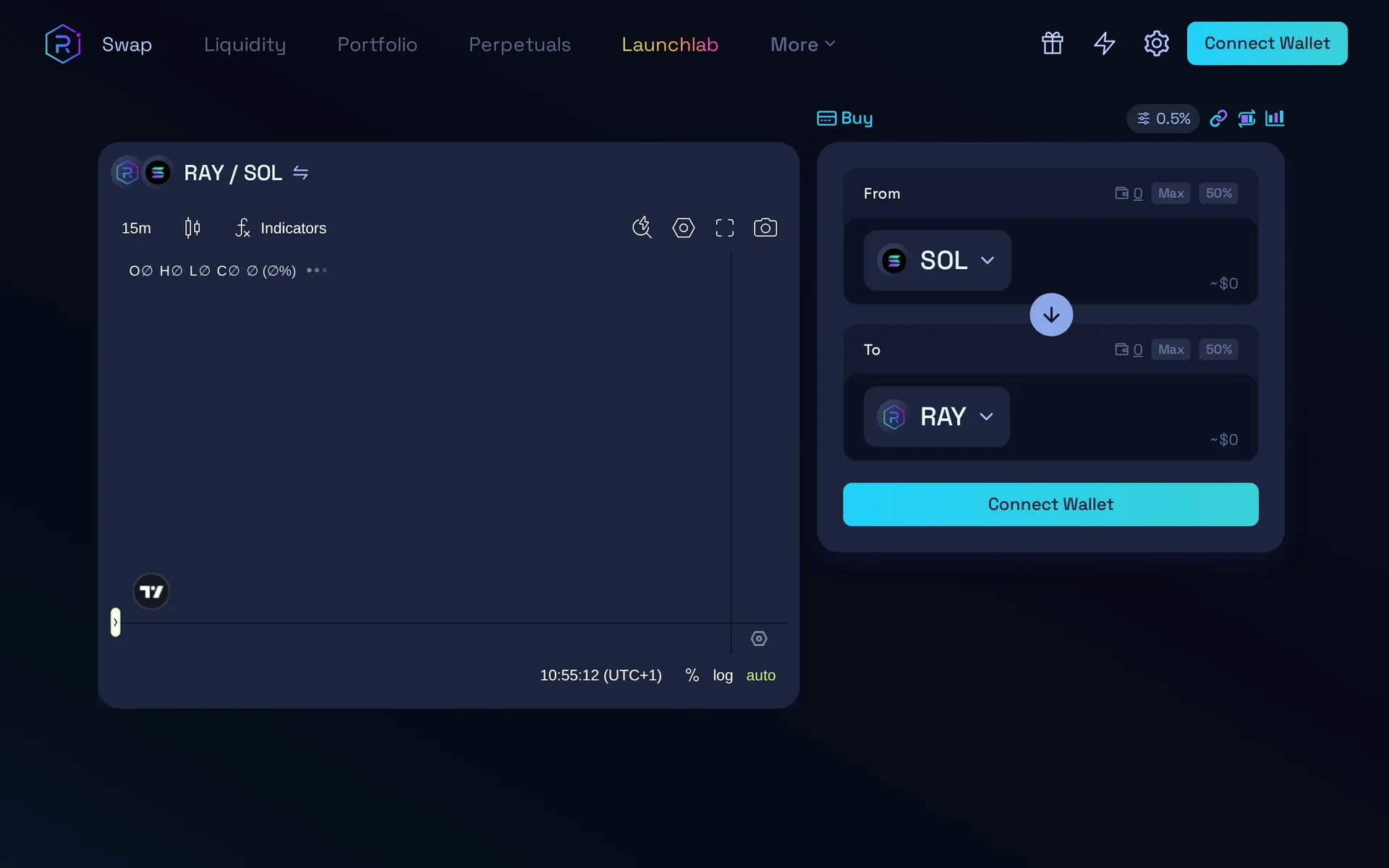
- Navigate to the Swap page at raydium.io/swap
- In the "From" field, select the token you want to sell (e.g., SOL)
- In the "To" field, select or paste the contract address of the token you want to buy
- Enter the amount you want to swap
- Review the price impact and minimum received amounts
- Adjust slippage tolerance if needed (click the gear icon):
- 0.5-1% for major tokens (SOL, USDC, RAY)
- 1-5% for mid-cap tokens
- 5-15% for new or volatile memecoins
- Click "Swap" and confirm the transaction in your wallet
Always verify the token contract address. Scammers create fake tokens with identical names. Copy the address from DEXTools or the project's official channels.
Understanding Swap Details
- Price Impact: The percentage your trade will move the price. Under 1% is good. Over 5% means the pool has low liquidity.
- Minimum Received: The worst-case amount you'll get after slippage. If the price moves beyond your slippage tolerance, the transaction will fail (no funds lost).
- Route: Raydium may route your trade through multiple pools for the best price.
Step 3: How to Provide Liquidity
Liquidity providers (LPs) earn trading fees by depositing token pairs into Raydium pools. This is more advanced but can be profitable if done correctly.
Standard Liquidity Pools
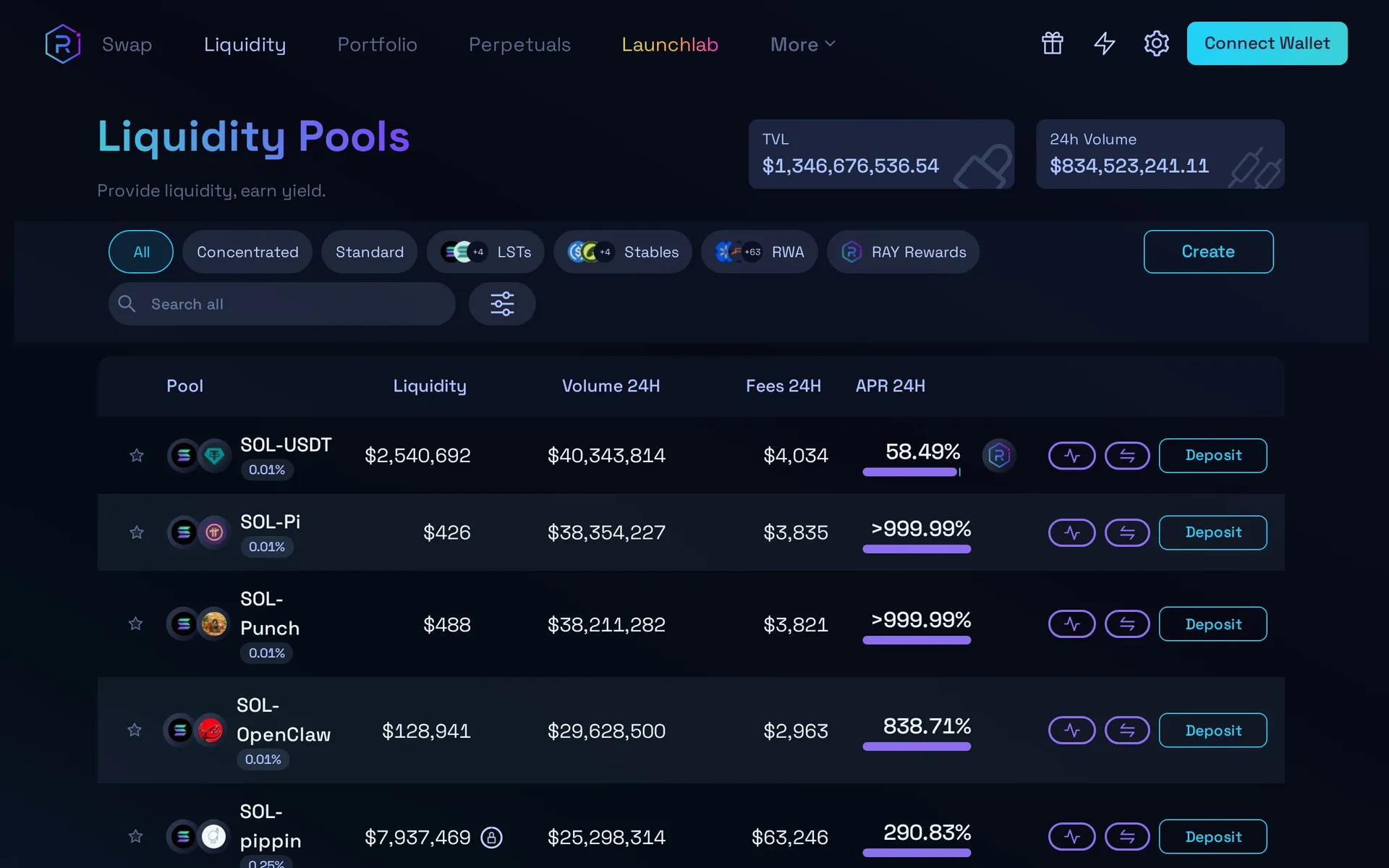
- Go to Liquidity on Raydium
- Click "Create Position" or find an existing pool
- Select the token pair (e.g., SOL/USDC)
- Deposit equal value of both tokens
- Confirm the transaction
Concentrated Liquidity (CLMM)
Raydium's concentrated liquidity pools let you choose a price range for your liquidity. This is more capital-efficient but requires active management.
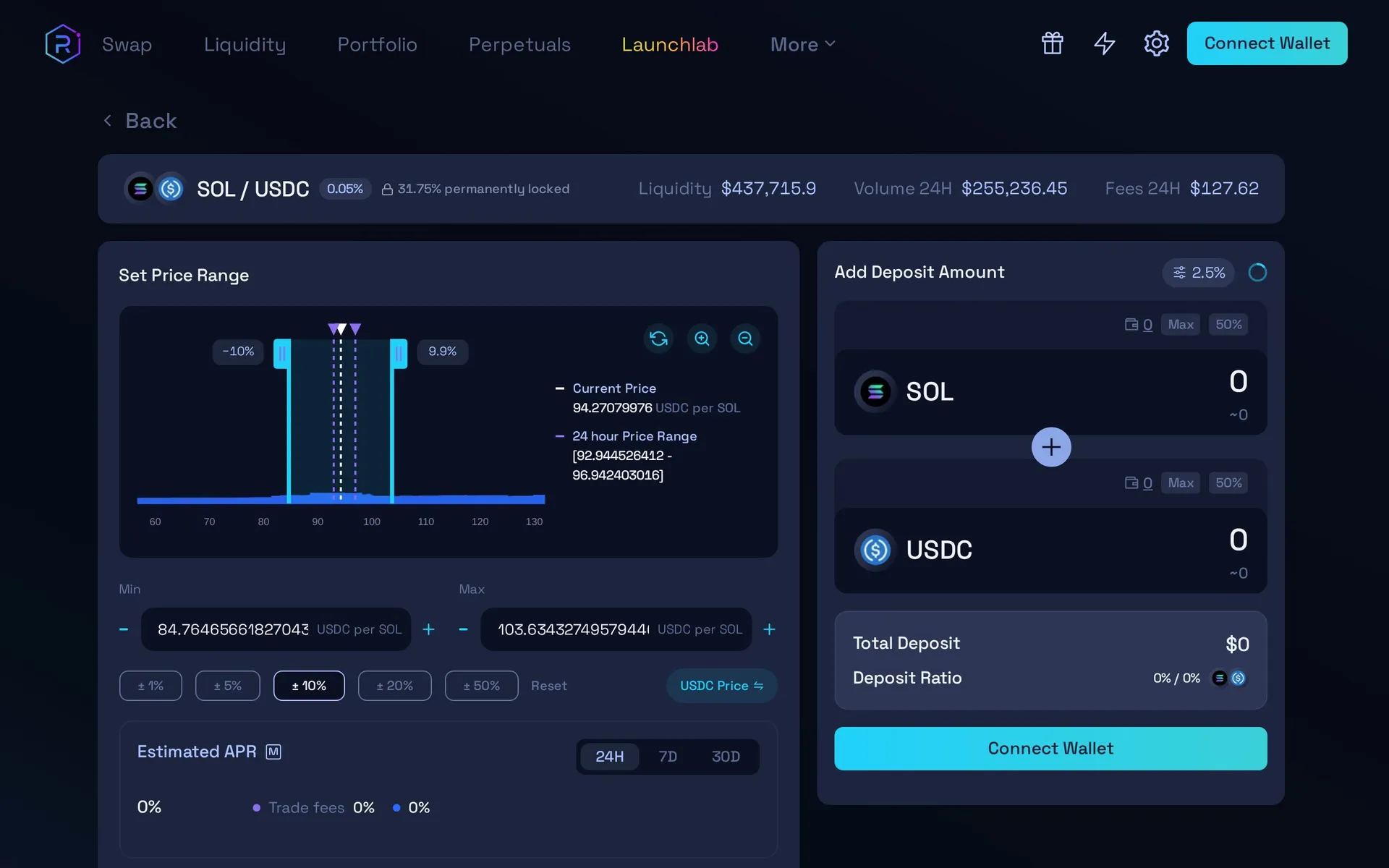
- Narrow range: Higher fees when price stays in range, but you'll need to rebalance more often
- Wide range: More passive, but lower fee earnings per dollar deposited
- Full range: Similar to traditional AMM pools - set and forget
Impermanent Loss Warning: When you provide liquidity, if the relative price of the two tokens changes significantly, you can end up with fewer total assets than if you'd simply held. This is called impermanent loss. It's especially risky with volatile memecoins.
Step 4: Track Your Positions
After swapping or providing liquidity, use these tools to monitor your positions:
- DEXTools - Real-time charts, liquidity data, and token analytics for any Raydium pool
- Raydium Portfolio - View your LP positions and accumulated fees directly on raydium.io
- Solscan - Transaction history and wallet balances on the Solana blockchain
Raydium vs Jupiter: When to Use Which
A common question is whether to use Raydium directly or go through Jupiter. Here's the difference:
- Jupiter is a DEX aggregator - it searches across Raydium, Orca, and other DEXs to find you the best price. For most swaps, Jupiter is the better choice because it optimizes your trade.
- Raydium directly is better when you want to:
- Provide liquidity (Jupiter doesn't do this)
- Access a very new pool that Jupiter hasn't indexed yet
- Use Raydium-specific features like limit orders or DCA
Pro tip: Even when you use Jupiter, many of your swaps will route through Raydium pools behind the scenes.
Advanced Features
Limit Orders
Raydium supports on-chain limit orders, letting you set a specific price at which you want to buy or sell. This is useful for:
- Setting buy orders below current price (buying dips automatically)
- Setting sell orders above current price (taking profit automatically)
DCA (Dollar-Cost Averaging)
The DCA feature lets you automatically buy a token in regular intervals, spreading your entry over time to reduce the impact of volatility.
Common Issues and Solutions
- "Transaction failed" - Increase slippage tolerance or try a smaller amount
- "Insufficient SOL" - Keep at least 0.05 SOL for fees
- Token not showing after swap - Add the token manually in your wallet using the contract address
- High price impact warning - The pool has low liquidity. Either reduce trade size or find a more liquid pool
Security Tips
- Always access Raydium through raydium.io - bookmark it to avoid phishing sites
- Never approve unlimited token allowances if you don't trust the token
- Revoke unused approvals periodically using Solscan's token approval checker
- Be cautious of tokens that appear in your wallet unsolicited - these are often scam airdrops
Frequently Asked Questions
Q Is Raydium safe to use?
Raydium is one of the most established DEXs on Solana with billions in cumulative volume. However, like all DeFi protocols, it carries smart contract risk. Always use official URLs (raydium.io), verify contract addresses, and never invest more than you can afford to lose.
Q What are the fees on Raydium?
Raydium charges a 0.25% swap fee on standard pools (0.22% to LPs, 0.03% to protocol). CLMM pools have variable fee tiers (0.01%, 0.05%, 0.25%, 1%). Solana network fees are under $0.01 per transaction.
Q How much can I earn providing liquidity on Raydium?
Earnings depend on the pool, volume, and your share of liquidity. Popular pairs like SOL/USDC can generate 10-50% APR from fees alone, while volatile memecoin pairs can be much higher but come with significant impermanent loss risk.
Q What is the difference between Raydium Standard and CLMM pools?
Standard pools spread liquidity across all prices (0 to infinity). CLMM pools let you concentrate liquidity in a specific price range, earning more fees per dollar deposited but requiring active management to stay in range.
Q Can I use Raydium on mobile?
Yes. Open raydium.io in your Phantom or Solflare mobile wallet's built-in browser. The interface is fully responsive and works identically to desktop.
Key Takeaways
Core Solana DEX: Raydium powers the majority of Solana's on-chain trading
Easy swaps: Connect wallet, select tokens, set slippage, swap
Earn fees: Provide liquidity to earn trading fees (understand impermanent loss first)
Use both: Jupiter for best-price swaps, Raydium for LP and advanced features
Stay safe: Always verify contract addresses and bookmark official sites
Track everything: Use DEXTools to monitor pools, prices, and holder data
Start exploring Raydium pools on DEXTools to find trading opportunities backed by real-time data.
Disclaimer: This article is for informational purposes only and does not constitute investment advice, financial advice, trading advice, or any other kind of advice. DeFi protocols carry smart contract risk. Users should conduct their own research and consult with a qualified financial advisor before making any investment decisions. DEXTools is not responsible for any losses incurred.
Related Guides
- How to Trade on Raydium: Solana Swaps, Entries and Execution Guide (2026)
- Raydium on Solana: Hybrid AMM, CLMM and RAY Token Explained (2026)
- How to Use Curve Finance: Stablecoin Swaps, Pools and Slippage Guide (2026)
- How to Use Orca DEX: Whirlpools and Solana Swap Guide (2026)
- How to Use 1inch for Swaps: Classic, Fusion and Limit Orders (2026)